The status layout sets three to seven workstreams in aligned rows: a name, a state, an optional owner and a one-line note on what changed or what needs help. The title states the overall position and the rows make the exceptions easy to find. Use it for a programme review or a launch readiness check.
Example
---
layout: status
title: The network launches today; two decisions remain
eyebrow: Launch readiness
surface: default
budget: 45s
items:
  - name: Open Network
    status: done
    owner: Tobi Adeyemi
    note: The API opens to every shop today.
  - name: Halyard Parcel
    status: on-track
    owner: Beatriz Lund
    note: The beta now feeds the live network.
  - name: Returns pick-up
    status: at-risk
    owner: Rafael Duarte
    note: Confirm the Q1 handover flow this month.
  - name: New city leases
    status: blocked
    owner: Yusuf Demir
    note: Saltby needs the board approval first.
---

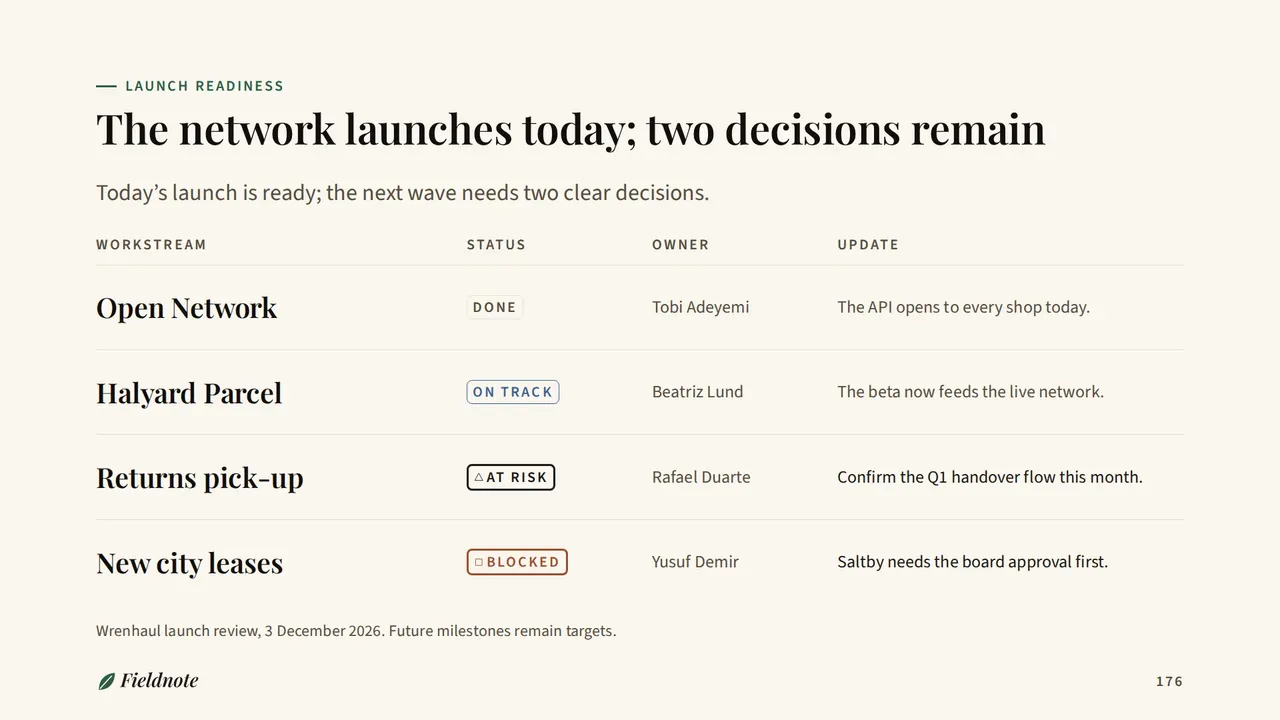
Today's launch is ready; the next wave needs two clear decisions.

<Footnote>Wrenhaul launch review, 3 December 2026. Future milestones remain targets.</Footnote>

<Notes>
`status` with four workstreams, every status value, owners and a one-line update on the default surface; use it for a readiness review where the title states the overall position.
Open Network opens today, and Halyard is already feeding it. The decisions sit in the last two rows: agree how returns reach the hub and approve Saltby's first lease. Neither holds up today's launch.
</Notes>
Slide 176 of the lookbook deckView on GitHub
Each workstream in items: has a name, a status, an owner and a note. The state is a pill that always prints its name, so colour is never the only signal: At risk carries a triangle, Blocked a square, and Done is set back in a muted tone. The body gives the scope of the review and <Footnote> its date.
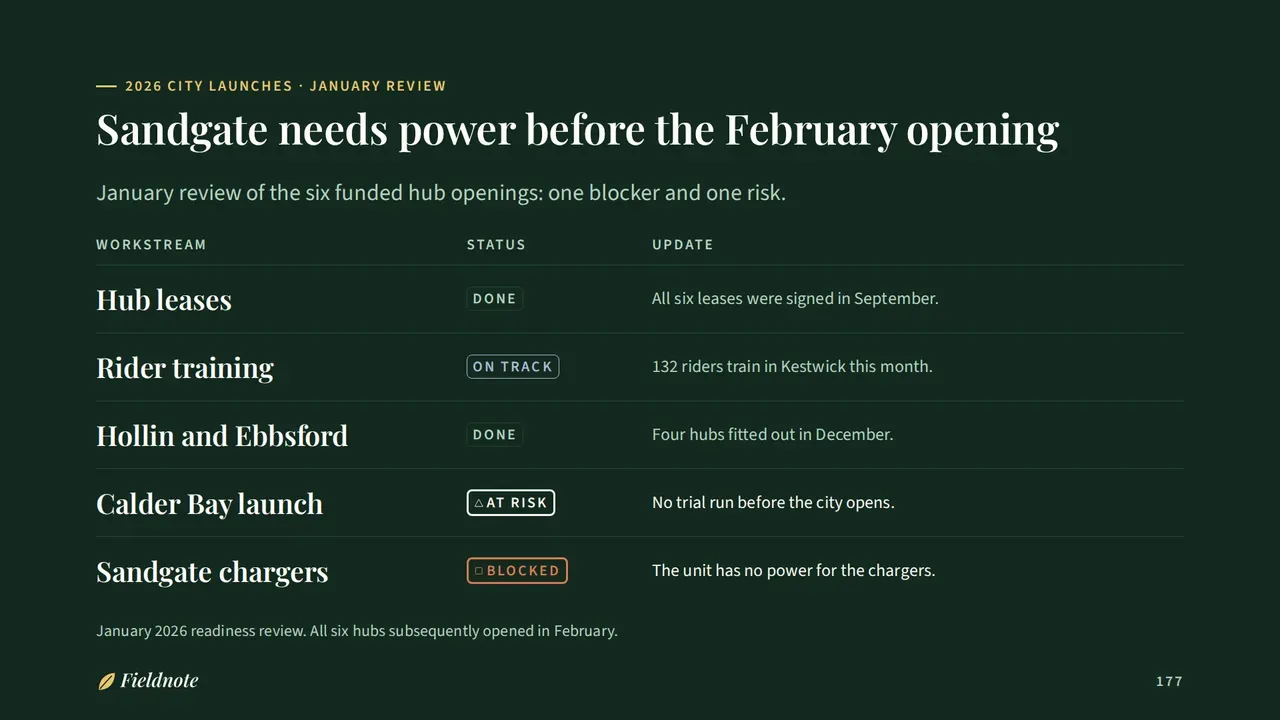
Five workstreams on surface: inverse with no owner, so the Owner column is not drawn and the notes take its width. reveal: true brings in one workstream per step; the still shows the last step.
When to use it
- The states are the point. The four are
on-track,at-risk,blockedanddone, and any other value is refused. Usetablefor arbitrary exact values,columnsto group several tasks into lanes,timelinewhen dates and sequence matter,actionsfor commitments with owners and deadlines, andstatsfor one headline number. - Three to seven workstreams. Split a longer report by programme. A
nametakes up to 24 characters, anownerup to 17 and anoteup to 40, each on one line. The title takes up to 50 characters, the body 14 words and the footnote 16. - Rename the words with
labels, for examplelabels: { name: Team }when you report teams. It changes the column heads (name,status,owner,note) and the four state words, each up to 11 characters. Keys you leave out keep their English defaults. - Walk through the report with
reveal: true, one workstream per step, and a[click]cue in the notes for each. See builds.
Reference
- Frontmatter
layout: status- Surface
- the deck's default
- Title
- required, 50 characters at most
- PowerPoint
- title-only slide
A status report of three to seven workstreams from items:, each with a name, a labelled state, an optional owner and a one-line note explaining what changed or what needs help. The title states the overall position, and aligned rows make the exceptions easy to scan. Use it for a programme review or a launch readiness check; the pills always name their states, so colour is never the only signal. Use table for arbitrary exact values, columns to group several tasks into lanes, timeline when dates and sequence are the point, actions for commitments with owners and deadlines, or stats for one headline number. The owner column appears only when a workstream names an owner. Use labels.name: Team when reporting teams. reveal: true introduces one workstream per step.
Slots
| Slot | Takes | Budget | What goes in it |
|---|---|---|---|
body | text | 14 words | One sentence setting the review date or scope; put the updates in items:. |
<Footnote> | text | 16 words | The report source or caveat on the bottom line. |
Frontmatter fields
| Field | Values | How to use it |
|---|---|---|
eyebrow | text | Write a few words of at most 40 characters, for example eyebrow: Budget committee, or leave it out. |
itemsrequired | text | List 3 to 7 workstreams, each with name (up to 24 characters), status (on-track, at-risk, blocked or done), optional owner (up to 17 characters), and note (up to 40 characters). Keep each field to one line. |
labels | default {"name":"Workstream","status":"Status","owner":"Owner","note":"Update","on-track":"On track","at-risk":"At risk","blocked":"Blocked","done":"Done"} | Optional replacements for name (Workstream), status (Status), owner (Owner), note (Update), on-track (On track), at-risk (At risk), blocked (Blocked) and done (Done); each is 1 to 11 characters. Omitted keys keep their English defaults. For example, labels: { name: Team }. |
reveal | true false (default) | Write reveal: true to show the items one per step, in order, or leave it out to show them all at once. |
chrome | true (default) false | Write chrome: false to hide the page number, logo and progress bar on this slide, or chrome: true to show them. |
Example
---
layout: status
title: "Planting is ready; watering needs cover"
eyebrow: Programme review
labels:
  name: Team
  status: Status
  owner: Owner
  note: Update
  on-track: On track
  at-risk: At risk
  blocked: Blocked
  done: Done
items:
  - name: Planting
    status: done
    owner: Dana Okafor
    note: All 300 trees are in the ground.
  - name: Watering
    status: at-risk
    owner: Leah Chen
    note: Two summer routes still need wardens.
  - name: Tree mapping
    status: on-track
    note: The app rollout starts next week.
---

Spring review of the canopy programme.

<Footnote>Urban Forestry Division, March 2027.</Footnote>

<Notes>
Name the watering gap first, then the completed planting and the mapping rollout.
</Notes>
Common mistakes
-
A state the layout does not have.
completeis not one of the four, so the slide fails theschemacheck:$ deck lint launch-review decks/launch-review/slides/plans.mdx error schema (plans): items[0].status: Expected "on-track" | "at-risk" | "blocked" | "done", got "complete". Fix: List 3 to 7 workstreams, each with `name` (up to 24 characters), `status` (on-track, at-risk, blocked or done), optional `owner` (up to 17 characters), and `note` (up to 40 characters). Keep each field to one line. launch-review: 1 error, 0 warnings. -
A note that is a paragraph. A note is one line: “items[1].note: Expected a workstream note of at most 40 characters, got “Ground work starts afte…” (67 characters).” Put the detail in
<Notes>. -
Naming an owner on only some rows. The Owner column is drawn for every row as soon as one workstream has an owner, so the others show an empty cell. Name an owner on all of them or on none.
-
Looking for a field to highlight one row.
statushas none; the pill marks the exceptions.riskshashighlightandactionshascurrentfor that.