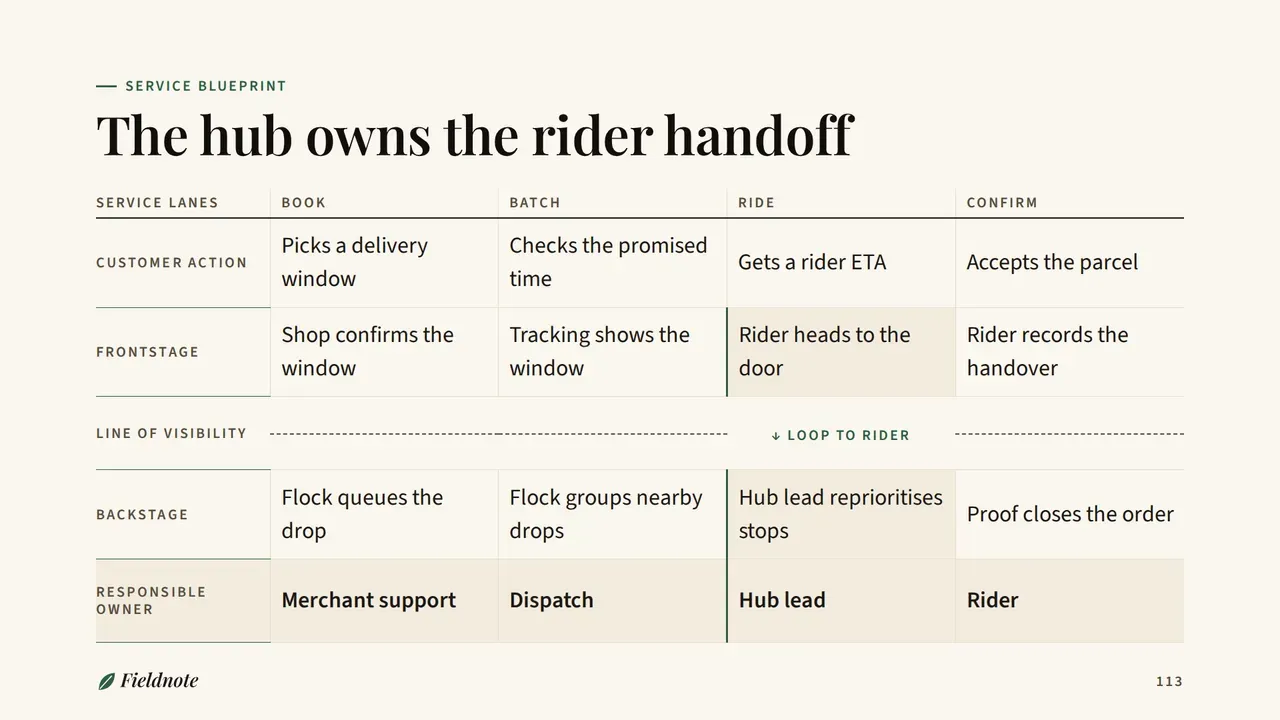
A customer can see a new arrival time without seeing the dispatch team change a rider’s route. The blueprint puts those two actions in the same column and names the team accountable for the handoff.
Author the slide
Write two to four stages in journey order. For each stage, fill in customer, frontstage, backstage and owner. Point handoff.stage at the column where the responsibility moves, counting from one. With reveal: true, the first advance shows backstage work and the second adds owners and highlights the handoff.
Example
---
layout: service-blueprint
title: The hub owns the rider handoff
eyebrow: Service blueprint
reveal: true
budget: 50s
stages:
  - title: Book
    customer: Picks a delivery window
    frontstage: Shop confirms the window
    backstage: Flock queues the drop
    owner: Merchant support
  - title: Batch
    customer: Checks the promised time
    frontstage: Tracking shows the window
    backstage: Flock groups nearby drops
    owner: Dispatch
  - title: Ride
    customer: Gets a rider ETA
    frontstage: Rider heads to the door
    backstage: Hub lead reprioritises stops
    owner: Hub lead
  - title: Confirm
    customer: Accepts the parcel
    frontstage: Rider records the handover
    backstage: Proof closes the order
    owner: Rider
handoff:
  stage: 3
  label: Loop to rider
---

<Notes>
`service-blueprint` traces Wrenhaul's delivery across the line of visibility. Read the visible service across the top. [click] Show the work below the line that keeps the service moving. [click] When the loop becomes a rider's route, the hub lead can still change the stop order and is accountable for the handoff. The recipient sees the resulting ETA.
</Notes>
Slide 113 of the lookbook deckView on GitHub
Reference
- Frontmatter
layout: service-blueprint- Surface
- the deck's default
- Title
- required, 60 characters at most
- PowerPoint
- title-only slide
Map two to four stages of a service for a single customer journey. Show the customer and frontstage actions above the line of visibility, then backstage work and the responsible owner below. Highlight the handoff that crosses the line and give it a short name.
Slots
| Slot | Takes | Budget | What goes in it |
|---|---|---|---|
body | — | Content outside every slot tag (in TSX, the default export). | |
<Footnote> | text | 24 words | An optional source or caveat below the blueprint. |
Frontmatter fields
| Field | Values | How to use it |
|---|---|---|
eyebrow | text | Write a few words of at most 40 characters, for example eyebrow: Budget committee, or leave it out. |
stagesrequired | text | List 2 to 4 stages in order. Each stage needs a title (up to 24 characters), a customer action, visible frontstage work and internal backstage work (up to 44 characters each), and an accountable owner (up to 24 characters). |
handoffrequired | text | Set stage to the 1-based column where the handoff crosses the line of visibility. Use label to name what changes hands in up to 26 characters. |
reveal | true false (default) | Use reveal: true to start with the visible service. The first click exposes backstage work and the second exposes owners and highlights the handoff. Omit it to start with the whole blueprint visible. |
chrome | true (default) false | Write chrome: false to hide the page number, logo and progress bar on this slide, or chrome: true to show them. |
Example
---
layout: service-blueprint
title: The desk owns the handoff to the repair team
eyebrow: Service blueprint
stages:
  - title: Report
    customer: Reports the breakage
    frontstage: Desk opens a ticket
    backstage: Checks asset records
    owner: Service desk
  - title: Book
    customer: Picks a repair time
    frontstage: Desk confirms the visit
    backstage: Technician accepts the job
    owner: Repair lead
handoff:
  stage: 2
  label: Confirmed job
reveal: true
---

<Notes>Follow the customer across both stages. [click] Show the work behind the desk. [click] The repair lead accepts the confirmed job.</Notes>
See the presentation patterns guide for related slides and their source files.