The pricing layout sets two to four plans side by side, each a column with its name, a one-line description, its price as the largest figure and two to four short features. Use it when every option has its own price and its own list of what it includes, and mark the plan you want the audience to pick.
Example
---
layout: pricing
title: Every plan is a price per drop, with no van
eyebrow: Prices
budget: 45s
plans:
  - name: Pay per drop
    price: €3.40
    period: a drop
    description: For a few drops a week
    features:
      - No monthly fee
      - No commitment
      - Same hour or two-hour slots
  - name: Hub plan
    price: €2.90
    period: a drop
    description: For steady daily volume
    features:
      - €190 a month
      - 500 drops a month minimum
      - Every delivery window
  - name: Open Network
    price: €3.10
    period: a drop
    description: Booked from your own systems
    features:
      - No monthly fee
      - Books by API and webhooks
      - Cheaper above 10,000 a month
    recommended: true
---

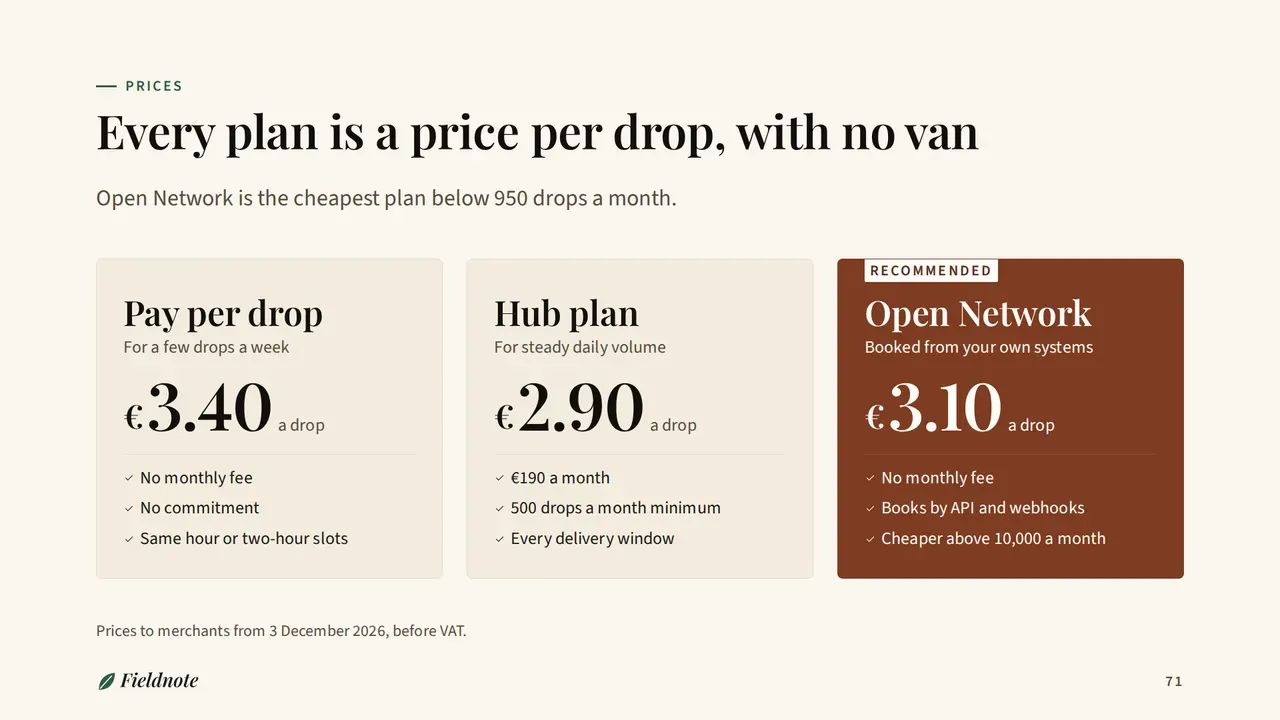
Open Network is the cheapest plan below 950 drops a month.

<Footnote>Prices to merchants from 3 December 2026, before VAT.</Footnote>

<Notes>
`pricing` with three plans and `recommended: true`, the default badge and a line of context; use it when each option has its own price and its own list of what it includes.
Three ways to pay, and every one is a price per drop: no hourly rates, no vans to rent. Most merchants should start on Open Network: no fee, no minimum, and it books straight from their own systems.
</Notes>
Slide 71 of the lookbook deckView on GitHub
The plans are in plans:, in the order of their columns. recommended: true lights the third plan on the accent surface and hangs the default “Recommended” badge from its top edge. The body says how to choose and <Footnote> carries the date and the tax. Names, prices and first features line up across the row.
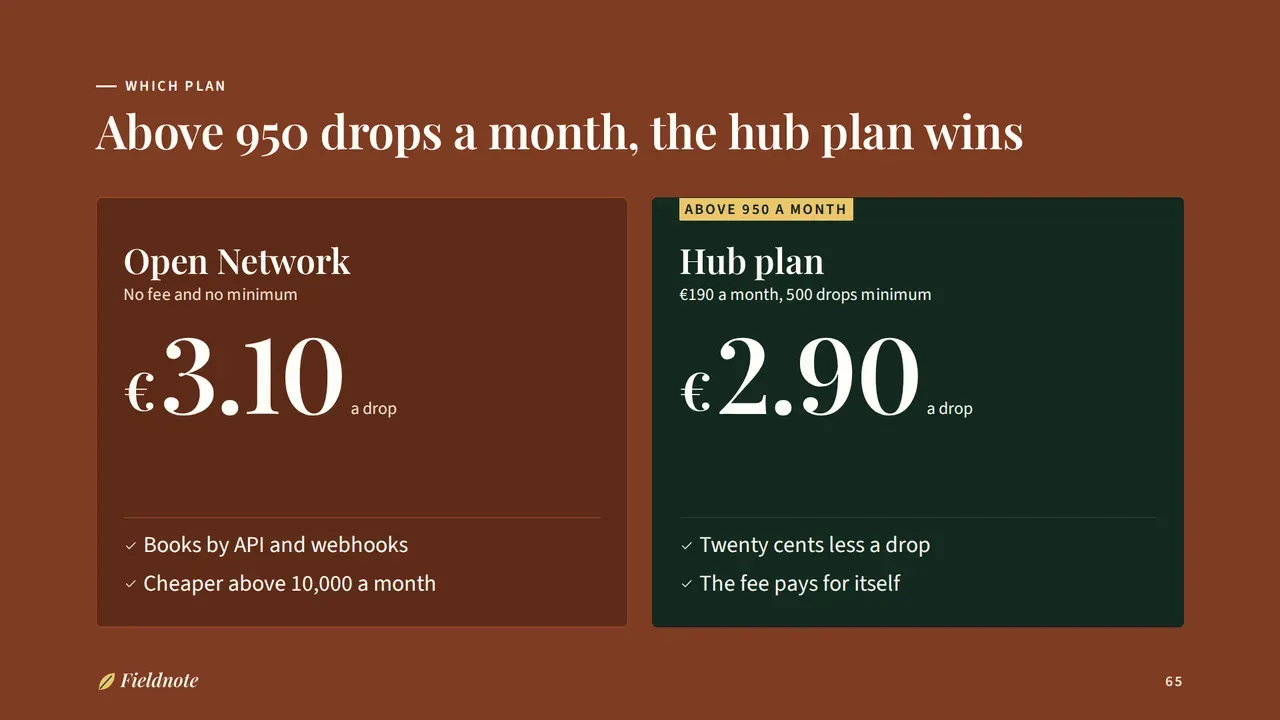
Two plans on surface: accent, with badge: Above 950 a month in place of “Recommended”. Because the slide is already on the accent, the recommended plan is lit on the inverse surface. reveal: true brings in one plan per step; the still shows the last step.
When to use it
- Each option has its own price and its own list. Use
comparisonwhen the options are measured on the same rows,tablefor more than four plans or a full feature grid, andstatsfor one number each. - Two to four plans, two to four features each. A plan has a
nameof up to 20 characters, apriceof up to 8 characters (€3.40,Free,Custom) or a number, adescriptionof up to 40, an optionalperiodof up to 16 (a drop) and features of up to 28. Four plans take the “four plans” variant: 16, 32, 22 and 14 for the badge. - Recommend one plan at most. Leave
recommendedout and every plan has equal weight.badge:(up to 20 characters, “Recommended” by default) is drawn only on the recommended plan. - Say how to choose in the body. One sentence of up to 14 words. The title takes up to 50 characters, on one line, and the footnote up to 16 words.
- Bring the plans in one at a time with
reveal: trueand a[click]cue in the notes for each. See builds.
Reference
- Frontmatter
layout: pricing- Surface
- the deck's default
- Title
- required, 50 characters at most
- PowerPoint
- title-only slide
Two to four plans or tiers side by side under a title that states the point, from plans: in the frontmatter. Each plan is a column with its name, a one-line description, its price set as the column's hero figure with an optional period ("per month") beside it, and two to four short features under a rule. Mark the plan you recommend with recommended: true: its column is lit on the accent surface with a badge on its top edge (badge:, "Recommended" by default). reveal: true brings the plans in one per step. Use it when each option has its own price and its own list of what it includes; use comparison when the options are measured on the same rows, a table for more than four plans or a full feature grid, and stats when each option is one number.
Slots
| Slot | Takes | Budget | What goes in it |
|---|---|---|---|
body | text | 14 words | One sentence under the title on how to choose between the plans. Put the plans in plans:, not here. |
<Footnote> | text | 16 words | A source or caveat on the bottom line: prices before tax, from a date. |
Frontmatter fields
| Field | Values | How to use it |
|---|---|---|
eyebrow | text | Write a few words of at most 40 characters, for example eyebrow: Budget committee, or leave it out. |
plansrequired | text | List 2 to 4 plans in the order of their columns, each with name (up to 20 characters, 16 in a row of four), price (a number or a figure as shown, up to 8 characters: "€3.40", "Free"), description (one line on who it is for, up to 40, 32 in a row of four) and features (2 to 4 short lines, each up to 28 characters, 22 in a row of four), and optionally period (up to 16: "per month") and recommended: true on the one plan you recommend. |
badge | default Recommended | Write the word over the recommended plan, up to 20 characters (14 in a row of four), such as badge: Most popular; it defaults to "Recommended". |
reveal | true false (default) | Write reveal: true to show the items one per step, in order, or leave it out to show them all at once. |
chrome | true (default) false | Write chrome: false to hide the page number, logo and progress bar on this slide, or chrome: true to show them. |
Variants
- four plans —
plans[].name: 16 characters;plans[].description: 32 characters;plans[].features[]: 22 characters;badge: 14 characters
Example
---
layout: pricing
title: Most schools need the district plan
eyebrow: Tree care contracts
badge: Most schools
plans:
  - name: Single site
    price: "$900"
    period: a year
    description: "One school ground, up to 40 trees"
    features:
      - Two inspections a year
      - Storm call-outs
  - name: District
    price: "$6,400"
    period: a year
    description: Every school in one district
    features:
      - Quarterly inspections
      - Storm call-outs
      - A named arborist
    recommended: true
  - name: City
    price: Custom
    description: Every public ground in the city
    features:
      - Monthly inspections
      - Planting included
      - A crew on call
---

Eight schools or more and the district plan costs less per site.

<Footnote>Prices for the 2027 season, before sales tax.</Footnote>

<Notes>
Name the district plan first: it is what most of the room needs. Then the two on either side.
</Notes>
Common mistakes
-
Recommending two plans. The layout lights one column, so two is a
schemaerror:$ deck lint launch-review decks/launch-review/slides/plans.mdx error schema (plans): plans: 2 plans are recommended (Single site, District); a pricing slide recommends at most one. Fix: Keep `recommended: true` on the one plan you recommend and remove it from the others. launch-review: 1 error, 0 warnings. -
Adding a fourth plan without shortening the others. The “four plans” limits apply to every plan, so a feature that fit in a row of three fails with “plans[1].features[1]: The pricing layout sets at most 22 characters here (four plans), got 25.”
-
A sentence as a price.
$6,400 for the first yearis aschemaerror (“Expected a price of at most 8 characters”). Put the period inperiod:and the terms in a feature. -
A fifth feature. “plans[1].features: Expected at most 4 features, got a list of 5 items.” Move the full list to a
tableslide.
Related layouts
comparison: options measured on the same rows.table: more than four plans, or a full feature grid.stats: one number per option.