A PowerPoint file can look different in each app that opens it, and different again on a machine without the brand’s fonts. deck export --verify checks the file for you before you send it. After this page you can run it, read its report per renderer, and decide whether to send the fonts or export with other options. How to export the file in the first place is on PowerPoint.
What it checks
--verify exports the PPTX and then checks it: it validates the file with the Open XML SDK (in Docker), renders it back to pictures, and compares each text block, chart, diagram, picture and table with the web slide by position, size and line count. It checks the PPTX only, not the PDF.
Run it
-
Start Docker. The validator and the LibreOffice renderers run in containers;
quicklookneeds macOS. -
Export with
--verify:$ deck export launch-review --verify /Users/you/talks/.deck/exports/launch-review/launch-review.pptx (3 slides, hybrid mode, masters: default, gradient, fonts embedded: Bricolage Deck Display, Bricolage Deck Headline, Bricolage Deck Label, Bricolage Deck Stat, Inter Deck Caption, Inter Deck Lead) /Users/you/talks/.deck/exports/launch-review/fonts: 6 static TrueType instance(s) in 6 families (Bricolage Deck Display, Bricolage Deck Headline, Bricolage Deck Label, Bricolage Deck Stat, Inter Deck Caption, Inter Deck Lead), cut from the brand fonts at the exact axes the deck uses and embedded in the PPTX; install them where an app ignores embedded fonts (Keynote, Google Slides, LibreOffice). Open XML SDK 3.3 validator (Microsoft 365 format): valid libreoffice: 4 of 17 regions differ (LibreOffice Impress 7.4 (Debian bookworm, Docker), fonts installed: Bricolage Deck Display, Bricolage Deck Headline, Bricolage Deck Label, Bricolage Deck Stat, Inter Deck Caption, Inter Deck Lead) libreoffice-nofonts: 11 of 17 regions differ (LibreOffice Impress 7.4 (Debian bookworm, Docker), brand fonts not installed and embedded fonts removed (an app that ignores embedding); substitutes Liberation Sans/Serif/Mono for Arial, Helvetica, Times New Roman and Courier New, DejaVu Serif for Georgia, DejaVu Sans Mono for Menlo, Carlito and Caladea for Calibri and Cambria) quicklook: 9 of 17 regions differ (macOS Quick Look (Apple's Office renderer, as Keynote and Finder use it), none of the presentation's fonts installed on this Mac) Regions: 24 of 51 differ 01 title: 4 region(s) differ text "Launch review": shifted 16px up (libreoffice-nofonts) text "One sentence that says what this ta…": 12% narrower (quicklook) text "Launch review": shifted 10px up (libreoffice) 02 results: 18 region(s) differ text "teams signed up in the first week": 3 lines vs 2, 14% narrower (libreoffice-nofonts) text "still active after 30 days": 2 lines vs 1, 13% narrower (quicklook) text "1.9 days": shifted 94px right, 33% wider (libreoffice-nofonts) 03 next-steps: 2 region(s) differ text "Next steps Open the beta to every t…": 8% narrower (quicklook) text "Next steps Open the beta to every t…": 5% wider (libreoffice-nofonts) Wrote 9 side-by-side picture(s), 21 region crop(s) and report.json to /Users/you/talks/.deck/exports/launch-review/verifyThis is the three-slide deck from your first deck, run with
@deckster/cli0.3.0; it took 26 seconds on a Mac (measured withtime). Under each slide the CLI prints the three regions that differ most;report.jsonlists them all. -
Open the
verify/folder beside the PPTX, here.deck/exports/launch-review/verify/. Its pictures show each slide side by side with the web, with crops of the regions that differ, andreport.jsonsits beside them.Each side-by-side picture is one slide in one renderer: the web slide, the renderer’s picture of the PPTX, and the difference between them. This one is the title slide of the
hellodeck, fromdeck export hello --verify --renderer libreoffice. The CLI writes the three panels in one row; here the difference panel is moved under the other two so the text stays readable: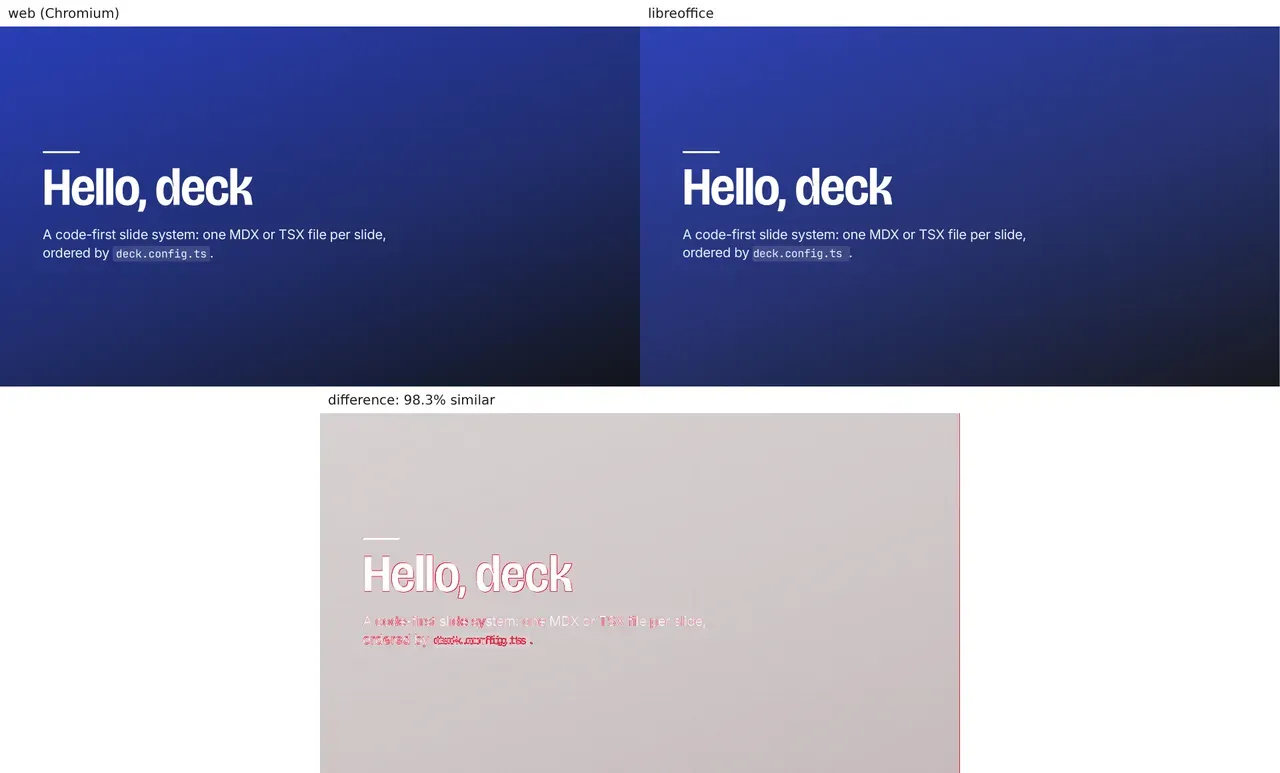
Read the report
Read it per renderer. Here, with the fonts installed, LibreOffice moved the title 10px up and drew three text blocks on the results slide 5 to 11% narrower; without the fonts, the substitutes changed widths, moved the figures and wrapped labels onto more lines, in LibreOffice and in Quick Look alike. So send the fonts/ folder with the file, or export with --fonts system (see fonts).
Options
| Option | What it does |
|---|---|
--renderer <ids> |
Which renderers to use, comma-separated. Default: libreoffice, libreoffice-nofonts (both Docker) and quicklook (macOS only). Also libreoffice-embedded (Docker, the file’s embedded fonts only) and keynote (macOS; opens Keynote and needs Automation permission, so it is never on by default). |
--strict |
With --verify, exits non-zero when any region differs or nothing was rendered. |
Without --strict, --verify exits with 1 only when the validator finds errors or cannot run (for example, when Docker is not running). Regions that differ leave the exit code at 0, as in the run above.
The full option list is in deck export --help and on the CLI reference.