The recap layout sets two to four takeaways, each a large numeral beside one sentence and, optionally, a second line of detail. Use it at the end of a part or of the talk to leave the audience with the few things to remember.
Example
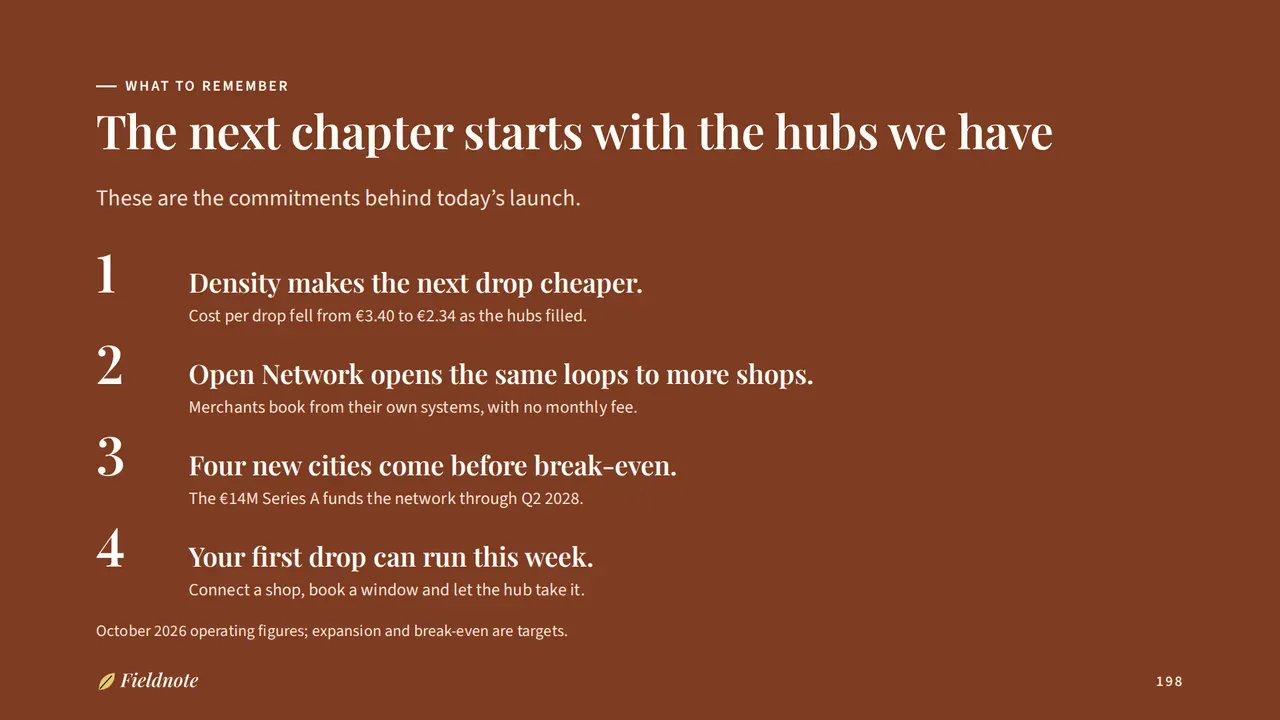
---
layout: recap
title: The next chapter starts with the hubs we have
eyebrow: What to remember
surface: accent
reveal: true
points:
  - title: Density makes the next drop cheaper.
    detail: Cost per drop fell from €3.40 to €2.34 as the hubs filled.
  - title: Open Network opens the same loops to more shops.
    detail: Merchants book from their own systems, with no monthly fee.
  - title: Four new cities come before break-even.
    detail: The €14M Series A funds the network through Q2 2028.
  - title: Your first drop can run this week.
    detail: Connect a shop, book a window and let the hub take it.
budget: 40s
---

These are the commitments behind today's launch.

<Footnote>October 2026 operating figures; expansion and break-even are targets.</Footnote>

<Notes>
`recap` with four points, supporting detail, context, a footnote and `reveal: true`, on accent; use it to close the talk by returning to its claims one at a time.
[click] Density has already brought cost per drop down to €2.34. [click] Open Network brings more shops onto those same loops. [click] The funding buys four cities and a path to break-even in Q2 2028. [click] The audience can start now: book one drop this week.
</Notes>
Slide 198 of the lookbook deckView on GitHub
The takeaways are points: in the frontmatter, each with a title that is one sentence and an optional detail. The numerals come from the order of the list, so don’t write them; they are recall cues, not stages of a process. There are no cards or icons. This slide sets surface: accent and reveal: true, which brings in one point per step; the still shows the last step.
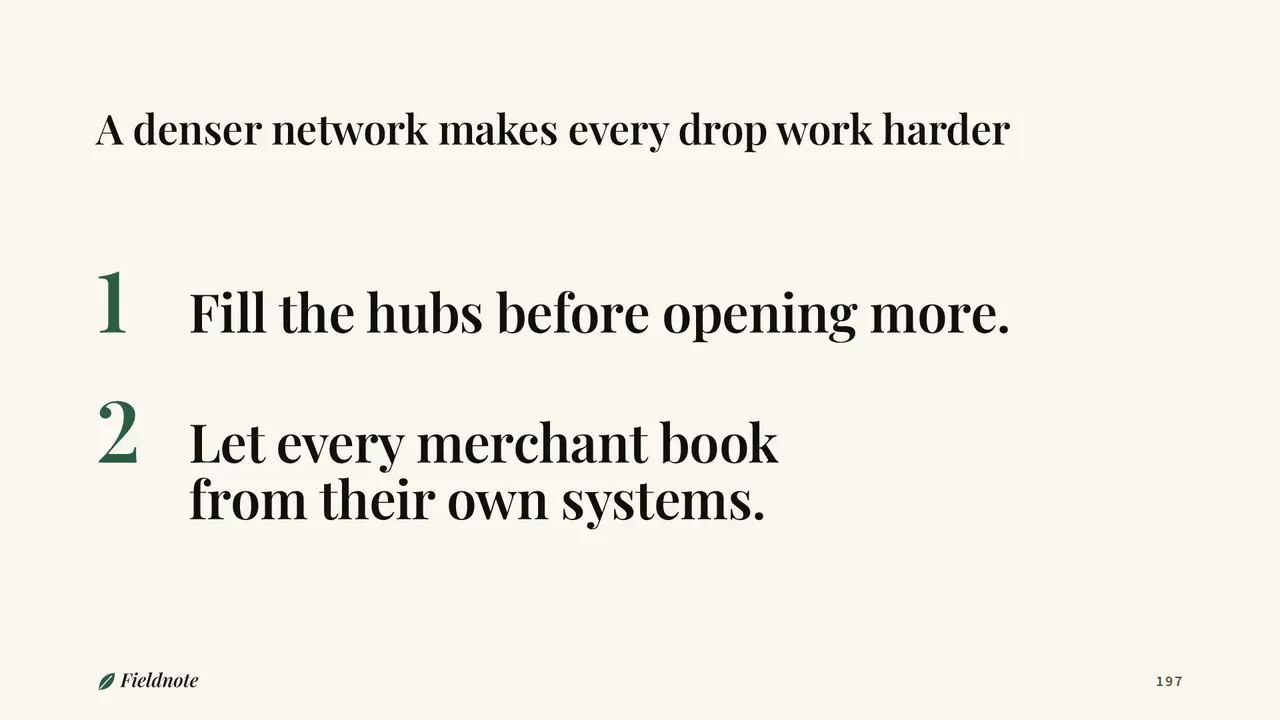
Two points with no detail, eyebrow or body are set larger: the layout tries the largest numerals and type first and steps down as the content grows.
When to use it
- The audience should carry these away. Use it where a part or the talk ends. Use
cardsfor parallel ideas that need icons and bodies,stepsfor actions that happen in order,agendafor the parts still to come,statementfor a single takeaway, andclosingfor the final ask and the contact details. - Two to four points. A
titletakes up to 76 characters with two points, 54 with three and 50 with four. Adetailtakes up to 90, or 60 with four points. - The body is one sentence of up to 14 words framing what to remember; a source goes in
<Footnote>, up to 16. The title takes up to 50 characters. - Return to the claims one at a time. With
reveal: true, put a[click]cue in the notes for each point; see builds.
Reference
- Frontmatter
layout: recap- Surface
- the deck's default
- Title
- required, 50 characters at most
- PowerPoint
- title-only slide
Two to four takeaways under a title that states the point, from points: in the frontmatter. Each is a large numeral beside one sentence (title) and an optional second line of detail, set directly on the slide without cards or icons. The numbers are recall cues, not stages of a process. Use it at the end of a part or the talk to leave the audience with the few things to remember. reveal: true brings in one point per click. Use cards for parallel ideas that need icons and bodies, steps for actions that happen in order, agenda for the parts still to come, a statement for a single takeaway, and closing for the final ask and contact details.
Slots
| Slot | Takes | Budget | What goes in it |
|---|---|---|---|
body | text | 14 words | One sentence framing what to remember. Put the takeaways in points:. |
<Footnote> | text | 16 words | A source or caveat on the bottom line. |
Frontmatter fields
| Field | Values | How to use it |
|---|---|---|
eyebrow | text | Write a few words of at most 40 characters, for example eyebrow: Budget committee, or leave it out. |
pointsrequired | text | List 2 to 4 takeaways, each with title (one sentence, up to 76 characters, 54 with three points, 50 with four points) and optional detail (up to 90 characters, 60 with four points). Numbers are supplied automatically. |
reveal | true false (default) | Write reveal: true to show the items one per step, in order, or leave it out to show them all at once. |
chrome | true (default) false | Write chrome: false to hide the page number, logo and progress bar on this slide, or chrome: true to show them. |
Variants
- three takeaways —
points[].title: 54 characters - four takeaways —
points[].title: 50 characters;points[].detail: 60 characters
Example
---
layout: recap
title: Shade needs care as much as planting
eyebrow: What to remember
points:
  - title: Plant the hottest blocks first.
    detail: Rank streets by summer surface heat.
  - title: Give every tree room to grow.
    detail: Connect soil cells under the pavement.
  - title: Fund three summers of care.
    detail: "Water, mulch and inspect every new tree."
---

These are the three commitments behind the canopy programme.

<Notes>
Return to the three commitments before asking the board for next season’s funding.
</Notes>
Common mistakes
-
Adding a third point without shortening the first two. The variants apply to every point, so a sentence that was fine in a pair becomes a
schemaerror:$ deck lint launch-review decks/launch-review/slides/launch.mdx error schema (launch): points[0].title: The recap layout sets at most 54 characters here (three takeaways), got 61. Fix: Shorten it to the essentials; `deck layouts --json` lists the limits of each variant. launch-review: 1 error, 0 warnings. -
A long slide title. The slide title takes up to 50 characters: “title: The recap layout sets at most 50 characters, got 79.” Write the title as the point of the recap and leave the sentences to
points:. -
Numbering the points yourself. The layout supplies the numerals, so “1.” in a
titleshows twice. -
A fifth point. The schema stops at four; keep the few that matter.
-
A process written as a recap. The numerals do not mean order; set a sequence as
steps.