<Flow> draws boxes and arrows: an architecture, a request path, a pipeline. This page shows you how to place the nodes, connect and group them, mark the nodes that matter with a card, make the diagram build one step at a time as you explain it, and stay inside the limits deck lint checks. Every prop is on the diagram reference; in the terminal, deck diagrams prints the components, node kinds, edge options, cards and animation parts with an example each, and deck diagrams --json gives an agent the same as data.
For alignment, sizing, and styling, see diagram design controls.
Place the nodes
Put a <Flow> in the diagram layout, under a title that states what it shows, with an optional <Aside> for what to notice. Its title prop is its accessible name; the build fails without one.
Give every node a grid cell with col and row, counted from 1. colSpan and rowSpan widen a node across cells, and cols and rows on the <Flow> set the least size of the grid. The diagram scales to its region and the text stays at the brand’s sizes.
<Flow title="Checkout request path">
  <Node id="web" kind="client" title="Web app" col={1} row={1} />
  <Node id="api" kind="service" title="Orders API" col={2} row={1} />
  <Node id="db" kind="database" title="Orders DB" col={3} row={1} />
  <Edge from="web" to="api" label="HTTPS" />
  <Edge from="api" to="db" label="SQL" />
</Flow>
Or leave every cell out and the kit lays the nodes out automatically with ELK: layout picks layered (the default), tree, force or radial, and direction picks right (the default), down, left or up. Cells are the reliable choice when an agent writes the diagram; automatic layout suits a map whose shape follows from its edges:
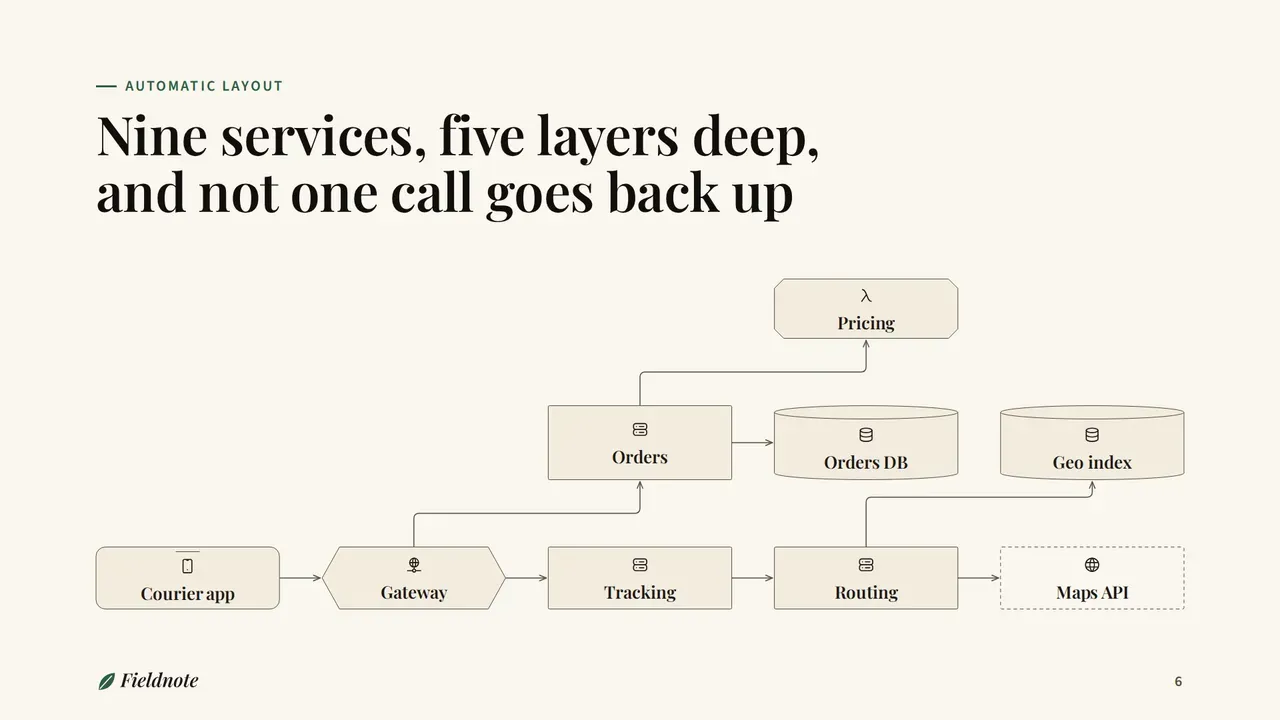
---
layout: diagram
title: Nine services, five layers deep, and not one call goes back up
eyebrow: Automatic layout
budget: 1m
---

<Flow title="The Parcelwise service map, laid out automatically" direction="right">
  <Node id="web" kind="mobile" title="Courier app" />
  <Node id="gateway" kind="gateway" title="Gateway" />
  <Node id="orders" kind="service" title="Orders" />
  <Node id="routing" kind="service" title="Routing" />
  <Node id="pricing" kind="function" title="Pricing" />
  <Node id="tracking" kind="service" title="Tracking" />
  <Node id="ordersdb" kind="database" title="Orders DB" />
  <Node id="geo" kind="database" title="Geo index" />
  <Node id="maps" kind="external" title="Maps API" />
  <Edge from="web" to="gateway" />
  <Edge from="gateway" to="orders" />
  <Edge from="gateway" to="tracking" />
  <Edge from="orders" to="pricing" />
  <Edge from="orders" to="ordersdb" />
  <Edge from="tracking" to="routing" />
  <Edge from="routing" to="geo" />
  <Edge from="routing" to="maps" />
</Flow>

<Notes>
Nobody placed these boxes: the layout engine sorted them into tiers from the edges alone. Read it left to right: clients, the gateway, services, then the stores and outside APIs they lean on.
</Notes>
Slide 6 of the diagrams-demo deckView on GitHub
Cells are all or nothing. A <Flow> that places some nodes and not others fails the build:
$ deck lint launch-review
decks/launch-review/slides/mixed.mdx
  error   schema (mixed): Line 7, column 1: Some nodes have a grid cell and some do not: "api" have none.
          Fix: Give every node `col` and `row`, or remove them all for an automatic layout.

launch-review: 1 error, 0 warnings.
Choose the node kinds
kind sets a node’s shape and icon. title is the name on the node (its id when left out), subtitle a quieter second line such as Postgres 16, and badge a small pill on a corner. icon overrides the kind’s icon with a name from the brand’s icon set (icon="map"), and icon="none" drops it. Several kinds have aliases: db is database, lambda is function.
Node kinds (19)
| kind | Shape | Icon (lucide / tabler) | Use when |
|---|---|---|---|
service | card | server / server-2 | An application service or API you run: orders API, auth service, a backend. |
databasealso db | cylinder | database / database | A database or any system of record: Postgres, DynamoDB, a ledger. |
queuealso stream bus | pipe | list-ordered / list-numbers | A queue, stream or event bus: SQS, Kafka topic, a job queue. |
cache | stack | zap / bolt | An in-memory cache in front of something slower: Redis, Memcached, an edge cache. |
storagealso bucket | card | archive / bucket | Object or file storage: an S3 bucket, a blob store, a file share. |
useralso person | pill | user / user | A person: a customer, an operator, a reviewer. Usually where a journey starts. |
clientalso browser web app | window | app-window / browser | A browser or desktop client: the web app, a single-page app, a CLI on a laptop. |
mobilealso phone | device | smartphone / device-mobile | A mobile app or device. |
cloud | soft | cloud / cloud | A managed platform or the internet as a whole: a CDN, a cloud provider, "the web". |
externalalso third-party | dashed | globe / world | A system outside your boundary that you call or that calls you: Stripe, a partner API. |
functionalso lambda worker | chamfer | lambda / lambda | A serverless function or a worker that runs on demand: Lambda, a cron job. |
gatewayalso proxy | hexagon | network / network | An API gateway, reverse proxy or ingress that routes requests inward. |
loadbalanceralso lb load-balancer | hexagon | split / arrows-split-2 | A load balancer that spreads traffic over several instances. |
agent | double | bot / robot | An AI agent: the loop that plans, calls tools and talks to a model. |
llmalso model | double | sparkles / sparkles | A language model endpoint: the model an agent or a feature calls. |
tool | card | wrench / tool | A tool an agent can call: search, code execution, a calendar API. |
documentalso file | folded | file-text / file-text | A document, file, report or prompt: a PDF, a config file, a knowledge base page. |
decision | diamond | none | A yes/no branch in a process; keep its title to a short question. |
nodealso generic | card | none | Anything else: give it an icon from the brand set, or children of your own. |
The same lists, as JSON, are in deck diagrams --json.
Connect the nodes
<Edge from="api" to="db" /> draws an arrow from one node id to another; to equal to from draws a small loop on the node, such as a retry. label wraps after about 18 characters to two lines and is then cut with an ellipsis. Give an edge an id to change it with <State edge="...">; without one it is from->to. The options:
Edge options
The same lists, as JSON, are in deck diagrams --json.
Group the nodes
<Group label="Production VPC"> draws a labelled container around the nodes inside it, and groups nest:
<Group label="Production">
  <Group label="EU region">
    <Node id="eu-api" kind="service" title="API" col={2} row={1} />
    <Node id="eu-db" kind="database" title="Postgres" col={3} row={1} />
  </Group>
  <Group label="US region">
    <Node id="us-api" kind="service" title="API" col={2} row={3} />
    <Node id="us-db" kind="database" title="Postgres" col={3} row={3} />
  </Group>
</Group>
A group wraps its nodes, or takes its own col, row, colSpan and rowSpan.
Pick a card
card picks the style a node is drawn with, from the cards the brand defines. Five exist in every brand: default, outline, solid, tint and raised. Each brand draws them in its own way, and a brand may add cards of its own. Use cards to mark the few nodes the slide is about: the one service that matters on solid, the systems you call but do not run as outline, and every other node on the brand’s default.
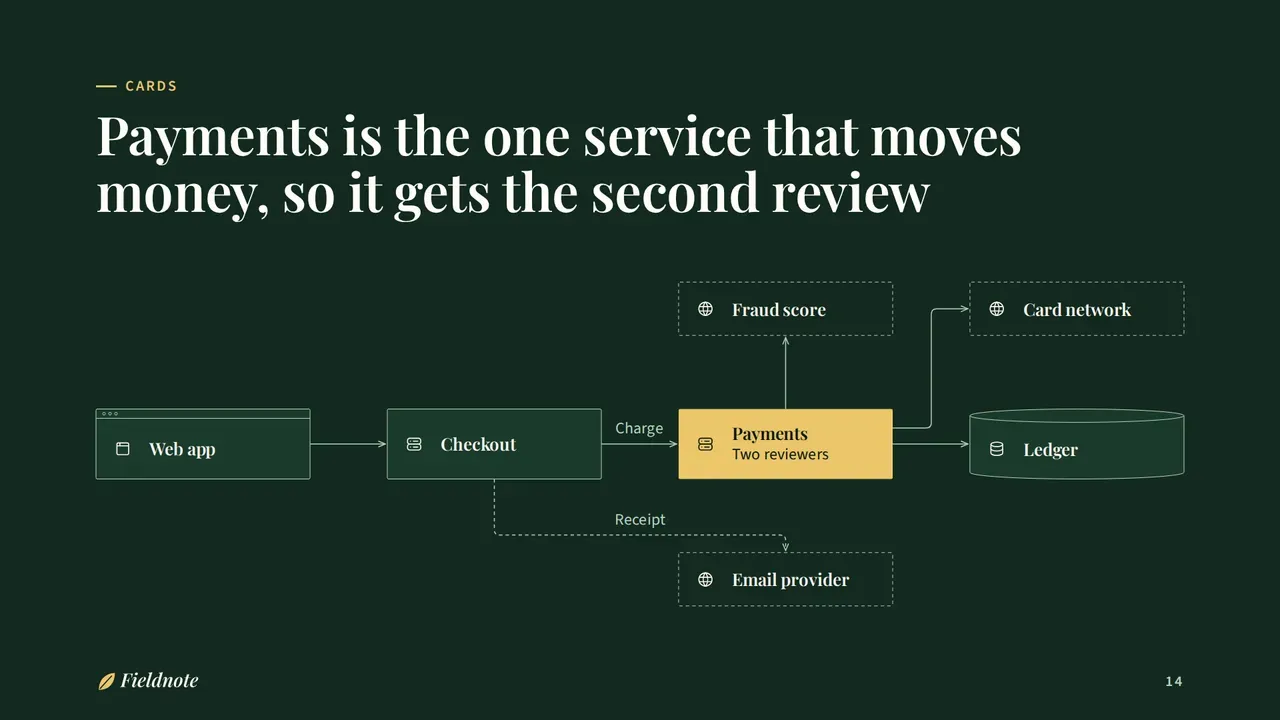
---
layout: diagram
title: Payments is the one service that moves money, so it gets the second review
eyebrow: Cards
budget: 1m
surface: inverse
---

<Flow title="The checkout path, with the payments service marked and the outside providers drawn as outlines">
  <Node id="web" kind="client" title="Web app" col={1} row={2} />
  <Node id="checkout" kind="service" title="Checkout" col={2} row={2} />
  <Node id="payments" kind="service" title="Payments" subtitle="Two reviewers" card="solid" col={3} row={2} />
  <Node id="ledger" kind="database" title="Ledger" col={4} row={2} />
  <Node id="fraud" kind="external" title="Fraud score" card="outline" col={3} row={1} />
  <Node id="network" kind="external" title="Card network" card="outline" col={4} row={1} />
  <Node id="email" kind="external" title="Email provider" card="outline" col={3} row={3} />
  <Edge from="web" to="checkout" />
  <Edge from="checkout" to="payments" label="Charge" />
  <Edge from="payments" to="ledger" />
  <Edge from="payments" to="fraud" />
  <Edge from="payments" to="network" />
  <Edge from="checkout" to="email" label="Receipt" async />
</Flow>

<Notes>
Every node here is a service or a store, but only one of them can charge a card twice. That one sits on the solid card, and its pull requests need two reviewers. The three outside providers are outlines: we call them, we do not run them. The cards are standard names, so the slide says the same thing in any brand.
</Notes>
Slide 14 of the diagrams-demo deckView on GitHub
Put card on a <Node> for that node, or on the <Flow> for all its nodes. A node takes, in order:
- its own
card; - its diagram’s
card; - the card the brand maps its kind to in
diagram.kinds(four of the five published brands drawexternalnodes asoutline; Nocturne maps no kind, so the slide above namesoutlineitself to draw the providers as outlines in every brand); default.
States still win over the card: highlighted, error and success recolour the outline, and muted nodes and a <Focus> still dim. Use one or two cards on a slide besides the default, each for a reason.
Stay on the five standard names for a deck that should render in any brand. A name the brand does not have does not fail the build: the node falls back to the next card in the order, and deck lint warns. Here the same slide, copied into a deck in the Kinetic brand with Payments on Kinetic’s own volt card, is linted in default:
$ deck lint launch-review --brand default
decks/launch-review/slides/money-path.mdx
  warning diagram-card-missing (money-path): The <Flow> "The checkout path, with the payments service marked and the outside providers drawn as outlines" asks for the card "volt" on the node "Payments", which the default brand does not have, so it is drawn with "default".
          Fix: Change the `card` in decks/launch-review/slides/money-path.mdx to one of the standard cards: default, outline, solid, tint, raised, which every brand has.

launch-review: 0 errors, 1 warning in 3 slides (3 steps checked).
deck brand <name> lists a brand’s cards, its own included. How a brand defines them is on diagram look and cards. Cards need @deckster/cli 0.4.0 or later. The guide deck diagrams prints:
Cards (card="...")
A node's card is, in order: its own card; its diagram's card; the card the brand maps its kind to (diagram.kinds in brand.ts); default. A name the brand does not have is skipped (the next in that order applies) and the node carries data-card-missing with the name asked for; every node carries data-card with the card it uses.
| Card | Look, unless the brand restyles it |
|---|---|
default | The brand's node: its node fill and border, the icon in a bordered tile. |
outline | No fill, the node border only. |
solid | Filled in the accent, no border, text in the accent foreground. |
tint | The accent at a low opacity with an accent border and a filled icon tile. |
raised | The surface fill, a hairline border and the brand's medium shadow. |
Every brand has the five standard cards and may restyle them or define more of its own (deck brand <name> lists them). Stick to the standard names for a deck that should look right in any brand.
- States still win over the card: highlighted, error and success recolor the outline and show the halo, muted and a focus dim the node.
- On <Layers> the items follow the stack's
card; the bands keep the stack's own look unless a <Layer> names a card. - Pick a card for a reason (a role, a group of nodes that belong together), not per node at random: one or two cards on a slide besides the default.
The same lists, as JSON, are in deck diagrams --json.
Build it step by step
Every node, group and edge takes at, the step it appears on; an edge also waits for its nodes. Four parts move things on a step:
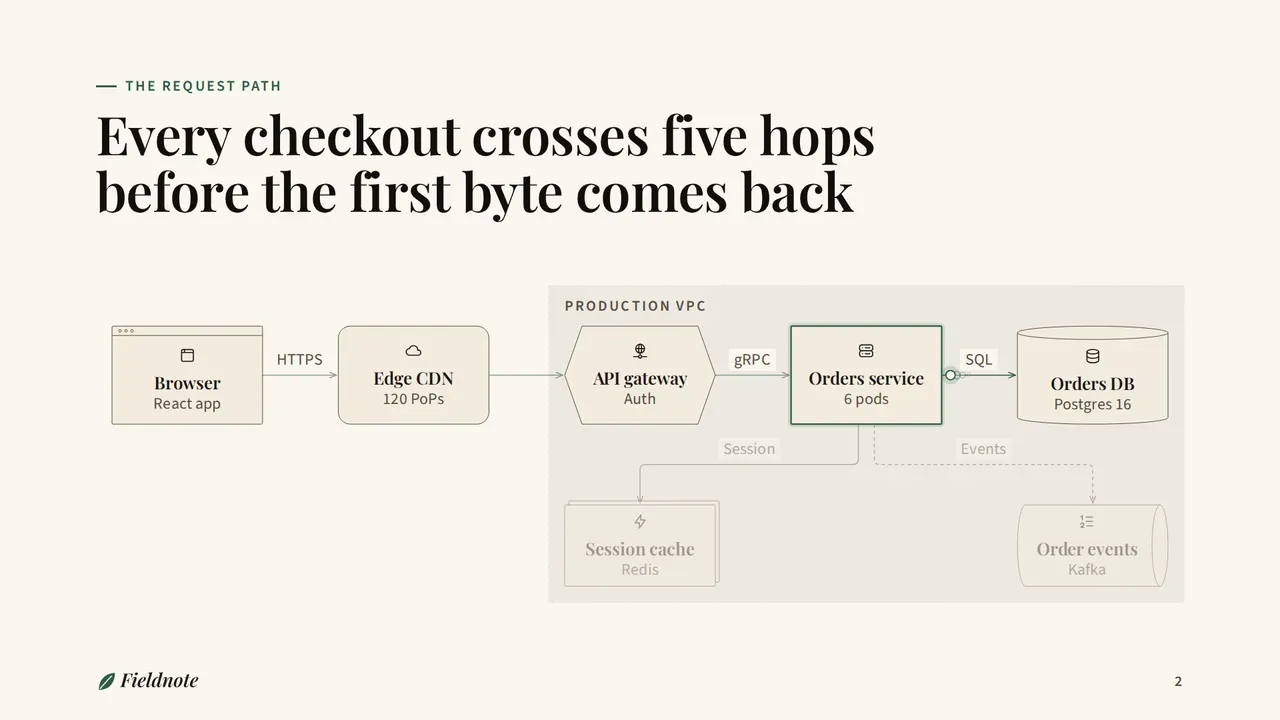
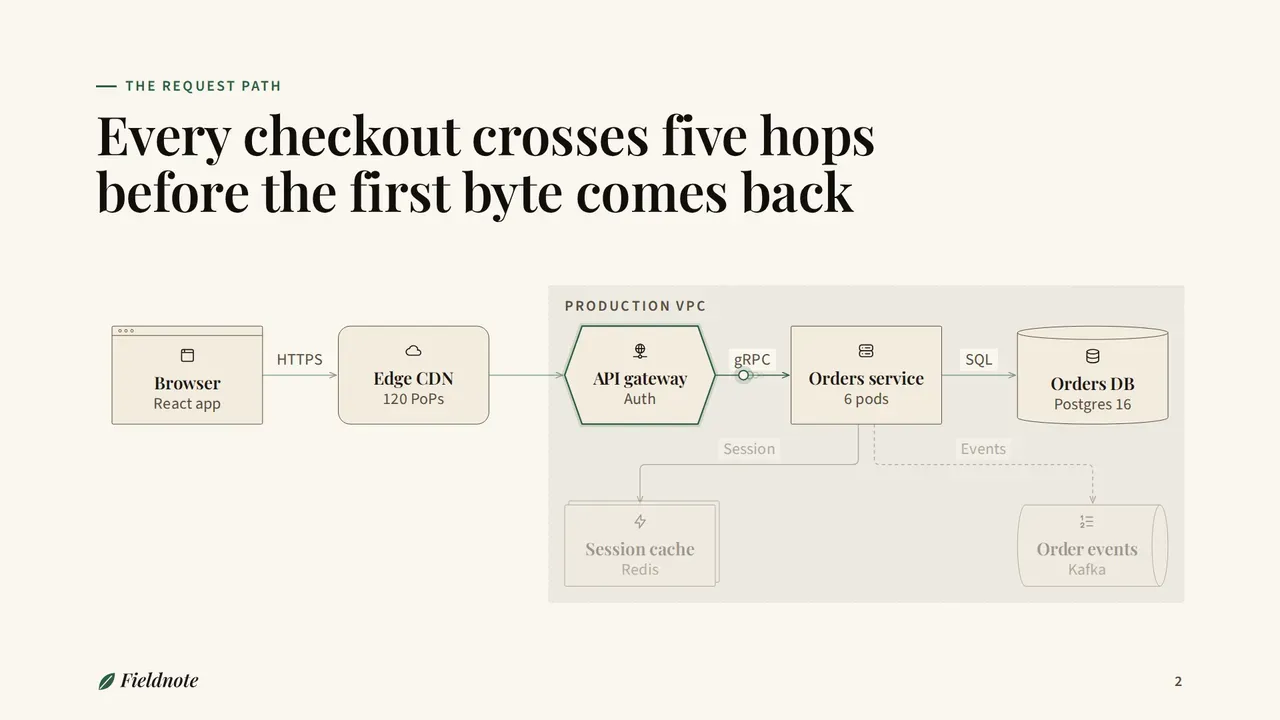
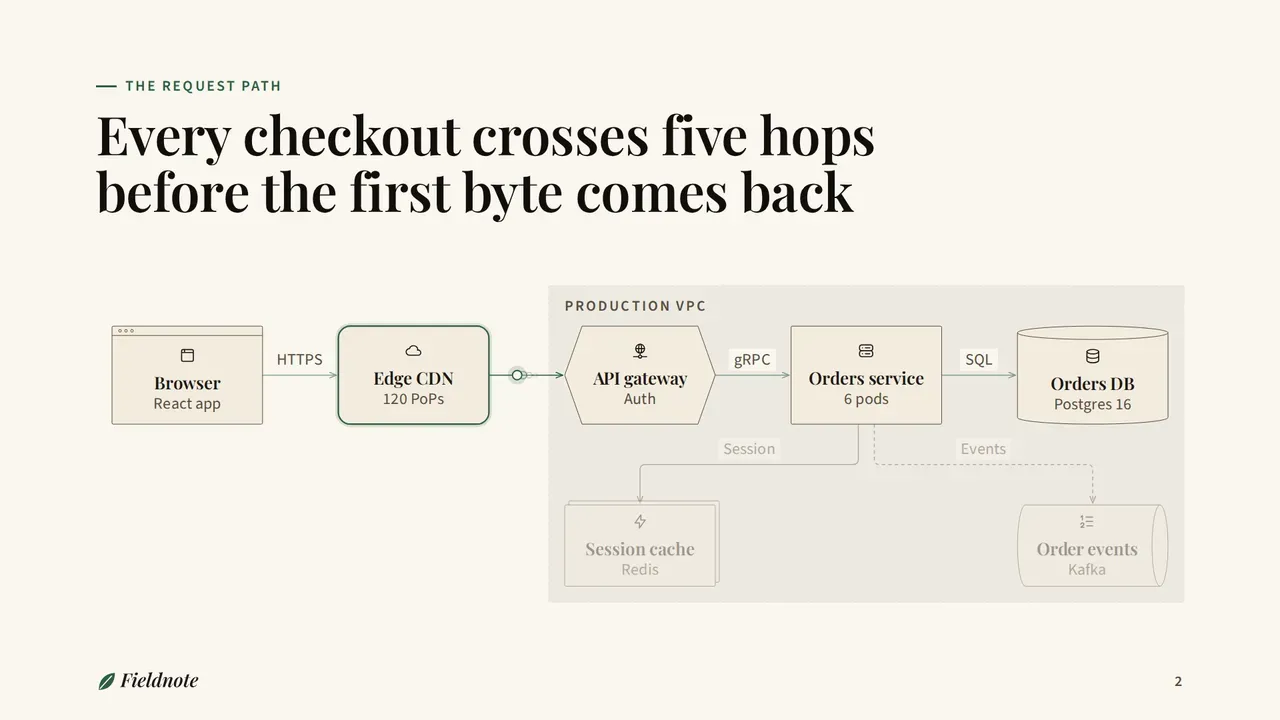
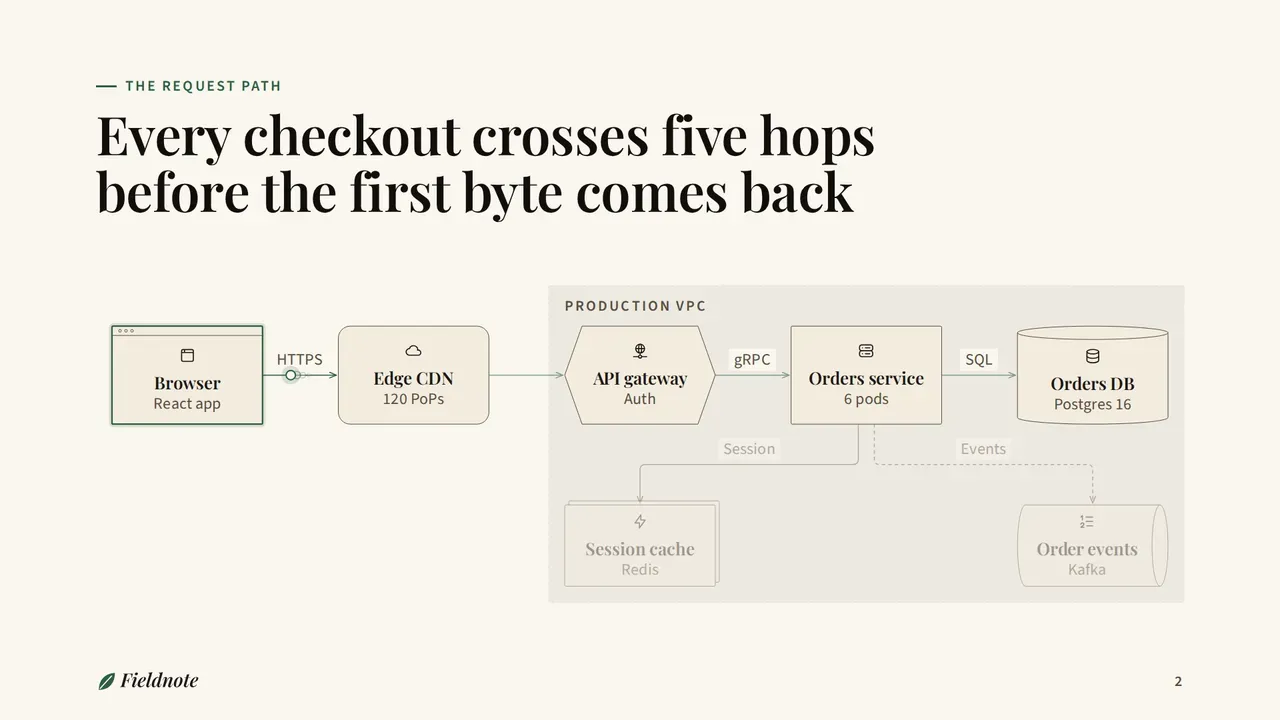
<Packet>: traffic along an edge,fromandtoor a multi-hoppath. It plays while itsatstep is current, or untiluntil; it loops unlessplay="once", andreplysends it back after a pause.<State>: changes a node or an edge fromaton (tountil):is="highlighted","error","success","muted"or"default", with an optionalbadgesuch asTimeout.<Focus>: dims everything but some nodes, and the edges between them, fromat(tountil).<Journey>: a request travelling hop by hop, one hop per step fromat.backbrings it back along the path,focusdims everything off the path, travelled edges stay lit (trail), andpace="trip"plays the whole path on one step.
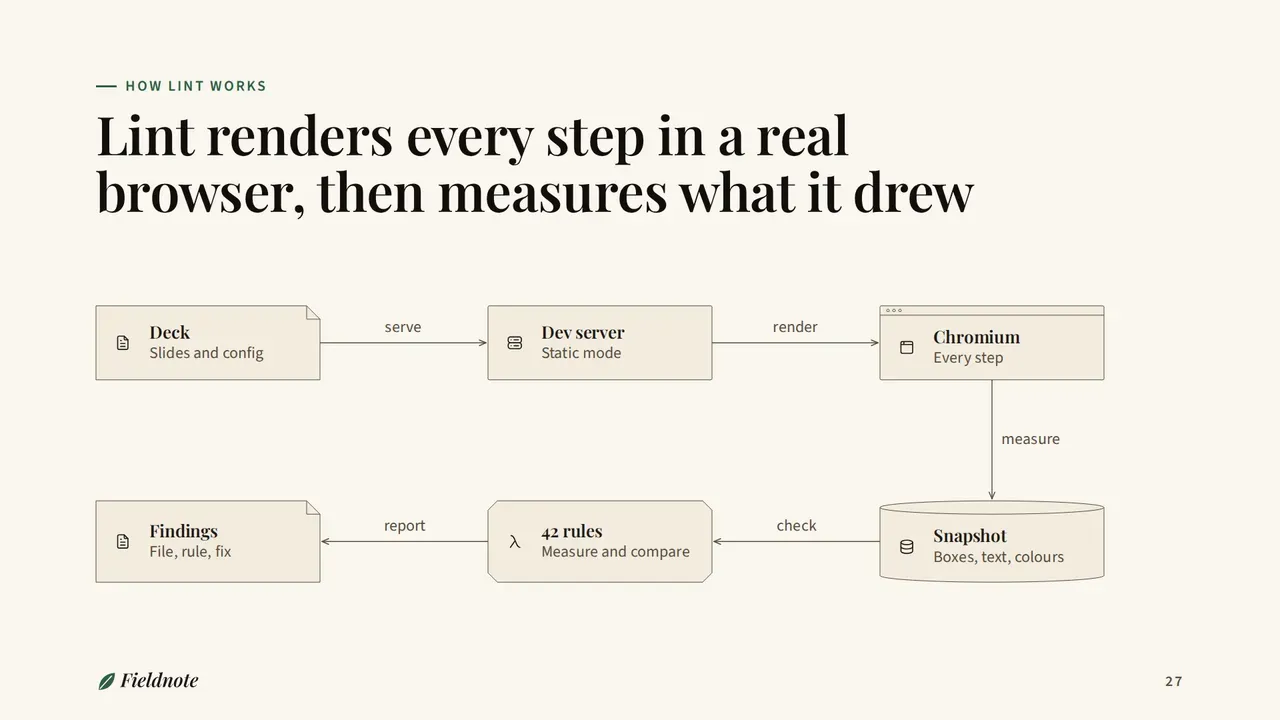
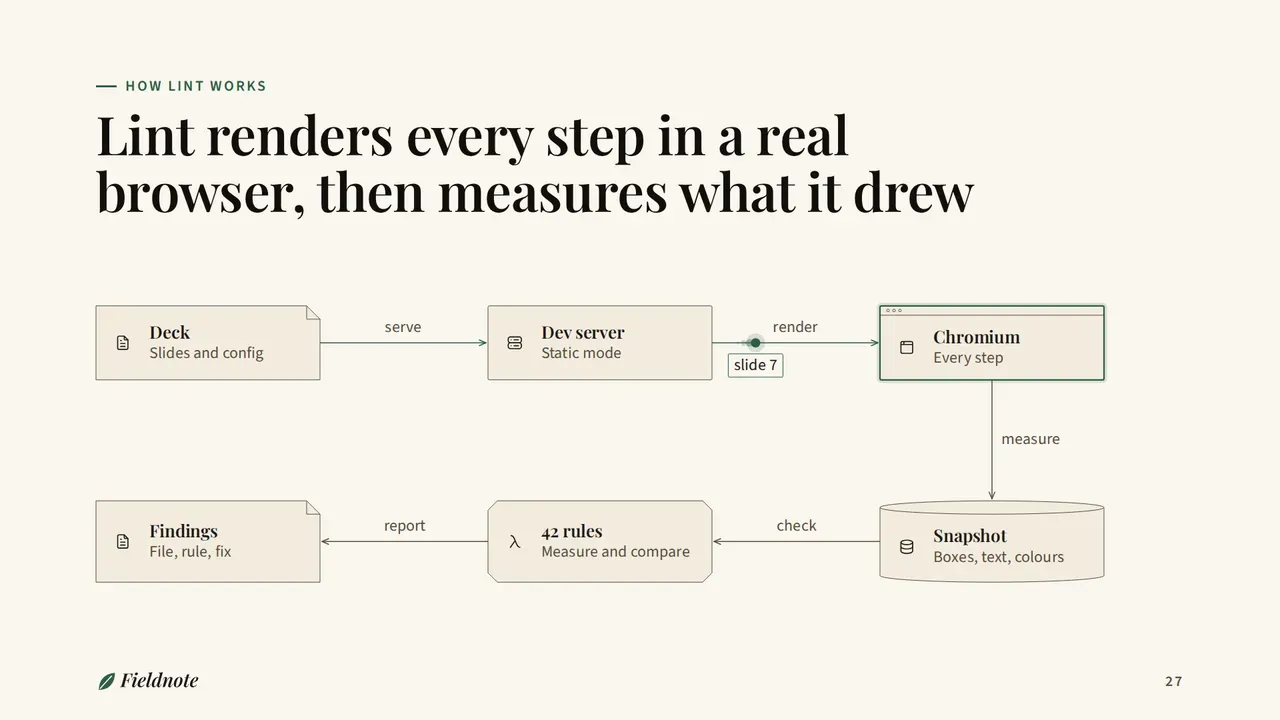
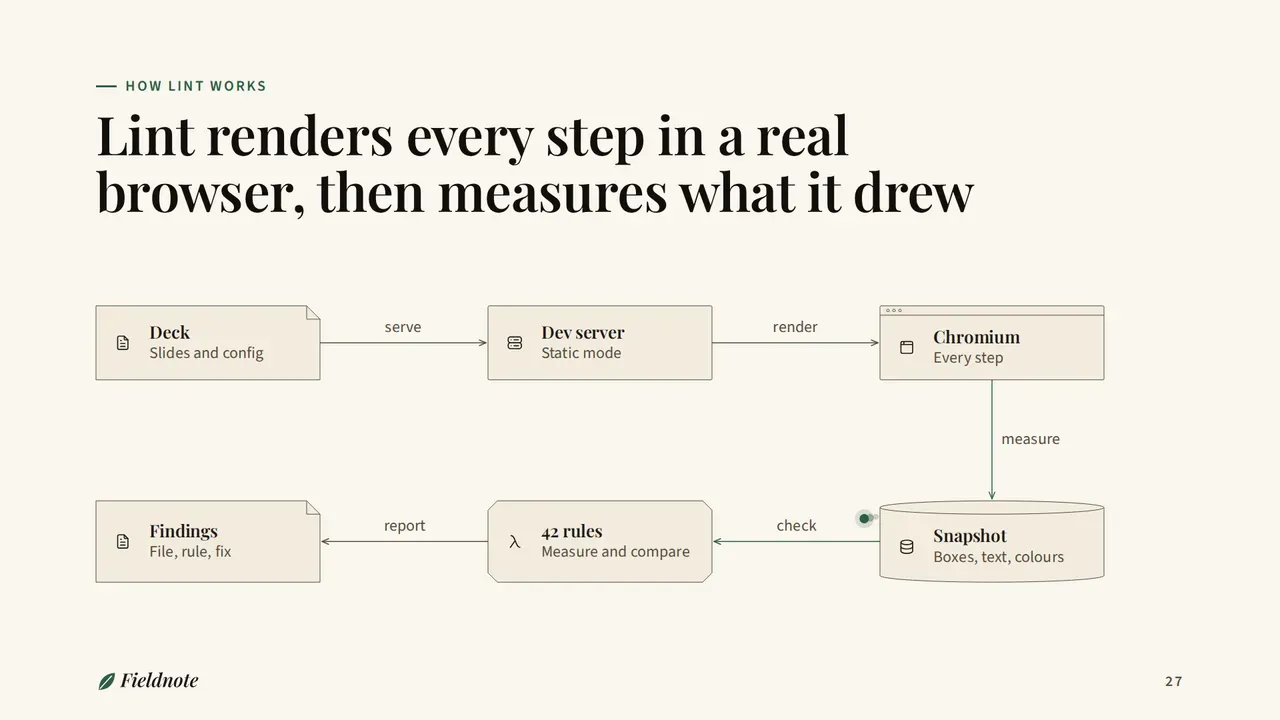
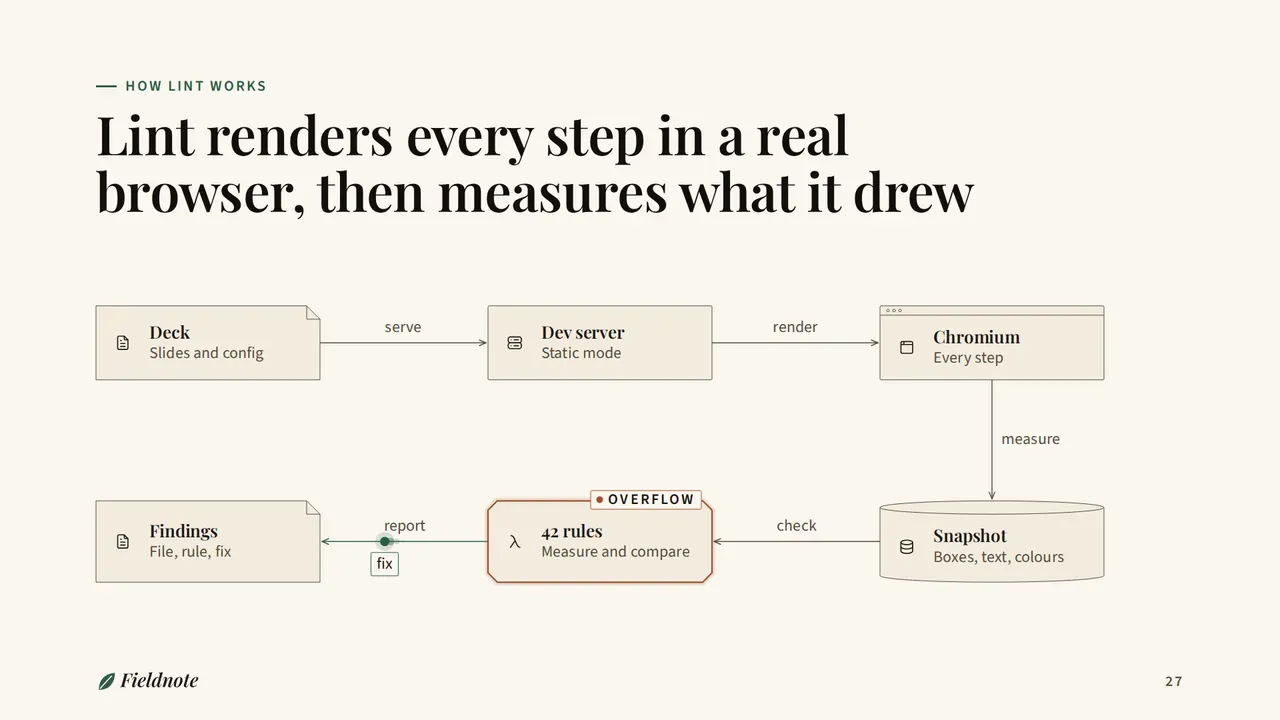
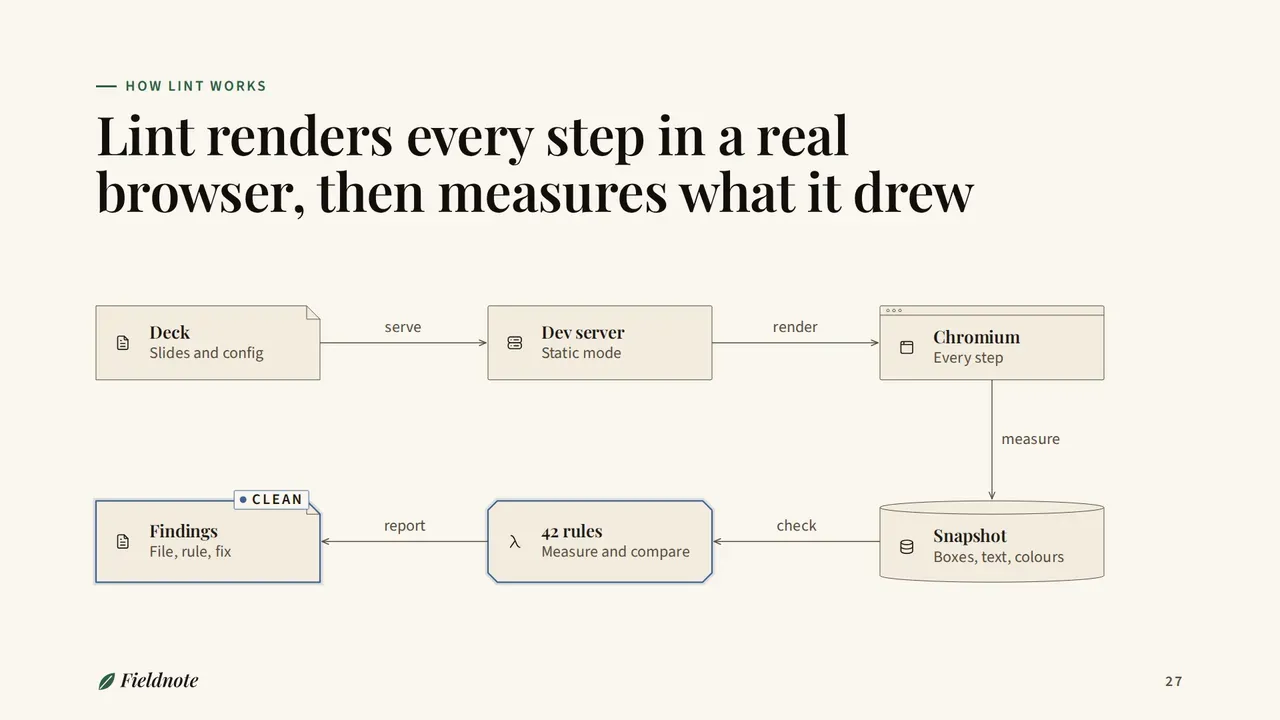
This slide uses packets and state changes: the rules node is in the error state with an “Overflow” badge on step 3 and in the success state on step 4:
 0start
 1
 2
 3
 4finished
<Packet path="deck server chromium" at={1} label="slide 7" />
<State node="chromium" at={1} until={2} is="highlighted" />
<Packet path="chromium snapshot rules" at={2} />
<State node="rules" at={3} until={4} is="error" badge="Overflow" />
<Packet path="rules findings" at={3} label="fix" />
<State node="rules" at={4} is="success" />
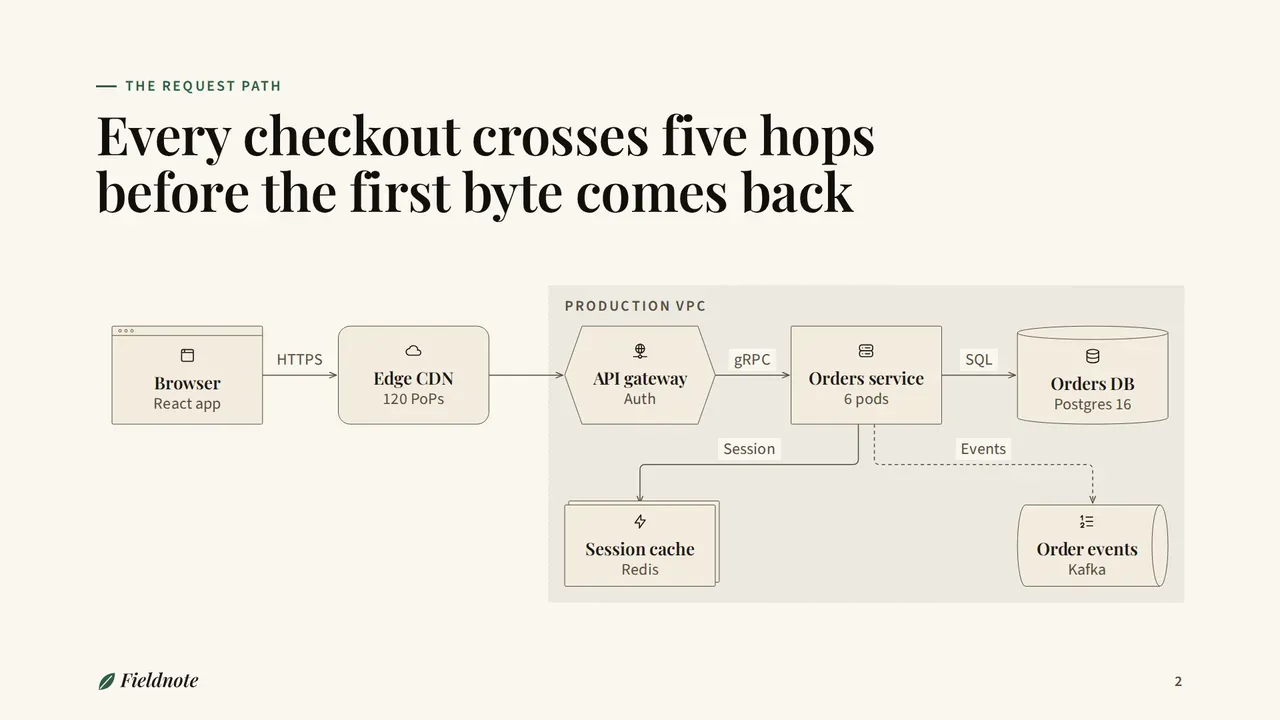
This one is a single line, <Journey at={1} path="browser cdn gateway orders db" back focus />, walking a request through a <Group> and back while the cache and the queue dim:
 0start
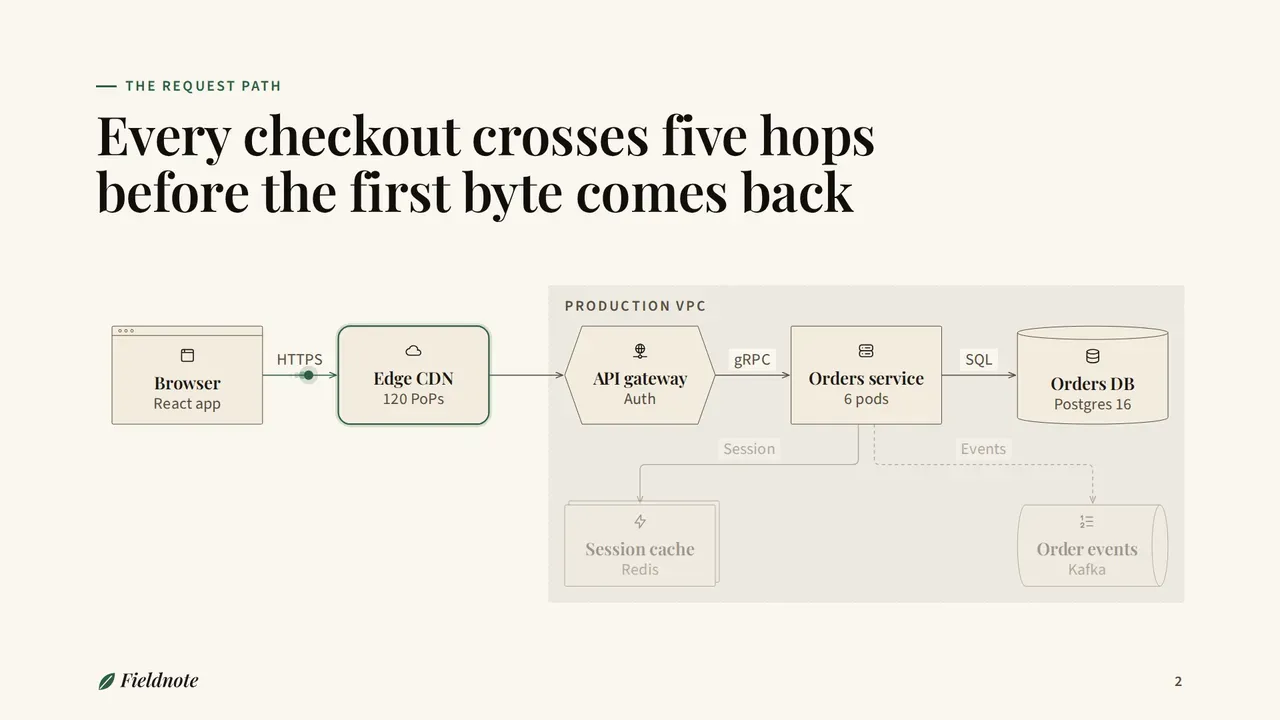 1
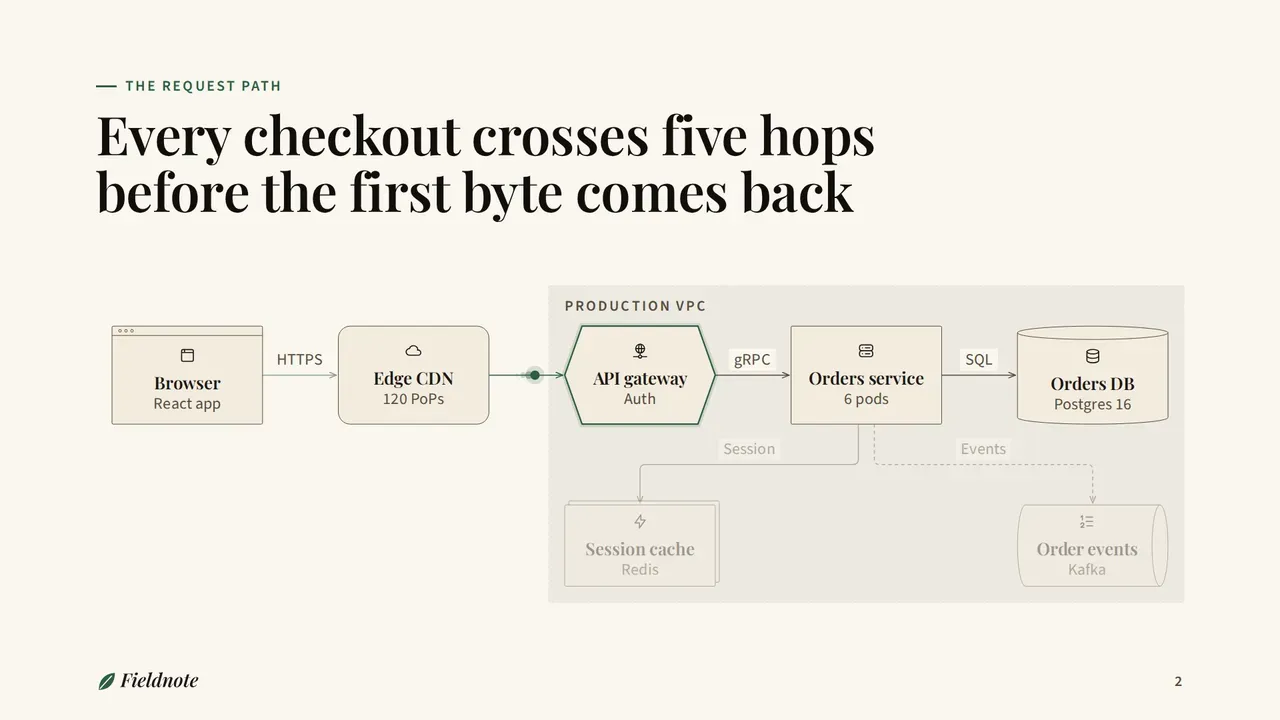 2
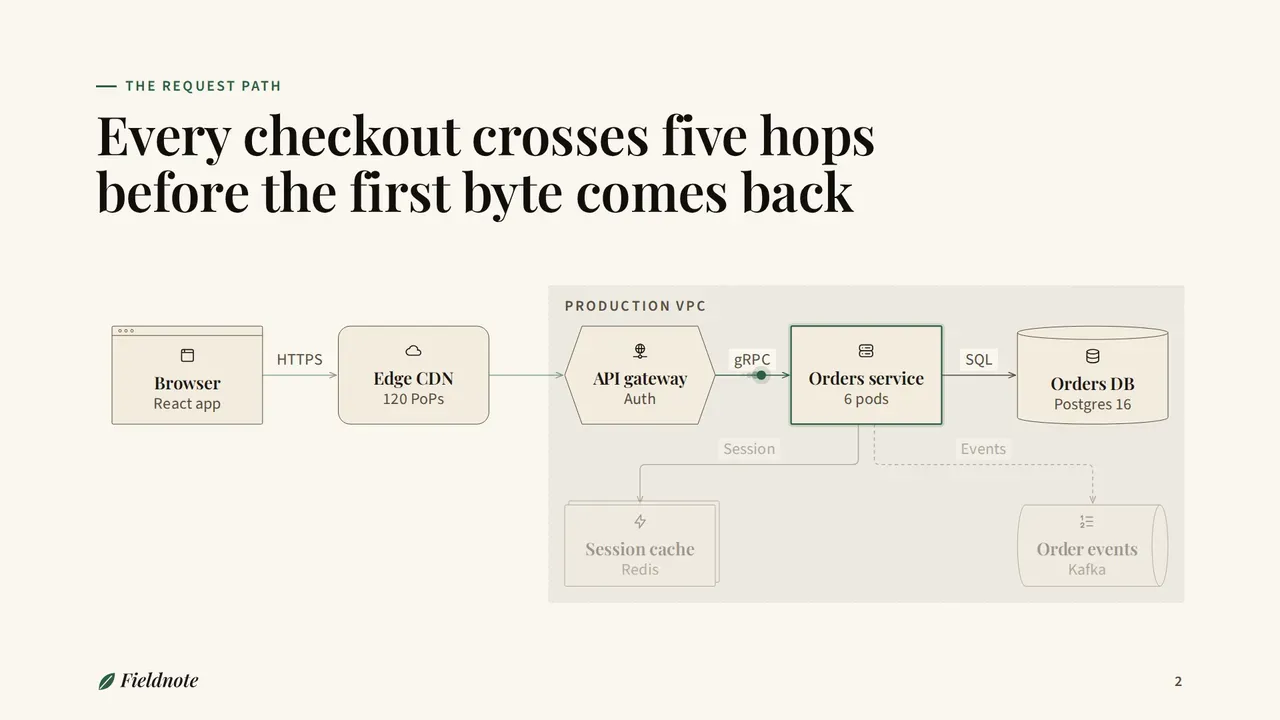 3
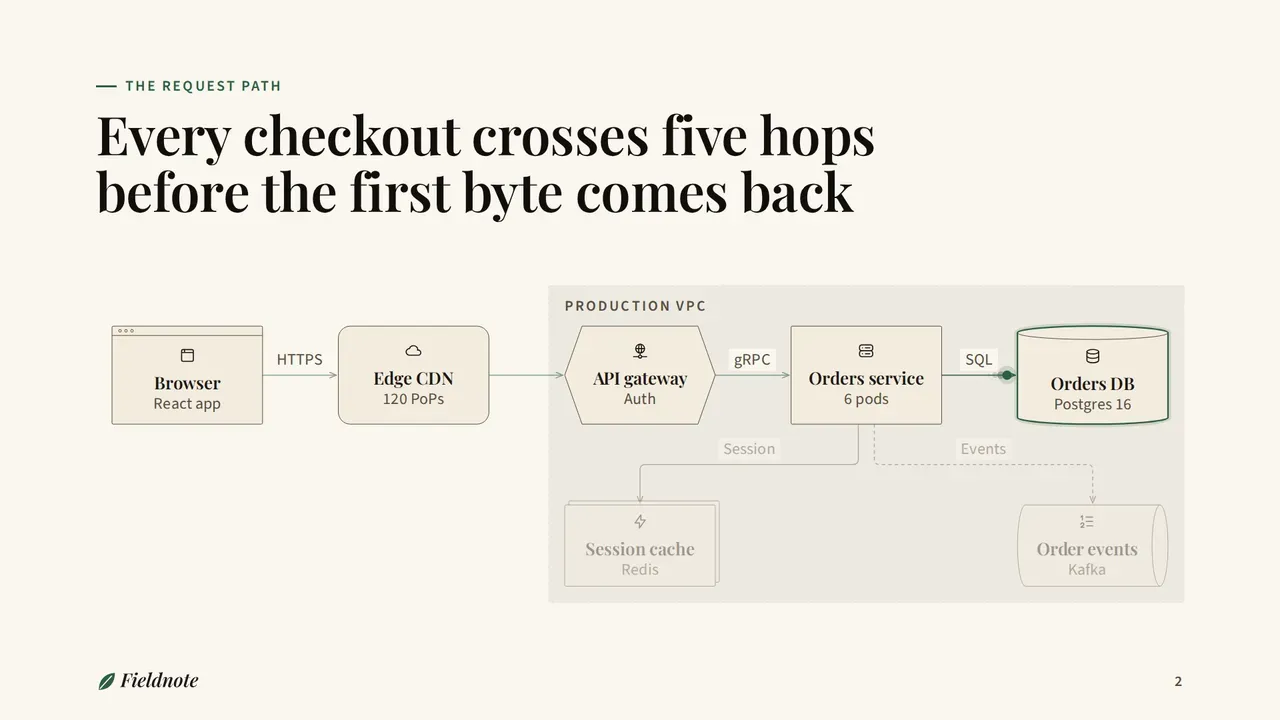 4
 5
 6
 7
 8finished
When each hop needs its own words, give the journey <Hop> children instead of path; a hop takes label, reply and returning:
<Journey at={1} focus>
  <Hop from="shop" to="hub" label="08:43" />
  <Hop from="hub" to="bike" label="Slot B3" />
  <Hop from="bike" to="door" label="Stop 7 of 9" reply="Signed" />
  <Hop path="door api shop" label="drop.delivered" />
</Journey>
Static mode, deck shot and every export show each step as a still, with packets frozen partway along and a tail that shows their direction. Steps across the whole slide are on Builds.
Stay inside the limits
Keep a slide to about 12 nodes, 16 edges, 5 columns and 3 rows. Keep edge labels to a word or two and node titles to about 20 characters: a title wraps to 3 lines at most, and a word too long for its node is broken. deck lint checks the drawing on every step with diagram-overlap (an error), diagram-too-dense, diagram-label-overlap, diagram-unlabeled-edge, diagram-edge-overlap, diagram-badge-overlap, diagram-small-text and diagram-long-word; Lint rules explains each one.
Write a flow in TSX
In a TSX slide, import the parts from @deckster/kit/diagrams and build the nodes from data. With no grid cells, the automatic layout places them:
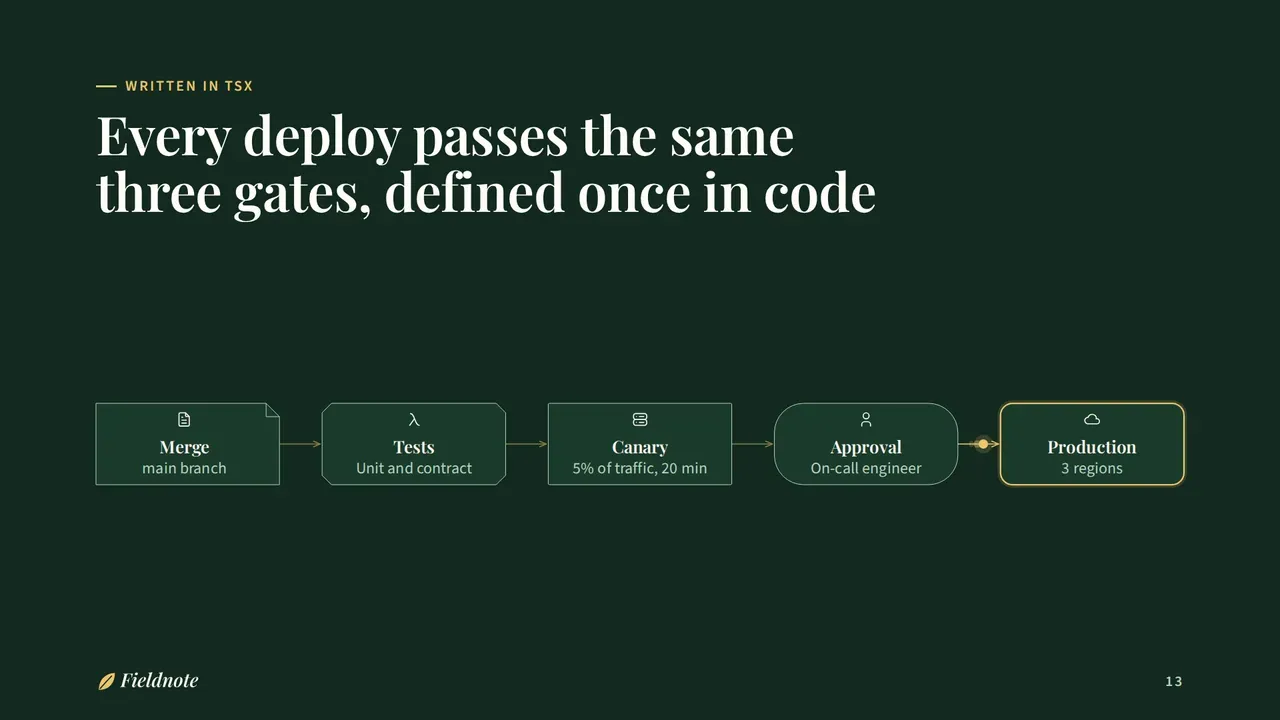
import type { ReactNode } from 'react';

import { Notes } from '@deckster/engine';
import { Edge, Flow, Journey, Node, State } from '@deckster/kit/diagrams';

/**
 * Read by the build without running the slide, so it must stay a literal.
 */
export const frontmatter = {
  layout: 'diagram',
  surface: 'inverse',
  title: 'Every deploy passes the same three gates, defined once in code',
  eyebrow: 'Written in TSX',
  budget: '1m',
};

/**
 * The gates between a merge and production, as the pipeline config lists them.
 */
const GATES = [
  { id: 'tests', kind: 'function', title: 'Tests', subtitle: 'Unit and contract' },
  { id: 'canary', kind: 'service', title: 'Canary', subtitle: '5% of traffic, 20 min' },
  { id: 'approval', kind: 'user', title: 'Approval', subtitle: 'On-call engineer' },
] as const;

/**
 * The deploy pipeline drawn from the same list the pipeline runs: a TSX slide maps the data to
 * nodes and edges with no grid cells, so the automatic layout places them (ELK loads for this slide
 * only), and the kind icons resolve at run time.
 */
export default function DeployGates(): ReactNode {
  const ids = ['merge', ...GATES.map((gate) => gate.id), 'production'];
  return (
    <>
      <Flow title="A merge passing tests, a canary and an approval before production">
        <Node id="merge" kind="document" title="Merge" subtitle="main branch" />
        {GATES.map((gate) => (
          <Node
            key={gate.id}
            id={gate.id}
            kind={gate.kind}
            title={gate.title}
            subtitle={gate.subtitle}
          />
        ))}
        <Node id="production" kind="cloud" title="Production" subtitle="3 regions" />
        {ids.slice(1).map((id, index) => (
          <Edge key={id} from={ids[index] ?? 'merge'} to={id} />
        ))}
        <Journey at={1} path={ids} />
        <State node="canary" at={2} until={3} is="highlighted" badge="Watching errors" />
      </Flow>
      <Notes>
        This slide is TSX: the gates come from the same list the pipeline config uses, so the
        picture cannot drift from the pipeline. Walk the release through one gate per click.
      </Notes>
    </>
  );
}
Slide 13 of the diagrams-demo deckView on GitHub
kind icons resolve from the brand’s icon set as in MDX, but icon takes an icon component (import Rocket from '~icons/lucide/rocket') or "none": a name string works only in MDX. Props are checked when the slide renders, and an unknown prop or value shows an error naming the closest one in place of the diagram.
Why the kit draws the diagrams
Diagrams are drawn by the kit, not by an outside tool such as Mermaid. That is what lets a diagram take the brand’s colours and type, build by step, get measured by deck lint and come out of a PowerPoint export as native shapes. For other diagram forms, see Sequence, timeline, layers, cycle and tree; for a drawing someone made, see SVG.