Write a slide as a React component when it needs real code: state, a loop over data, a chart computed from a list, or a helper you import. A TSX slide uses the same layouts, steps, notes and lint as an MDX slide.

import type { ReactNode } from 'react';

import { Notes, Step, useStep, type SlideFrontmatterInput } from '@deckster/engine';

/**
 * Read by the build without running the slide, so it must stay a literal.
 */
export const frontmatter = {
  title: 'A TSX slide',
  surface: 'accent',
  budget: '45s',
} satisfies SlideFrontmatterInput;

/**
 * A TSX slide that reads the step directly and reveals one more line on step 1.
 */
export default function LiveCounter(): ReactNode {
  const step = useStep();
  return (
    <div>
      <h2>A TSX slide</h2>
      <p data-testid="live-step">This slide is on step {step}.</p>
      <Step at={1}>
        <p>TSX slides use the same steps as MDX slides.</p>
      </Step>
      <Notes>TSX is the escape hatch for slides that need real code.</Notes>
    </div>
  );
}
Slide 3 of the hello deckView on GitHub
When to use TSX
Use MDX for most slides: text, a component or two, data from a file. Switch to TSX when the slide computes something:
- it maps a list to nodes, cards or rows, as a diagram drawn from the same list the pipeline config uses;
- it reads the step with
useStep()and changes more than a<Step>can; - it hosts a widget with state (see live components);
- it imports a helper from your own code.
List the slide in deck.config.ts by its id, as any other; the file is slides/<id>.tsx.
What the file exports
A TSX slide has two exports:
frontmatter, a literal object with the same keys an MDX slide’s frontmatter has. Addsatisfies SlideFrontmatterInputfor editor checking.- A default export, the component that renders the slide’s body.
import type { ReactNode } from 'react';

import { Notes, Step, useStep, type SlideFrontmatterInput } from '@deckster/engine';

export const frontmatter = {
  title: 'A TSX slide',
  surface: 'accent',
  budget: '45s',
} satisfies SlideFrontmatterInput;

export default function LiveCounter(): ReactNode {
  const step = useStep();
  return (
    <div>
      <h2>A TSX slide</h2>
      <p>This slide is on step {step}.</p>
      <Step at={1}>
        <p>TSX slides use the same steps as MDX slides.</p>
      </Step>
      <Notes>TSX is the escape hatch for slides that need real code.</Notes>
    </div>
  );
}
The build reads frontmatter and the <Notes> text from the source without running the slide, so both must stay literal: strings, numbers, booleans, lists and objects, and plain text in <Notes>. A computed value stops the build:
$ deck lint launch-review
decks/launch-review/slides/in-tsx.tsx
  error   schema (in-tsx): The frontmatter value on line 12 is not a literal; the build reads frontmatter without running the slide.
          Fix: Use only strings, numbers, booleans, lists and objects in `export const frontmatter`.

launch-review: 1 error, 0 warnings.
What it can import
| From | What |
|---|---|
@deckster/engine |
Step, Notes, useStep, useSlide, the SlideFrontmatterInput type |
@deckster/kit |
The kit components: Code, Image, Live, AppFrame, the charts and the rest |
@deckster/kit/diagrams |
Flow, Node, Edge, Journey, State and the other diagram components |
| A relative path | Your own helpers and widgets, such as ../lib/counter.tsx |
In an MDX slide the kit components need no import; in TSX you import each one. Images, videos and posters are imports too: import street from '../assets/street.jpg', then <Image src={street} ... />. A plain string path is not resolved in TSX. A kit <Image> then shows an “Image not found” placeholder that deck lint does not report, so look at the slide with deck shot; a raw <img> is reported as broken-image.
Fill a layout’s slots
The default export fills the layout’s main slot. Every other slot is a named export with the slot’s tag name, such as Aside, Media or Footnote:
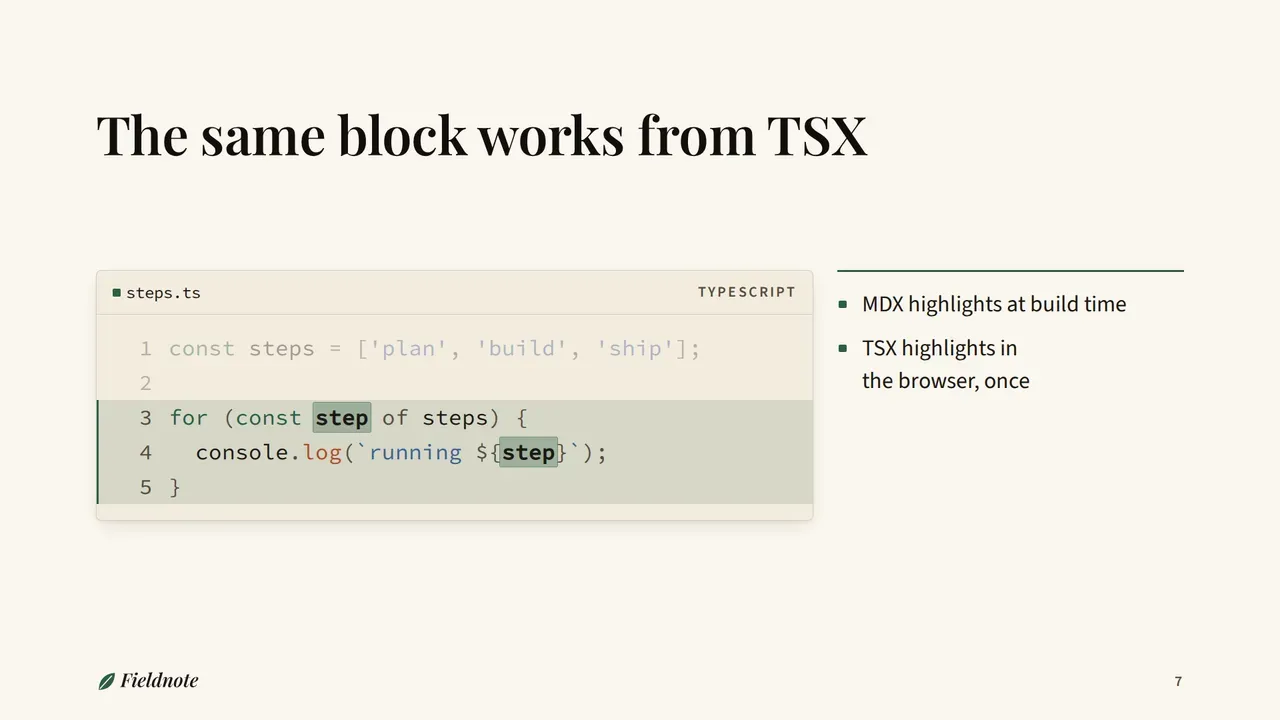
import type { ReactNode } from 'react';

import { Notes, type SlideFrontmatterInput } from '@deckster/engine';
import { Code } from '@deckster/kit';

/**
 * Read by the build without running the slide, so it must stay a literal.
 */
export const frontmatter = {
  layout: 'code',
  title: 'The same block works from TSX',
  budget: '45s',
} satisfies SlideFrontmatterInput;

/**
 * The block's source, kept in a constant so the browser highlights it: TSX slides have no build
 * step for code, so the highlighter loads in its own chunk and the slide waits for it.
 */
const SOURCE = `const steps = ['plan', 'build', 'ship'];

for (const step of steps) {
  console.log(\`running \${step}\`);
}`;

/**
 * The code layout's body: a block highlighted in the browser, with the focus moving by step.
 */
export default function InTsx(): ReactNode {
  return (
    <>
      <Code
        code={SOURCE}
        lang="ts"
        file="steps.ts"
        highlight={{ 1: '3-5' }}
        words={['step']}
        lineNumbers
      />
      <Notes>
        This block is highlighted in the browser. MDX slides do it at build time, which is why this
        slide is the only one that loads a highlighter. One press moves the focus into the loop.
      </Notes>
    </>
  );
}

/**
 * The notes beside the code.
 */
export function Aside(): ReactNode {
  return (
    <ul>
      <li>MDX highlights at build time</li>
      <li>TSX highlights in the browser, once</li>
    </ul>
  );
}
Slide 7 of the components deckView on GitHub
The code layout puts the <Code> from the default export in its code area and the Aside export beside it. A <Code> in TSX is highlighted in the browser, not at build time; see code.
A diagram in TSX can be built from data, so the picture cannot drift from the list it shows: see write a flow in TSX.
How props are checked
In MDX the build refuses an unknown prop on most components, such as <Code> and diagram nodes. Charts, and every component in TSX, check their props when the slide renders, so the slide shows an error in its place and deck lint reports it as render-error, with the closest prop name:
$ deck lint launch-review
decks/launch-review/slides/in-tsx.tsx
  error   render-error (in-tsx step 0): The slide shows an error instead of its content: `lineNumber` is not a prop of <Code>. Did you mean `lineNumbers`? Its props are: code, children, lang, data, file, label, lineNumbers, start, highlight, at, dim, diff, words. `deck components --json` describes each one.
          Fix: Fix the error in decks/launch-review/slides/in-tsx.tsx; `deck dev` shows it with its stack in the browser.

launch-review: 1 error, 0 warnings in 4 slides (9 steps checked).
A missing required prop is refused the same way. In deck dev the slide shows the error with its stack.
Editor types
Run deck types once in the workspace so your editor resolves the @deckster/* imports and checks the props as you type:
$ deck types
tsconfig.json
.deck/env.d.ts
Mapped 71 @deckster/* entry points. The paths name this install: run `deck types` again after upgrading @deckster/cli.
It writes tsconfig.json with paths into this install of the CLI, so run it again after an upgrade and do not commit it to a repository others install differently. More on the workspace is on workspace layout. For content that loads late, such as data a widget fetches, see useReadyHold on static mode and readiness. Every component’s props are on components.