deckster is a slide framework where every slide is a file: MDX or TSX, filling a typed layout, styled by a brand you never touch from the slide. A deck CLI serves, checks, screenshots, exports and presents the result. This page tells you what the parts are, how the work goes, and what your machine needs, so you can decide whether it suits you before the quickstart.
Who it is for
- People who write slides as files, in an editor and in git, rather than in a drawing tool.
- People who direct an AI agent such as Claude Code or Codex to write the slides. The layouts tell the agent how much fits,
deck linttells it what broke, anddeck shotgives it a picture to look at. The agent skills teach it the workflow. - Teams that review slides like code: small diffs, one file per slide, comments that point at a file and a line.
The parts of a deck
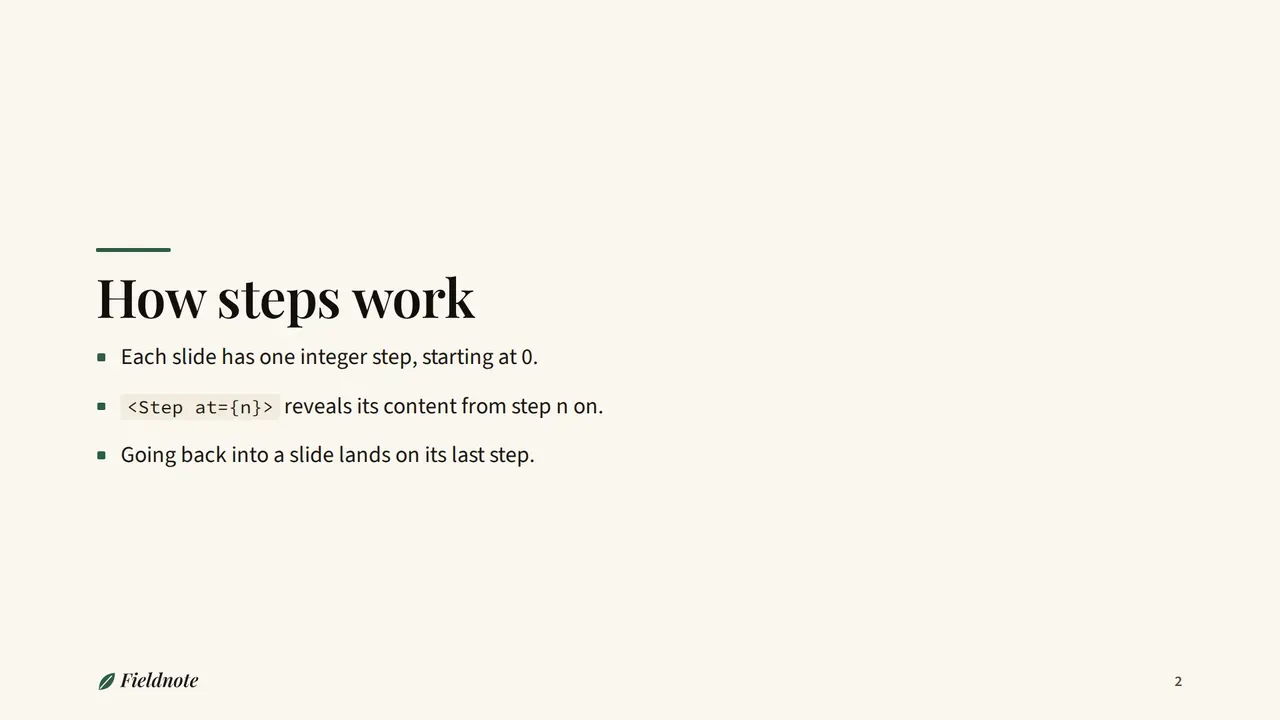
---
layout: default
title: How steps work
budget: 1m30s
---

## How steps work

<Step at={1}>
- Each slide has one integer step, starting at 0.
</Step>

<Step at={2}>
- `<Step at={n}>` reveals its content from step n on.
</Step>

<Step at={3}>
- Going back into a slide lands on its last step.
</Step>

<Notes>
Press the right arrow three times to reveal each point.

Mention that the step count comes from the steps that mount.
</Notes>
Slide 2 of the hello deckView on GitHub
A workspace is a folder of your own with decks/ in it, and brands/ when you add brands. The CLI finds it from wherever you run it.
A deck is a folder in decks/ with a deck.config.ts that names the title, the brand, the talk length and the slides in order. Reordering slides is a one-line change. See Decks and slides.
A slide is one file in the deck’s slides/ folder. An MDX slide is frontmatter plus Markdown and components such as <Step> and <Notes>; a TSX slide is a React component for slides that need real code. The example above is the whole of slides/steps.mdx.
A layout is picked by each slide’s layout: field. The kit includes 63, such as stats, cards and comparison. The layout sets the grid, type and spacing. Its contract lists the fields and slots it takes and how much content fits. Choose a layout · Layouts and slots
A brand is a typed brand.ts with colours, surfaces, fonts, icons, motion and chart palettes. Slides hold no colours or pixel positions, so the same deck renders in another brand without an edit. The default brand comes with the CLI.
How the work goes
- Write the slides, or have an agent write them.
- Run
deck lint. It renders every step of every slide in Chromium and reports overflow, text cut short, contrast, off-brand values, content over a layout’s budget, missing notes and a talk over its length, each with a fix. See Lint as the contract. - Run
deck shotto get a PNG of any slide, for you or the agent to look at. - Open
deck devto click through the deck with hot reload, and presscto leave a comment on an element. - When it is ready:
deck presentto give the talk,deck exportfor a PDF and an editable PowerPoint file, ordeck buildfor a static site.
The reasons behind these choices are on Design decisions.
What your machine needs
| For | You need |
|---|---|
| Every command | Node.js 26 or later |
deck lint, deck shot, deck diff, deck export |
Playwright’s Chromium. Without it these commands stop and print the command to install it: npx playwright@1.65.0 install chromium for 0.8.0 |
deck present |
Electron’s binary, downloaded once (about 120 MB). Without it, deck present prints the command that downloads it; --browser presents in Chrome instead. Checked on macOS with one display only: several displays, Windows and Linux are untested |
deck diff against a git ref |
A git repository; otherwise compare with a folder saved by deck diff --save-baseline |
deck export --verify |
Docker, for the LibreOffice and Open XML SDK checks. The quicklook and keynote renderers work on macOS only |
deck dev --agent claude or --agent codex |
That CLI installed and signed in. deck agent doctor checks both |
| GIFs as looping video | ffmpeg on your PATH. Without it a GIF stays an image |
deck new, deck dev and deck build need nothing beyond Node.js.
Without Electron’s binary, deck present prints this (paths shortened):
$ deck present launch-review
Electron's binary is not downloaded (.../node_modules/electron/dist), so `deck present` cannot open a window.
Run `node ".../node_modules/electron/install.js"` (about 120 MB), or pass --browser to present in Chrome.
What it is not
- Not a visual editor. You change a slide by editing its file, or by asking an agent to. The browser shows the deck; it does not edit it.
- Not a hosted service. Everything runs on your machine.
deck buildwrites static files you host where you like. - No comments on a built deck. Comment mode is part of
deck dev; a built or exported deck has none.
Next: install the CLI and make a deck in the quickstart.