In deckster, a slide is finished when deck lint reports no errors on it: not when it compiles, and not when an agent says it is done. This page explains why, and what kinds of problem lint catches, so you can decide how far to trust slides an agent wrote. Lint covers running it and the fixes, and lint rules lists every rule.
An agent cannot see its slides
An agent writes slide files as text and never sees the result. A slide can pass every check the build runs and still show a title cut off at the edge, a list spilling out of its column, grey text on a grey photo, or a colour the brand doesn’t have. Without a check it can run, the agent can’t tell a good slide from a broken one, and you become the check, one screenshot at a time.
deck lint is that check: a command with an exit code and a fix for each finding, so an agent can run it, fix what it reports and run it again without a person. Before and after a fix shows one slide of nine wrapped bullets that compiles but runs off the canvas, its four lint errors, and the clean run once it is cut to three.
Three phases, on the rendered slide
A schema check reads the source. deck lint also renders it:
- Schema. The deck config, the brand and every slide file go through the same checks as
deck build, each problem with its file and fix. If a file fails, lint stops here, because the deck can’t render. - Rendered. The deck opens in Chromium in static mode, and every step of every slide is measured: the boxes, the text, the colours, the images.
- Deck. Rules run over the whole deck, such as the order of layouts.
Because the second phase measures what Chromium drew, lint reports what the audience would see, in the brand the deck renders in (--brand <name> checks it in another).
What it catches
- Layout: content past the edge of the 1920x1080 canvas or out of its container, text cut short with an ellipsis, text drawn over other text, and type below the 20px minimum.
- Colour: text below WCAG AA contrast, including text over a photo, which is measured against the pixels under its glyphs, and colours, fonts, type sizes or spacing that are not brand tokens (
off-brand). - Content: slots over their layout’s budget, content a slot doesn’t accept, slides without speaker notes, and slide budgets that add up to more than the talk’s
duration. - Charts and diagrams: honesty, such as a bar axis that starts above zero without marking the break, and density: too many series, categories, nodes or edges, and labels that overlap.
- Media: missing posters on live demos and video, images that fail to load or are too low-resolution.
- The deck: three or more slides in a row with the same layout on the same surface, and too few chart, diagram and code slides that build in steps.
Elements marked aria-hidden="true" or data-decorative are skipped by the overflow and text rules, so decoration can run off the canvas without a finding.
Errors and warnings
An error is something wrong on the slide: clipped, unreadable, off-brand or over budget. Any error makes deck lint exit non-zero, and the slide isn’t finished. A warning is a judgement call, such as a missing note, a dense diagram or a chart title that reads like a topic: read it and decide. A deck with warnings only passes:
$ deck lint launch-review
decks/launch-review/slides/why-now.mdx
  warning missing-notes (why-now): The slide has no speaker notes.
          Fix: Add a `<Notes>` block saying what the slide proves and what to say, in a sentence or two.

launch-review: 0 errors, 1 warning in 2 slides (2 steps checked).
$ echo $?
0
Where pictures fit
Lint measures; it doesn’t judge taste, such as whether the chart makes the point or the photo suits the talk. For that someone has to look. deck shot renders any slide, or every step of it, to a PNG that you can open or an agent can read. The two go together in each round of review:
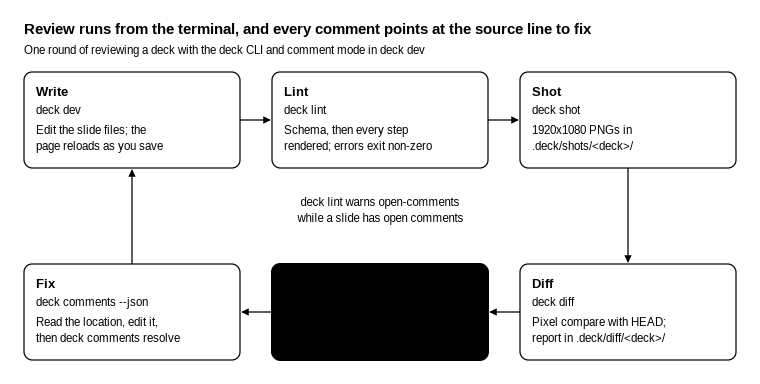
deck lint also warns with open-comments while a slide has open review comments. Screenshots covers deck shot.
How agents use it
An agent connected to deck dev --mcp runs lint through the deck_lint tool (MCP tools). In the agent panel, deckster lints the slides each turn touched. When the turn left new errors, one automatic fix turn follows, labelled Auto-fix. Findings that were there before the turn are listed apart and don’t count against it.