The risks layout sets a register of three to five rows. Each row names a risk, rates its likelihood and its impact as low, medium or high, and says in one line what you will do about it. Use it to review what could go wrong and what the action is.
Example
---
layout: risks
title: Missed webhooks are the risk that gates launch
eyebrow: Launch readiness
surface: accent
reveal: true
budget: 45s
risks:
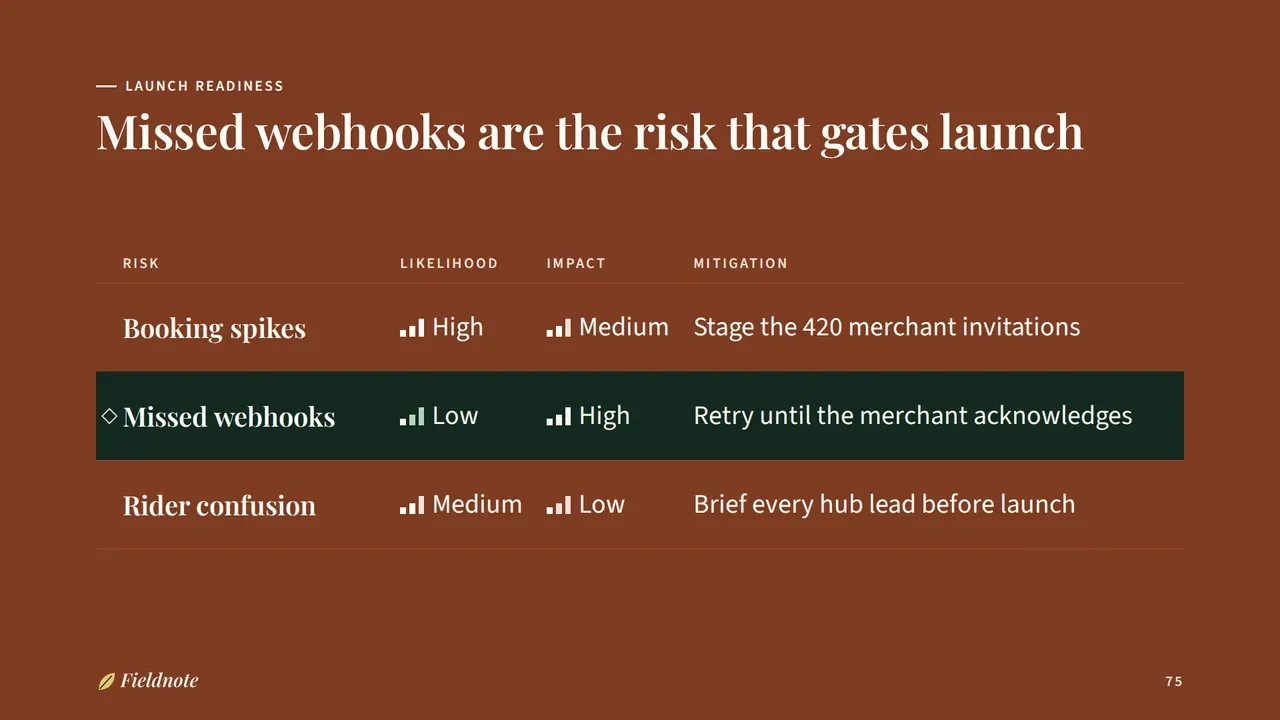
  - name: Booking spikes
    likelihood: high
    impact: medium
    mitigation: Stage the 420 merchant invitations
  - name: Missed webhooks
    likelihood: low
    impact: high
    mitigation: Retry until the merchant acknowledges
    highlight: true
  - name: Rider confusion
    likelihood: medium
    impact: low
    mitigation: Brief every hub lead before launch
---

<Notes>
`risks` with three rows, `reveal: true` and one `highlight` on the accent surface; use it to review a short register one mitigation at a time.
[click] We invite the 420 active merchants in stages so a booking spike stays manageable. [click] A missed webhook can leave a shop unsure whether its parcel arrived; retrying until acknowledgement is the launch gate. [click] Hub leads brief riders before the first Open Network loop.
</Notes>
Slide 75 of the lookbook deckView on GitHub
Each entry in risks: has a name, a likelihood, an impact and a mitigation. The two levels are printed as a word beside one, two or three filled bars, so meaning never depends on colour. highlight: true lights the row the title is about and marks it with a diamond; this slide is on surface: accent, so the row is lit on the inverse surface. reveal: true brings in one row per step. Rows stay in the order you write them; the layout does not sort by severity.
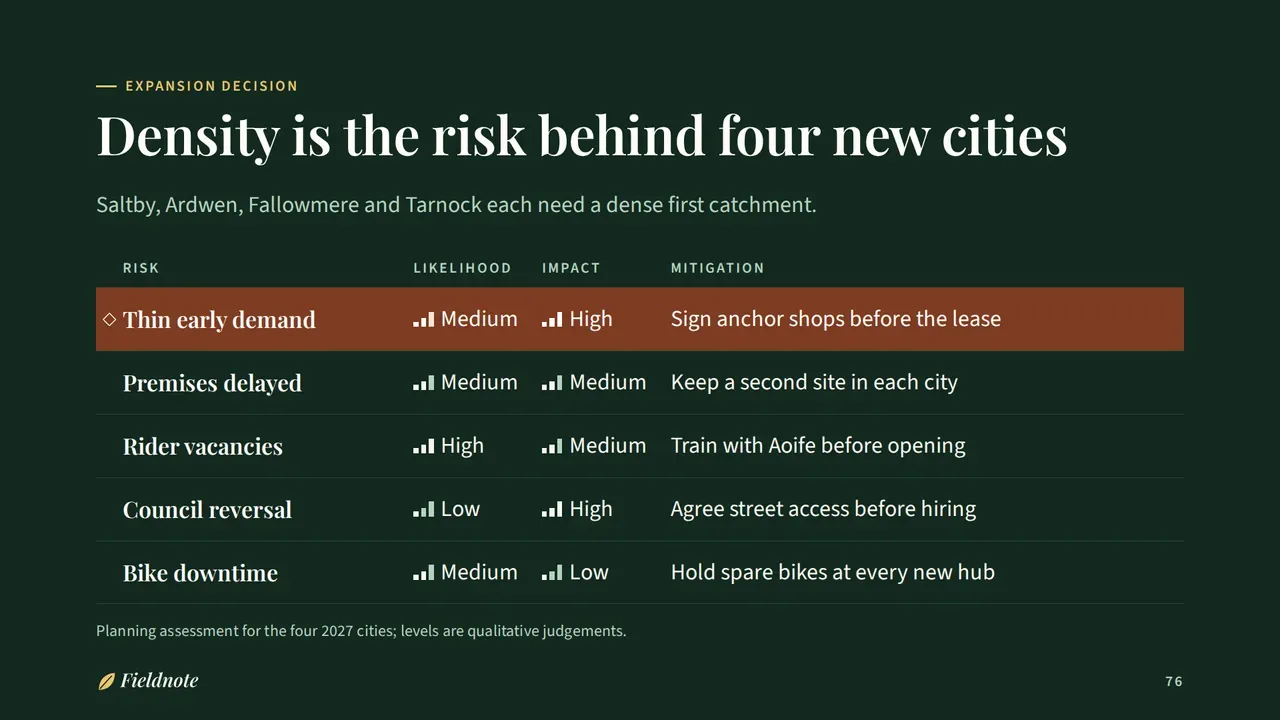
Five rows, the most the layout takes, with a context line and a footnote on surface: inverse. The highlighted row is lit in the accent here, because the slide is dark.
When to use it
- Each risk has the same two levels and one action. Use
tablefor a longer register with owners, dates or exact scores,matrixfor two continuous axes,actionsfor commitments with owners and deadlines, andstepsfor the stages of a process. - Three to five rows. A longer register belongs on several slides. A
nametakes up to 24 characters and amitigationup to 42, one action on one line. The title takes up to 50 characters. - Likelihood and impact are independent. Each is
low,mediumorhigh, with no other value and no score. - Highlight the most severe row, one at most. A screen reader hears its name prefixed with “Priority risk”.
- Context and footnote are optional. Up to 14 and 16 words; the footnote is the place for the assessment date.
- Rename the words with
labels, for examplelabels: { name: Hazard }. It changes the column heads (name,likelihood,impact,mitigation, each up to 11 characters), the level words (low,medium,high, up to 8) and the screen-reader prefix (highlight, up to 24). Keys you leave out keep their English defaults. - Walk through the register with
reveal: true, one row per step, and a[click]cue in the notes for each. See builds.
Reference
- Frontmatter
layout: risks- Surface
- the deck's default
- Title
- required, 50 characters at most
- PowerPoint
- title-only slide
A risk register of three to five rows under a title that states the point. Each entry in risks: has a short name, likelihood and impact (low, medium or high), and a one-line mitigation. The two levels show their names and one, two or three filled marks, so meaning never depends on colour. Rows stay in the order written; highlight: true lights the most severe row on the accent surface and marks it with a diamond, and reveal: true brings rows in one per step. Use it to review what could go wrong and what you will do about it. labels renames the column heads and level words, for example labels: { name: Hazard }; use table for a longer register with owners, dates or exact scores, matrix to position items on two continuous axes, actions for commitments with owners and deadlines, and steps for the stages of a process.
Slots
| Slot | Takes | Budget | What goes in it |
|---|---|---|---|
body | text | 14 words | One line of context under the title. Write the register in risks:. |
<Footnote> | text | 16 words | A source, assessment date or caveat on the bottom line. |
Frontmatter fields
| Field | Values | How to use it |
|---|---|---|
eyebrow | text | Write a few words of at most 40 characters, for example eyebrow: Budget committee, or leave it out. |
risksrequired | text | List 3 to 5 risks in reading order, each with name (up to 24 characters), likelihood and impact (each low, medium or high), and mitigation (one action of up to 42 characters). Optionally mark the most severe risk with highlight: true, on at most one row. |
labels | default {"name":"Risk","likelihood":"Likelihood","impact":"Impact","mitigation":"Mitigation","low":"Low","medium":"Medium","high":"High","highlight":"Priority risk"} | Optional replacements for the column heads name (Risk), likelihood (Likelihood), impact (Impact) and mitigation (Mitigation), each 1 to 11 characters; the level words low (Low), medium (Medium) and high (High), each 1 to 8 characters; and highlight (Priority risk), the screen-reader prefix of the highlighted row, 1 to 24 characters. Omitted keys keep their English defaults. For example, labels: { name: Hazard }. |
reveal | true false (default) | Write reveal: true to show the items one per step, in order, or leave it out to show them all at once. |
chrome | true (default) false | Write chrome: false to hide the page number, logo and progress bar on this slide, or chrome: true to show them. |
Example
---
layout: risks
title: Summer watering is the risk we must fund
eyebrow: Canopy programme
labels:
  name: Risk
  likelihood: Likelihood
  impact: Impact
  mitigation: Mitigation
  low: Low
  medium: Medium
  high: High
  highlight: Priority risk
risks:
  - name: Late stock
    likelihood: low
    impact: medium
    mitigation: Reserve trees with two local nurseries
  - name: Warden turnover
    likelihood: medium
    impact: low
    mitigation: Pair each new warden with a neighbour
  - name: Summer drought
    likelihood: high
    impact: high
    mitigation: Fund a weekly watering crew
    highlight: true
---

Every planting district has a mitigation before the season opens.

<Footnote>Assessment for the 2027 planting season.</Footnote>

<Notes>
Watering has the highest likelihood and impact. The funded crew is the decision today.
</Notes>
Common mistakes
-
A level the layout does not have.
criticalis not a level, so the slide fails theschemacheck:$ deck lint launch-review decks/launch-review/slides/plans.mdx error schema (plans): risks[0].likelihood: Expected "low" | "medium" | "high", got "critical". Fix: List 3 to 5 risks in reading order, each with `name` (up to 24 characters), `likelihood` and `impact` (each low, medium or high), and `mitigation` (one action of up to 42 characters). Optionally mark the most severe risk with `highlight: true`, on at most one row. launch-review: 1 error, 0 warnings. -
Highlighting two rows. “risks: 2 risks are highlighted; a register highlights at most one.”
-
A label that is a phrase.
labels.name: Hazard of the seasonfails with “Expected a risk column label of at most 11 characters.” Use one word. -
A mitigation that is a plan. The column holds one action in 42 characters. Steps with owners and dates belong on an
actionsslide after this one.