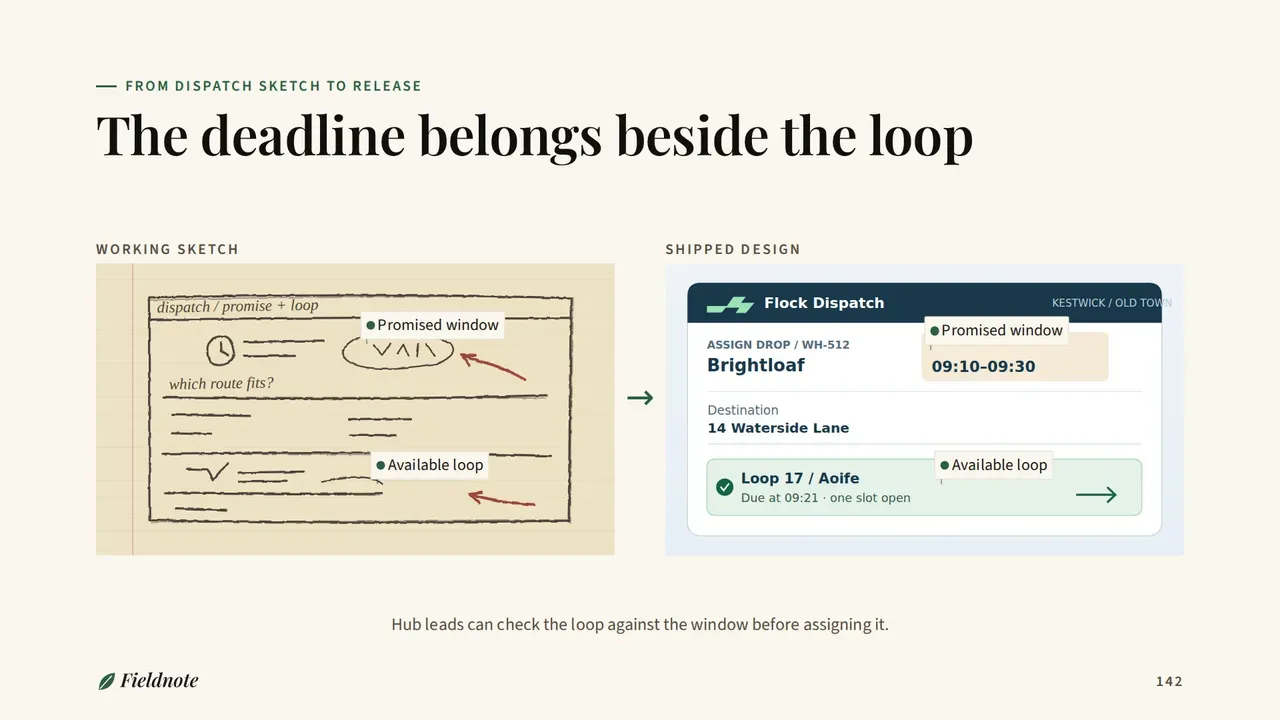
Show where the delivery deadline appeared in the notebook and where it landed in Dispatch. Matching labels let the audience find the same information in two views.
Author the slide
Supply 16:9 sketch and finished images. Write two annotations. Each label has one point on each image in percentages from its top-left corner. Leave room above and to the right of each pin for the label. With reveal: true, the finished image and its pins appear on the first advance. Write the consequence for the user in result.
Example
---
layout: sketch-to-ship
title: The deadline belongs beside the loop
eyebrow: From dispatch sketch to release
budget: 45s
reveal: true
sketch:
  src: ../assets/screens/dispatch-notebook.svg
  alt: Rough pencil drawing with a deadline on one row and a loop slot below it.
finished:
  src: ../assets/screens/dispatch-assignment.svg
  alt: The original Wrenhaul dispatch assignment view puts the deadline beside the chosen loop.
annotations:
  - label: Promised window
    sketch: { x: 52, y: 28 }
    finished: { x: 51, y: 30 }
  - label: Available loop
    sketch: { x: 54, y: 76 }
    finished: { x: 53, y: 76 }
result: Hub leads can check the loop against the window before assigning it.
---

<Notes>
`sketch-to-ship` pins the same decisions in an original sketch and the released state. At the drawing stage we wrote the customer promise at the top and put the route choice on its own line. [click] In the released view our hub lead reads both in one glance. The useful change was making those two facts visible at the decision, while a different loop can still be chosen.
</Notes>
Slide 142 of the lookbook deckView on GitHub
Reference
- Frontmatter
layout: sketch-to-ship- Surface
- the deck's default
- Title
- required, 70 characters at most
Connect an annotated sketch to the same decisions in a finished design.
Slots
| Slot | Takes | Budget | What goes in it |
|---|---|---|---|
body | — | Content outside every slot tag (in TSX, the default export). | |
<Footnote> | text | 24 words | A source or caveat on the bottom line. |
Frontmatter fields
| Field | Values | How to use it |
|---|---|---|
eyebrow | text | Write a few words of at most 40 characters, for example eyebrow: Budget committee, or leave it out. |
reveal | true false (default) | Start with the marked-up sketch. The click exposes the shipping design and its corresponding annotations. |
chrome | true (default) false | |
sketchrequired | text | The rough design as { src, alt } with up to 160 alt characters. Use the same 16:9 orientation as finished. |
finishedrequired | text | The released design as { src, alt } with up to 160 alt characters and the same landmarks as the sketch. |
annotationsrequired | text | Write 2 { label, sketch: { x, y }, finished: { x, y } } mappings. A label takes up to 28 characters. Coordinates are percentages from the top left. Keep room above and to the right of the pin. |
resultrequired | text | Name what changed for the person using the product, in up to 98 characters. |
Example
---
layout: sketch-to-ship
title: The repair estimate now shows its due date
reveal: true
sketch:
  src: "data:image/svg+xml,%3Csvg xmlns='http://www.w3.org/2000/svg' viewBox='0 0 640 360'%3E%3Cpath fill='%23ecdcc5' d='M0 0h640v360H0z'/%3E%3Cpath fill='none' stroke='%233c4a62' stroke-width='7' stroke-linecap='round' stroke-linejoin='round' d='M44 60q267-5 552 3l-3 233q-246 9-552-5zM49 93l542 1M369 92l-4 203M92 142l110-2m-109 32 78-4m241 30 106-3m-105 30h62'/%3E%3C/svg%3E"
  alt: A rough two-column estimate
finished:
  src: "data:image/svg+xml,%3Csvg xmlns='http://www.w3.org/2000/svg' viewBox='0 0 640 360'%3E%3Cpath fill='%23d8e6f4' d='M0 0h640v360H0z'/%3E%3Cpath fill='none' stroke='%233c4a62' stroke-width='7' stroke-linecap='round' stroke-linejoin='round' d='M44 60h552v236H44zM44 93h552m-227 0v203M92 142h110m-110 31h78M412 198h106m-106 30h62M463 253h42'/%3E%3C/svg%3E"
  alt: The released two-column estimate
annotations:
  - label: Estimate
    sketch:
      x: 12
      y: 24
    finished:
      x: 12
      y: 24
  - label: Due date
    sketch:
      x: 52
      y: 70
    finished:
      x: 52
      y: 70
result: The customer sees the price and due date together.
---

<Notes>Point to both landmarks in the sketch. [click] Find the same decisions in the final design.</Notes>
See the presentation patterns guide for related slides and their source files.