Write what the speaker says under each slide, cue every step, and give each slide a time budget so the presenter window can tell you whether the talk is on pace. This page is also the checklist for reviewing notes an agent wrote.
Add notes to a slide
In an MDX slide, put a <Notes> block at the end. Its content is Markdown:
---
layout: statement
title: Opening
budget: 45s
---

We ship on Thursday.

<Notes>
Say the date first, then stop. The rest of the talk is how we get there.
</Notes>
In a TSX slide, import Notes from @deckster/engine and render it inside the slide; the build reads its text without running the slide, so keep it to text. See TSX slides.
What belongs in them
Notes are what the speaker says and does, not a copy of the slide. Text the audience must read belongs on the slide.
- What the slide proves, in a sentence, and the point in spoken language.
- A
[click]cue for each step, in order, where that part is spoken. A slide that builds in four steps has four cues. - Cues for anything else the speaker does: pause, ask the room, switch to the demo.
- Sources and caveats for questions, after an “If asked” line.
- The transition into the next slide.
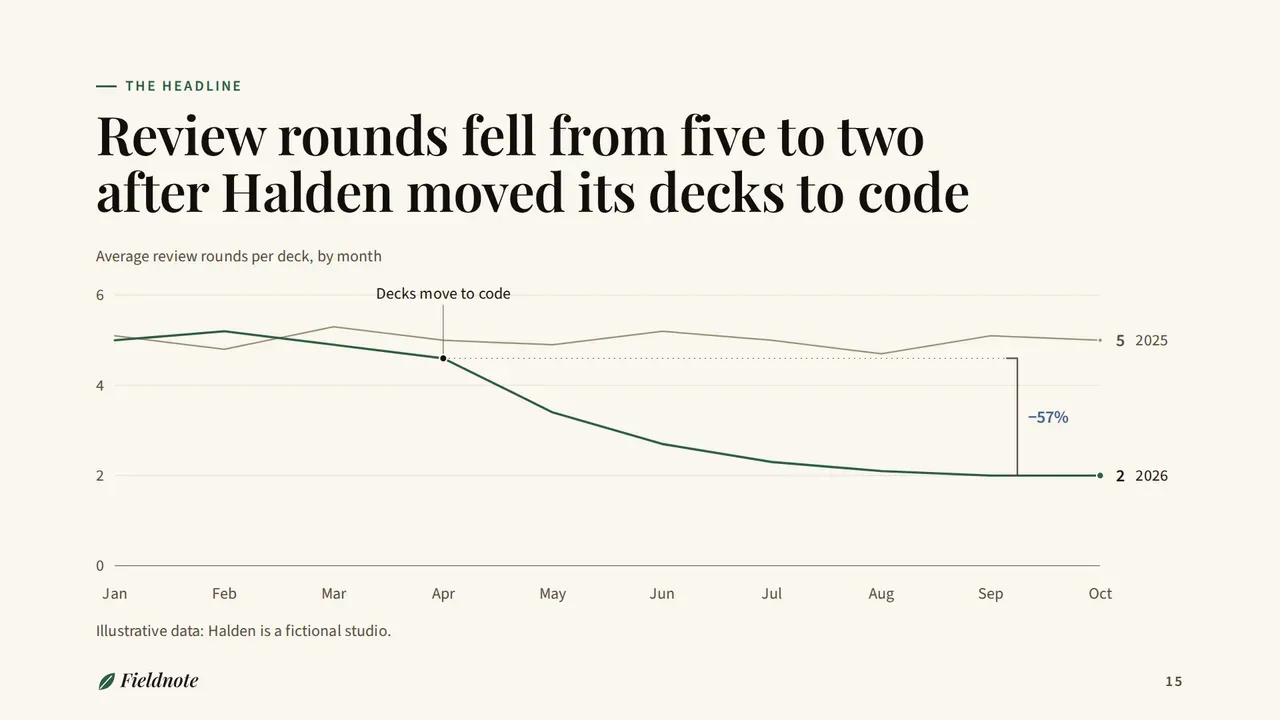
The create-presentation skill writes notes this way and sizes them at about 130 to 150 spoken words per minute of budget. A slide with cues, sources and a transition:
---
layout: chart
title: Review rounds fell from five to two after Halden moved its decks to code
eyebrow: The headline
budget: 1m30s
---

<LineChart
  data={[
    { month: 'Jan', '2025': 5.1, '2026': 5.0 },
    { month: 'Feb', '2025': 4.8, '2026': 5.2 },
    { month: 'Mar', '2025': 5.3, '2026': 4.9 },
    { month: 'Apr', '2025': 5.0, '2026': 4.6 },
    { month: 'May', '2025': 4.9, '2026': 3.4 },
    { month: 'Jun', '2025': 5.2, '2026': 2.7 },
    { month: 'Jul', '2025': 5.0, '2026': 2.3 },
    { month: 'Aug', '2025': 4.7, '2026': 2.1 },
    { month: 'Sep', '2025': 5.1, '2026': 2.0 },
    { month: 'Oct', '2025': 5.0, '2026': 2.0 },
  ]}
  x="month"
  y={['2025', { field: '2026', at: 1 }]}
  highlight="2026"
  zero
  annotations={[
    { type: 'callout', x: 'Apr', label: 'Decks move to code', at: 2 },
    { type: 'bracket', from: 'Apr', to: 'Sep', better: 'down', at: 3 },
  ]}
  caption="Average review rounds per deck, by month"
/>

<Footnote>Illustrative data: Halden is a fictional studio.</Footnote>

<Notes>
This is the slide whose source you read five minutes ago.

The grey line is last year: five rounds of review per deck, month after month. [click] This year starts the same. [click] In April the decks move to code. [click] By autumn a deck needs two rounds, a drop of more than half.

The reviews that disappeared were the ones about margins, fonts and overflow.

If asked: illustrative numbers for a fictional studio.

Transition: fewer rounds means fewer hours.
</Notes>
Slide 15 of the showcase deckView on GitHub
Give a slide a time budget
budget: in the frontmatter is how long you plan to speak on the slide, in minutes and seconds: 30s, 2m, 1m30s. Anything else fails the build:
$ deck lint launch-review
decks/launch-review/slides/plan.mdx
  error   schema (plan): budget: Expected a duration such as "90s", "2m" or "1m30s", got "30 seconds".
          Fix: Write the speaking time as minutes and seconds, for example `budget: 90s` or `1m30s`.

launch-review: 1 error, 0 warnings.
The talk’s length is duration in deck.config.ts (deck new <deck> --duration 20m writes it):
export default defineDeck({
  title: 'Launch review',
  brand: 'default',
  duration: '20m',
  slides: ['opening', 'plan'],
});
What uses the budgets
The presenter window paces the talk against them, scaled to fit the duration when there is one, and leaves out hidden slides (new in 0.5.0). It needs at least one budget: a deck with a duration and no budgets shows No budgets, because the duration alone is not spread over the slides. How pacing works explains the figures it shows.
deck lint adds the budgets up. When they come to more than the deck’s duration, time-budget is an error; without a duration the rule reports nothing. A hidden slide is not in the talk, so its budget is left out of the total (new in 0.5.0). A slide without notes is a missing-notes warning:
$ deck lint launch-review
decks/launch-review/slides/plan.mdx
  warning missing-notes (plan): The slide has no speaker notes.
          Fix: Add a `<Notes>` block saying what the slide proves and what to say, in a sentence or two.

decks/launch-review/deck.config.ts
  error   time-budget: The slides' budgets add up to 1:15; the talk has 1:00.
          Fix: Cut slides, shorten their budgets, or move detail into an appendix.

launch-review: 1 error, 1 warning in 2 slides (2 steps checked).
More on reading findings is on lint.
Where notes show
- In the presenter window, beside the current and next slide.
- In the PDF, as a notes page (the slide with its notes) after the slides, with
deck export <deck> --notes. See PDF. - In the PowerPoint export, as each slide’s speaker notes.