deck diff shows which slides of a deck changed and how: it renders the deck now and at a base, matches the slides by id and compares them pixel by pixel. After this page you can check what an edit (yours or an agent’s) did to every slide, with or without git, and put the result on a pull request.
Compare with the last commit
In a git repository, deck diff compares the working tree with HEAD:
-
Edit the deck. Here the
revenueslide got a new title and moved up one place indeck.config.ts. -
Run the diff:
$ deck diff launch-review
launch-review (default) against HEAD: 1 changed, 2 unchanged
  changed  revenue  (slide 3 -> 2)  3.6%
Report: /Users/you/talks/.deck/diff/launch-review/index.html
Summary for a pull request: /Users/you/talks/.deck/diff/launch-review/summary.md
Each slide that is not unchanged gets a line: its status, its id, its position before and after, and the share of its pixels that changed. The command prints absolute paths; they are shortened to
/Users/you/talkson this page. -
Open
index.htmlto see the before, after and difference pictures.
--base <ref> compares with any branch, tag or commit instead: deck diff launch-review --base main. A ref git does not know is an error:
$ deck diff launch-review --base nope
Git does not know "nope" in this workspace.
Pass a branch, tag or commit, or a folder of baseline pictures with `--base <dir>`. In CI, fetch the base branch first (`git fetch origin <branch>` or `fetch-depth: 0`).
The ref is extracted with git archive into a temporary folder that is deleted afterwards; your working tree and repository are not touched. In an npm workspace the ref brings your decks/ and brands/ files, while the deckster packages are not in git, so both sides render with the CLI you have installed now and nothing is installed. The diff shows what your files changed, not what a CLI upgrade changed. (The help’s line about a ref “rendered with its own packages” is about the deckster repository, which keeps its packages in git.)
Compare without git
Save a baseline before you edit, then diff against it:
$ deck diff launch-review --save-baseline
Saved 3 pictures of "launch-review" to /Users/you/talks/.deck/baseline/launch-review
Edit, then run deck diff launch-review. Outside a git repository the default base is that baseline folder:
$ deck diff launch-review
launch-review (default) against /Users/you/talks/.deck/baseline/launch-review: 1 changed, 2 unchanged
  changed  risks  (slide 2)  4.5%
Report: /Users/you/talks/.deck/diff/launch-review/index.html
Summary for a pull request: /Users/you/talks/.deck/diff/launch-review/summary.md
Inside a git repository the default is HEAD, so pass the folder: --base .deck/baseline/launch-review. Any folder of pictures made by deck shot works as a base, because the file names (03-risks.png) carry the position and id. --save-baseline <dir> writes somewhere else, and saving again replaces the earlier pictures.
The deck must render cleanly on both sides. If a slide throws, deck diff stops and says so instead of comparing a picture of an error; run deck lint to find it.
What the statuses mean
Slides are matched by id, not by position, so inserting a slide reports one added slide instead of a change in every slide after it.
| Status | Meaning |
|---|---|
unchanged |
Same pictures. |
changed |
Pixels differ by more than the threshold. A changed slide that also moved shows both positions. |
added |
The id is new. |
removed |
The id is gone. |
moved |
Same pictures, another place in the order. |
Only the slides that left their order are moved: reordering one slide reports that slide, not every slide it passed. With nothing else changed, the reorder above prints moved revenue (slide 3 -> 2).
Hidden slides
New in 0.5.0. deck diff shoots every slide, hidden ones included, so an edit to a backup slide is reported like any other (see hidden slides). Hiding or showing a slide is reported too, because the pictures change: the page numbers and totals of the shown slides move, and a hidden slide has no page number of its own. With the default brand, a baseline saved while pricing-backup was shown and a diff after adding hidden: true to it:
$ deck diff launch-review
launch-review (default) against /Users/you/talks/.deck/baseline/launch-review: 3 changed, 1 unchanged
  changed  revenue  (slide 2)  <0.01%
  changed  risks  (slide 3)  <0.01%
  changed  pricing-backup  (slide 4)  0.02%
Report: /Users/you/talks/.deck/diff/launch-review/index.html
Summary for a pull request: /Users/you/talks/.deck/diff/launch-review/summary.md
The title slide stays unchanged because the default brand draws no page number on the first slide (chrome.skipFirst).
Options
| Option | What it does |
|---|---|
--steps |
Compares every step, not only each slide’s finished state. A baseline folder must then hold step pictures (deck shot <deck> --steps, or --save-baseline with --steps). |
--threshold <n> |
The share of visibly changed pixels, from 0 to 1, above which a picture counts as changed. Default 0. |
--brand <name> |
Renders both sides with brands/<name>. The default folders get an @<name> suffix. |
--out <dir> |
The report folder. Default .deck/diff/<deck>. |
--fail-on-change |
Exits with 1 when any slide changed, was added, removed or moved. Without it the exit code is 0 unless the command fails. |
--json |
Prints the report as JSON with absolute picture paths. |
Read the report
The report folder, .deck/diff/<deck>/, holds:
index.html: open it in a browser.summary.md: a Markdown table for a pull request comment, with relative picture links.report.json: the--jsonreport, with paths relative to the folder.before/,after/andcompare/: pictures of the slides that differ, and nothing else.
This is what an index.html looks like for the hello deck with one changed slide and one moved slide (a staged example for this page, not a real edit):
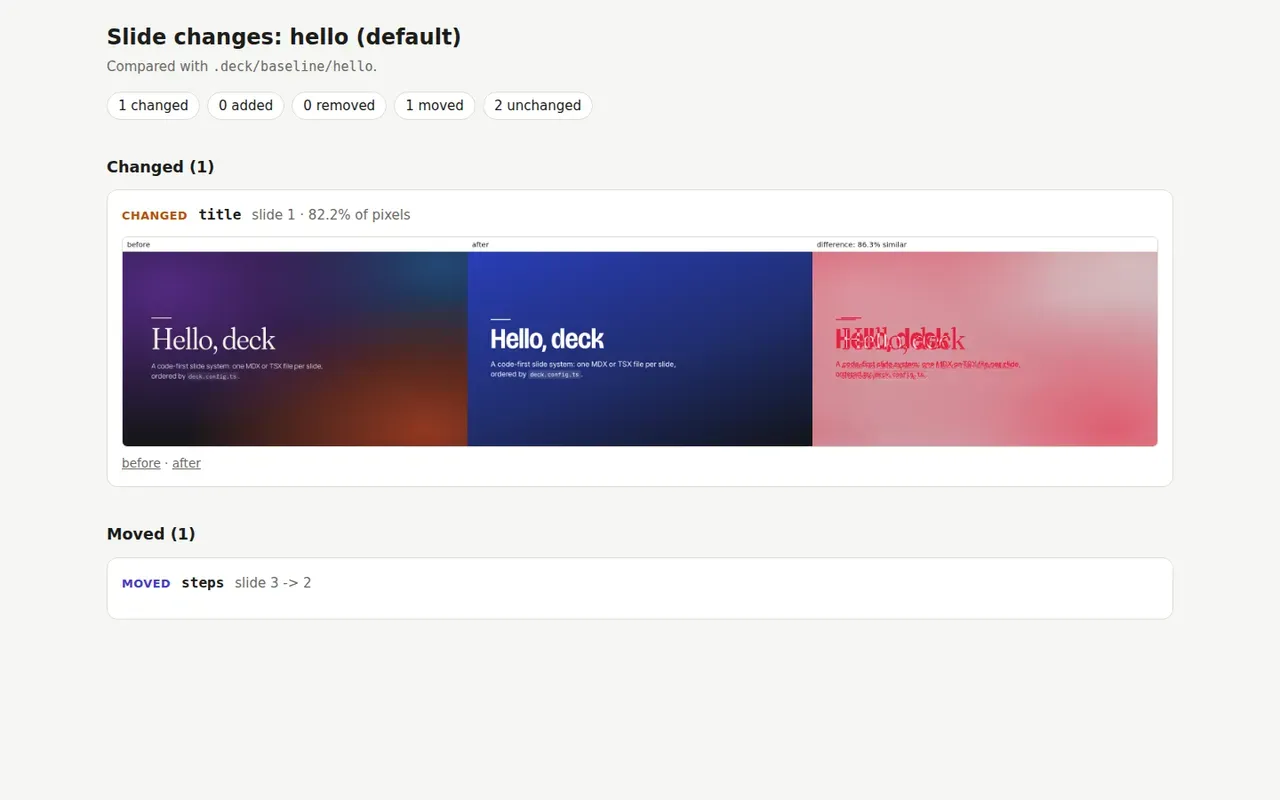
The summary.md of the first run on this page:
### Slide changes in launch-review (default)
Compared with `HEAD`: 1 changed, 2 unchanged.
| Slide | Status | Position | Pixels changed | Picture |
| --- | --- | --- | --- | --- |
| `revenue` | changed, moved | 3 -> 2 | 3.6% |  |Use it on pull requests
deck diff is built to run in CI against the pull request’s base branch. The deckster repository’s own workflow, .github/workflows/slides-diff.yml, is the pattern:
- Check out with full history (
fetch-depth: 0), so the base branch can be archived. - Work out which decks the pull request touches: every deck when a brand or a package changed, otherwise the decks whose own folder changed.
- Install the dependencies and Chromium.
- Run
deck diff <deck> --base origin/<base branch>for each of them. - Upload
.deck/diffas an artifact, so reviewers can open each deck’sindex.html. - Post the
summary.mdtables as one comment on the pull request, updated on every push. A comment cannot show the pictures without an image host, so the workflow turns the picture links into paths inside the artifact.
That workflow uses the repository’s pnpm set-up, so it is not ready to copy into an npm workspace. In an npm workspace, the job’s commands for steps 3 and 4 are these, with main as the base branch:
npm install --global @deckster/cli@0.8.0
npx playwright@1.65.0 install chromium
git fetch origin main
deck diff launch-review --base origin/main
The repository’s workflow needs only a read-only token plus pull-requests: write for the comment. Add --fail-on-change if a pull request that changes slides should need a second look before merging.