The quadrants layout sets four named lists in a ruled two-by-two grid. Use it for a SWOT, for keep, stop, start and try, or for any four categories that each need a short list of their own.
Example
---
layout: quadrants
title: Density is our strength and our constraint
eyebrow: Open Network · SWOT
budget: 45s
quadrants:
  - title: Strengths
    icon: bike
    items:
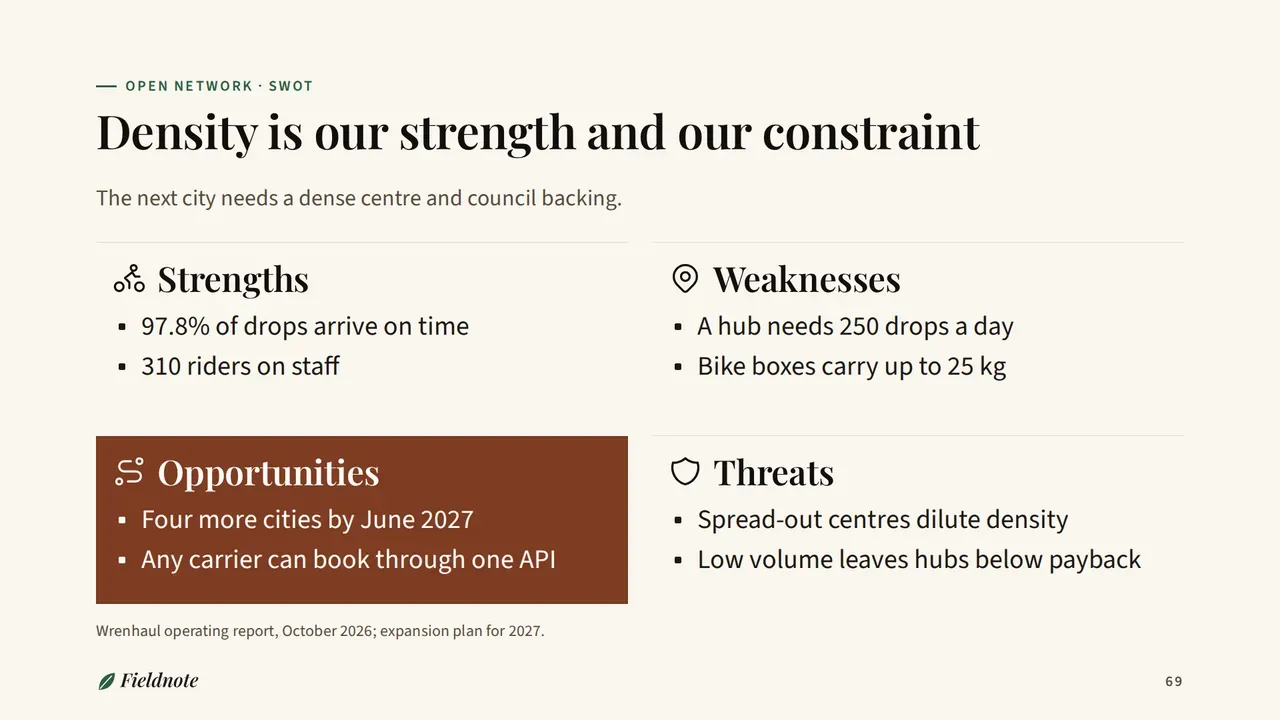
      - 97.8% of drops arrive on time
      - 310 riders on staff
  - title: Weaknesses
    icon: map-pin
    items:
      - A hub needs 250 drops a day
      - Bike boxes carry up to 25 kg
  - title: Opportunities
    highlight: true
    icon: route
    items:
      - Four more cities by June 2027
      - Any carrier can book through one API
  - title: Threats
    icon: shield
    items:
      - Spread-out centres dilute density
      - Low volume leaves hubs below payback
---

The next city needs a dense centre and council backing.

<Footnote>Wrenhaul operating report, October 2026; expansion plan for 2027.</Footnote>

<Notes>
`quadrants` as a SWOT, with icons, `quadrants[].highlight: true` on the default surface and two bullets per box, all shown at once; use it when four categories each need their own short list.
Our reliability comes from staff riders and dense loops. Those same loops explain why we cannot open everywhere. We choose cities where demand can support a hub, and use Open Network to bring more drops into those loops.
</Notes>
Slide 69 of the lookbook deckView on GitHub
The boxes are in quadrants: in reading order: top left, top right, bottom left, bottom right. Each has a title, bullets in items and an icon from the brand’s set. highlight: true on Opportunities gives that box its own surface, and the body is the sentence that frames the four lists. Headings and bullets name each category, so nothing depends on colour.
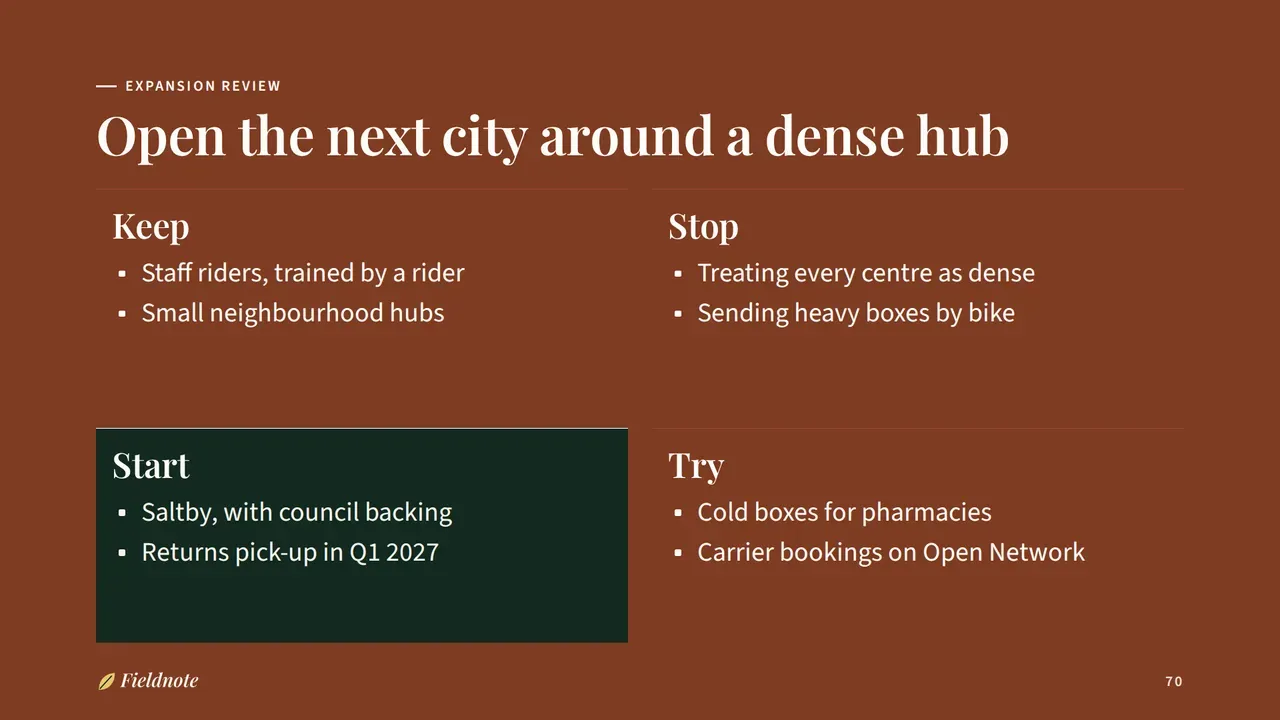
Keep, stop, start and try on surface: accent, without icons. The highlighted box is lit on the inverse surface, because the slide is already on the accent. reveal: true brings in one box per step, in reading order; the still shows the last step.
When to use it
- Four categories, each with its own list. Use
matrixwhen items are positions on two axes,columnsfor a board of two to four lanes,cardsfor equal options with one sentence each, andcomparisonwhen options are measured on the same rows. - Exactly four boxes. Each has a
titleof up to 24 characters and one to four bullets of up to 40. - Short context and footnote. The body takes up to 10 words and the footnote up to 10, fewer than the 14 and 16 of the
pricinglayout, so both rows keep their height. - Highlight at most one box. A screen reader hears it as “Highlighted: Start”. Without it, the four boxes have equal weight.
- Icons on all four boxes or on none. The icon is decoration from the brand’s set; icons lists the names every published brand has.
- Name the boxes one at a time with
reveal: trueand a[click]cue in the notes for each. See builds.
Custom labels
New in v0.6.1. Screen readers use highlight to identify the emphasised quadrant. Set these fields in the slide frontmatter. Omitted labels keep their English defaults.
labels:
  highlight: Priorität
Reference
- Frontmatter
layout: quadrants- Surface
- the deck's default
- Title
- required, 50 characters at most
- PowerPoint
- title-only slide
Four named lists in a full-height, ruled two-by-two grid, from quadrants: in reading order: top left, top right, bottom left, bottom right. Each box has a title, one to four short items as bullets and an optional icon from the brand set. Set highlight: true on at most one quadrant to give it a nested surface and an accessible highlight label; the headings and bullets identify each category without colour. reveal: true brings in one whole box per click. Use it for SWOT, keep/stop/start/try, or any four categories that each need their own list. Use matrix when items are positions on two axes, columns for a board of two to four lanes, cards for equal options with one sentence each, and comparison when options are measured on the same rows. labels.highlight renames the prefix screen readers hear before the highlighted heading, for example labels: { highlight: Priorität }.
Slots
| Slot | Takes | Budget | What goes in it |
|---|---|---|---|
body | text | 10 words | One sentence under the title framing the four lists. Put the lists in quadrants:. |
<Footnote> | text | 10 words | A source or caveat on the bottom line. |
Frontmatter fields
| Field | Values | How to use it |
|---|---|---|
eyebrow | text | Write a few words of at most 40 characters, for example eyebrow: Budget committee, or leave it out. |
quadrantsrequired | text | List exactly 4 boxes in reading order, each with title (up to 24 characters), items (1 to 4 bullets, each up to 40 characters), and optionally icon (a name from the brand set, such as leaf, or tabler:leaf). Give an icon to all four boxes or to none. Set highlight: true on at most one box to emphasize it, or omit it for equal weight. |
labels | default {"highlight":"Highlighted"} | An optional replacement for highlight (Highlighted), the screen-reader prefix of the highlighted box's heading, 1 to 24 characters; it is never drawn. An omitted key keeps its English default. For example, labels: { highlight: Priorität }. |
reveal | true false (default) | Write reveal: true to show the items one per step, in order, or leave it out to show them all at once. |
chrome | true (default) false | Write chrome: false to hide the page number, logo and progress bar on this slide, or chrome: true to show them. |
Example
---
layout: quadrants
title: Keep the care that makes new trees survive
eyebrow: Season review
labels:
  highlight: Highlighted
quadrants:
  - title: Keep
    items:
      - Three summers of watering
      - A named street warden
  - title: Stop
    items:
      - Planting without a care budget
  - title: Start
    items:
      - Weekly checks in dry spells
    highlight: true
  - title: Try
    items:
      - Shared hose carts on each block
---

The next planting season starts with a funded care plan.

<Footnote>Programme team review of the 2026 season.</Footnote>

<Notes>
Read keep and stop first, then the two actions for the next season.
</Notes>
Common mistakes
-
Bullets in the body. The lists belong in
quadrants:, and the body takes text only.deck lintreports a list there with theslot-contentrule:$ deck lint launch-review decks/launch-review/slides/plans.mdx error slot-content (plans): The body slot holds a list of 2 items; the quadrants layout sets it as text. Fix: Write it as a sentence, or move the points to a layout made for a list (content or split; `deck layouts`). launch-review: 1 error, 0 warnings in 1 slide (1 step checked). -
Three boxes. “quadrants: Expected exactly 4 quadrants, got a list of 3 items.” Use
columnsfor a board of two to four lanes. -
Highlighting two boxes. “quadrants: 2 quadrants are highlighted; a board highlights at most one.”
-
A context line of 12 words.
content-budgetreports “The body slot holds 12 words; its layout allows 10.” -
An icon the brand’s set lacks. It is a
schemaerror: “quadrants[0].icon: watering-canis not an icon of the lucide set.”
Related layouts
matrix: items placed by two axes instead of sorted into categories.columns: a board of two to four lanes.cards: equal options with a title and one sentence each.comparison: options measured on the same rows.