The showcase is “Slides an agent can write”, a 45-slide talk about deckster built with deckster. Use this page to find the slide that shows a technique, open it in the built deck, and read or copy its source.

Open the full showcase deck in Fieldnote. It uses 23 of the 63 layouts; ten of the nineteen chart and number components; flow, sequence, layers, cycle and tree diagrams and an imported SVG; code, video, a Lottie animation and two live React demos. Its deck.config.ts sets duration: '45m', and every slide has speaker notes and a time budget.
The content is illustrative. Halden, its people, its clients and every Halden number are fictional, and each chart of Halden data says so in a footnote. The portraits and logos are drawn stand-ins. Numbers about deckster itself (layouts, charts, rules, terminal output) were read from the repository.
A chart with its source
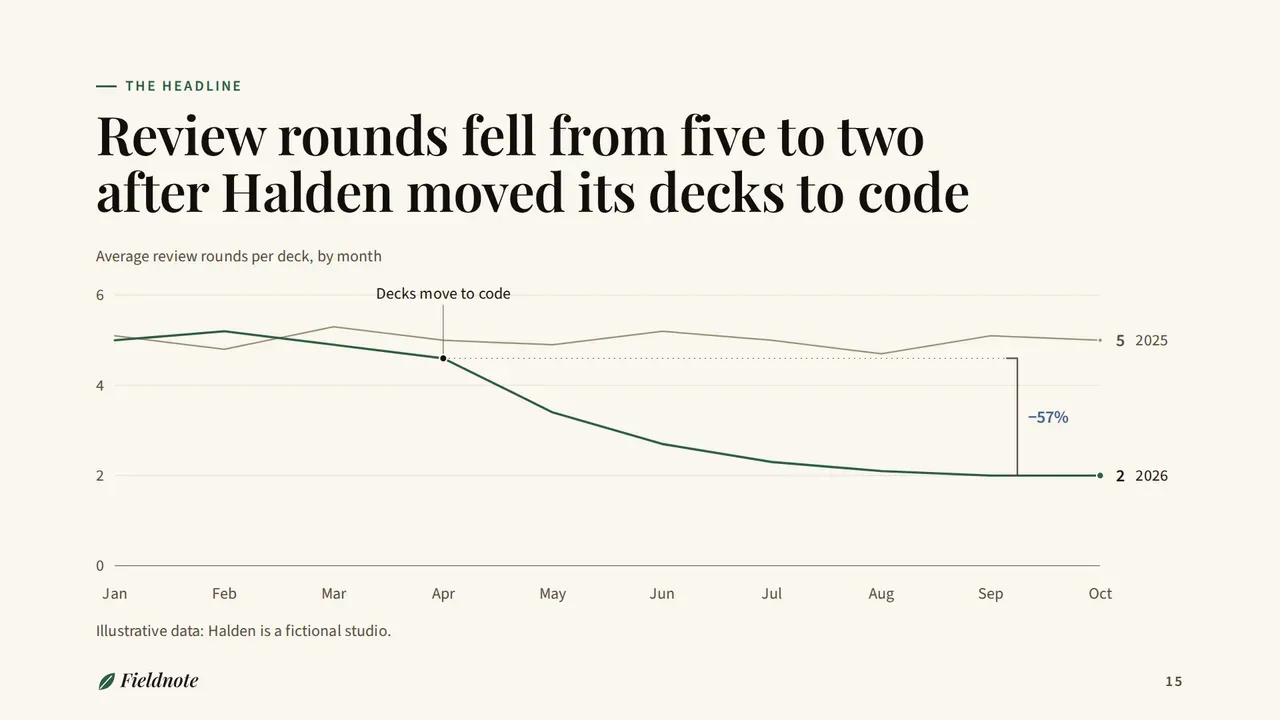
review-rounds is a <LineChart> with a highlight and annotations that arrive by step. The source tab shows the frontmatter, the chart props and the notes:
---
layout: chart
title: Review rounds fell from five to two after Halden moved its decks to code
eyebrow: The headline
budget: 1m30s
---

<LineChart
  data={[
    { month: 'Jan', '2025': 5.1, '2026': 5.0 },
    { month: 'Feb', '2025': 4.8, '2026': 5.2 },
    { month: 'Mar', '2025': 5.3, '2026': 4.9 },
    { month: 'Apr', '2025': 5.0, '2026': 4.6 },
    { month: 'May', '2025': 4.9, '2026': 3.4 },
    { month: 'Jun', '2025': 5.2, '2026': 2.7 },
    { month: 'Jul', '2025': 5.0, '2026': 2.3 },
    { month: 'Aug', '2025': 4.7, '2026': 2.1 },
    { month: 'Sep', '2025': 5.1, '2026': 2.0 },
    { month: 'Oct', '2025': 5.0, '2026': 2.0 },
  ]}
  x="month"
  y={['2025', { field: '2026', at: 1 }]}
  highlight="2026"
  zero
  annotations={[
    { type: 'callout', x: 'Apr', label: 'Decks move to code', at: 2 },
    { type: 'bracket', from: 'Apr', to: 'Sep', better: 'down', at: 3 },
  ]}
  caption="Average review rounds per deck, by month"
/>

<Footnote>Illustrative data: Halden is a fictional studio.</Footnote>

<Notes>
This is the slide whose source you read five minutes ago.

The grey line is last year: five rounds of review per deck, month after month. [click] This year starts the same. [click] In April the decks move to code. [click] By autumn a deck needs two rounds, a drop of more than half.

The reviews that disappeared were the ones about margins, fonts and overflow.

If asked: illustrative numbers for a fictional studio.

Transition: fewer rounds means fewer hours.
</Notes>
Slide 15 of the showcase deckView on GitHub
Which slide shows what
The talk opens with five slides, then four parts, each opened by a section slide. Each id links to the slide in the built deck.
| Slide | Layout | Demonstrates |
|---|---|---|
cover |
title |
The cover on the gradient surface |
speaker |
bio |
Portrait, role and contacts |
the-claim |
statement |
One sentence on the inverse surface |
three-ways |
comparison |
Options with a recommended one and true/false rows |
agenda |
agenda |
Parts with times |
A slide is a file (part-file):
| Slide | Layout | Demonstrates |
|---|---|---|
slide-source |
code |
A fenced block with a title and stepped highlights |
canvas |
diagram |
<Svg>: an imported SVG recoloured to brand roles and revealed by element id |
layout-contract |
cards |
Cards with icons, one per step (reveal: true) |
limits |
table |
<Table> with a highlighted row |
bullets-to-cards |
code |
<CodeMove>: an animated change between two code states |
no-styling |
default |
<Step> reveals in plain Markdown |
kit-numbers |
stats |
A row of four numbers |
Evidence makes the point (part-evidence):
| Slide | Layout | Demonstrates |
|---|---|---|
review-rounds |
chart |
<LineChart> with a highlight and annotations by step |
deck-hours |
chart |
<Comparison> and a <Sparkline> |
where-hours-went |
chart |
<Waterfall> |
effort-share |
split |
<Donut> beside text |
render-path |
diagram |
<Flow> with a <Journey> stepping through it |
packages |
diagram |
<Layers> |
motion |
split |
A cued <Video> with one poster per part |
photo |
image |
A photo edge to edge, with text on a scrim |
live-widget |
demo |
<Live>: a React component running in a TSX slide |
The deck checks itself (part-checks):
| Slide | Layout | Demonstrates |
|---|---|---|
rebrand |
code |
A diff fence |
client-brands |
logos |
A logo wall |
lint-path |
diagram |
<Flow> with <Packet>s and <State> changes |
lint-session |
code |
<Terminal> with <Cmd> and <Out>, and a <Lottie> animation |
first-draft |
chart |
<BarChart>, sorted, with two bars highlighted |
title-length |
chart |
<Scatter> with a trend |
author-loop |
diagram |
<Cycle> |
People and agents share it (part-people):
| Slide | Layout | Demonstrates |
|---|---|---|
roles |
team |
Four portraits |
comment-anchor |
diagram |
<Tree>, revealed |
agent-turn |
diagram |
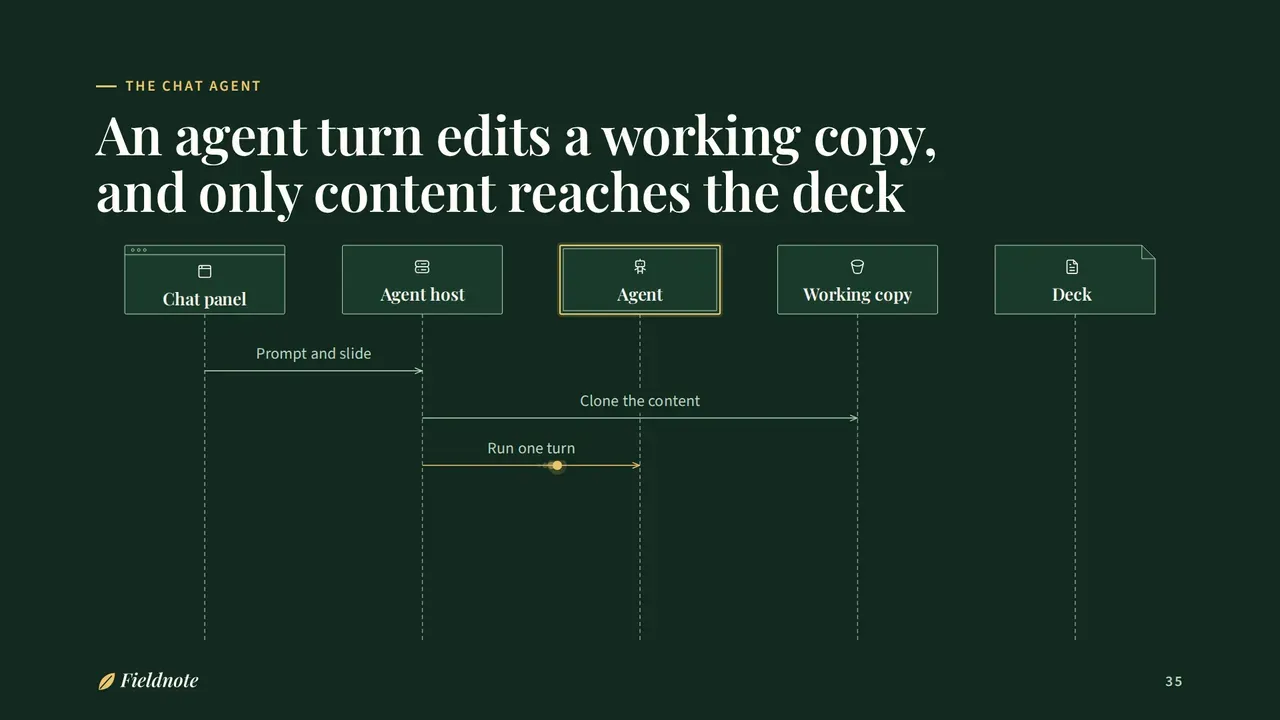
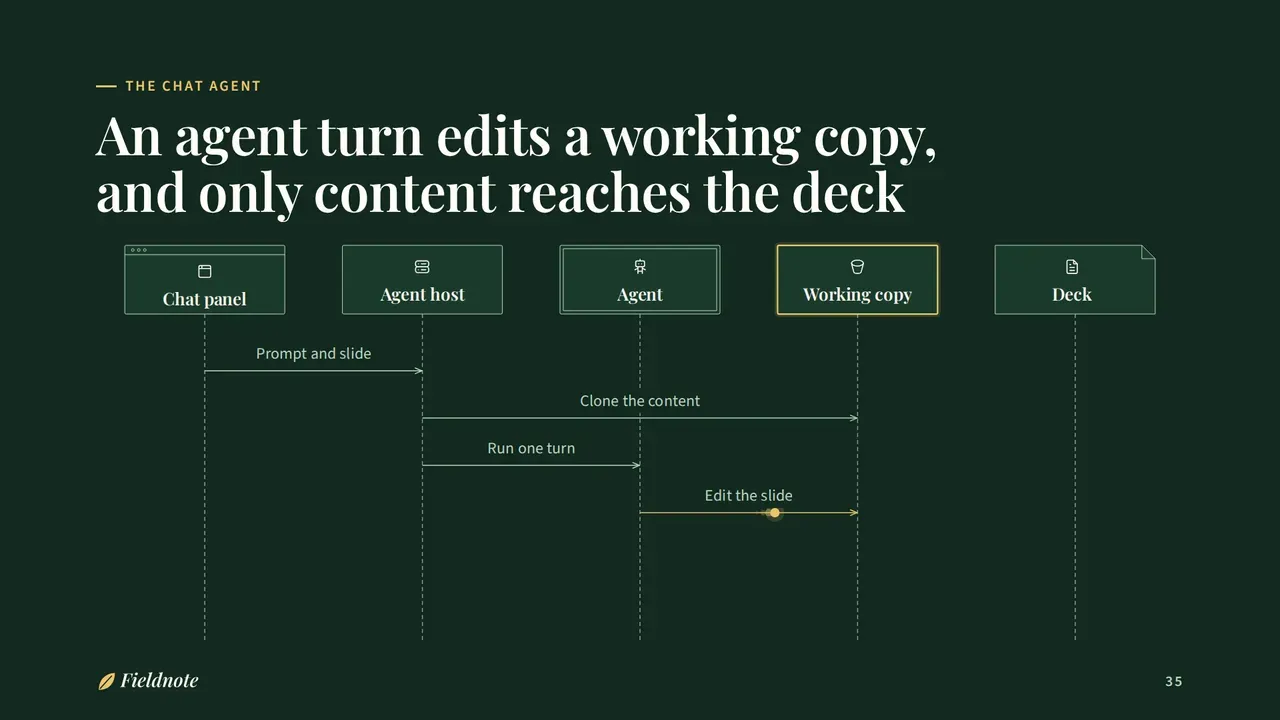
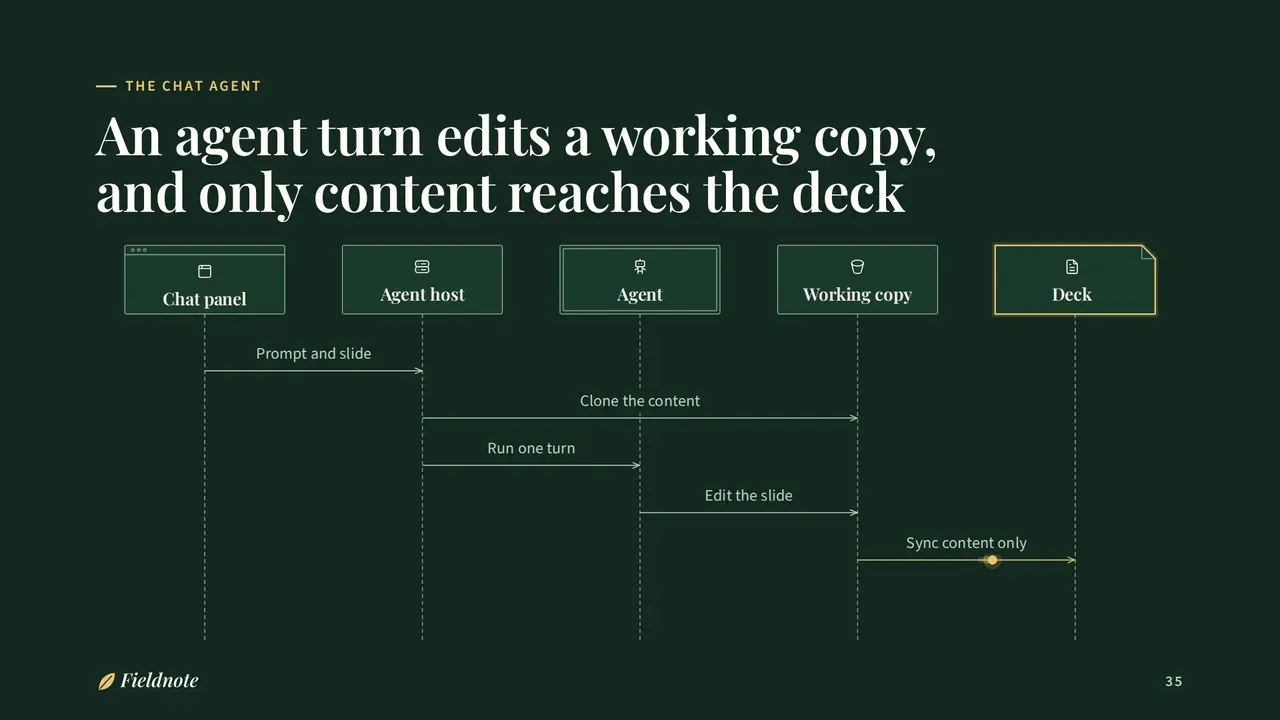
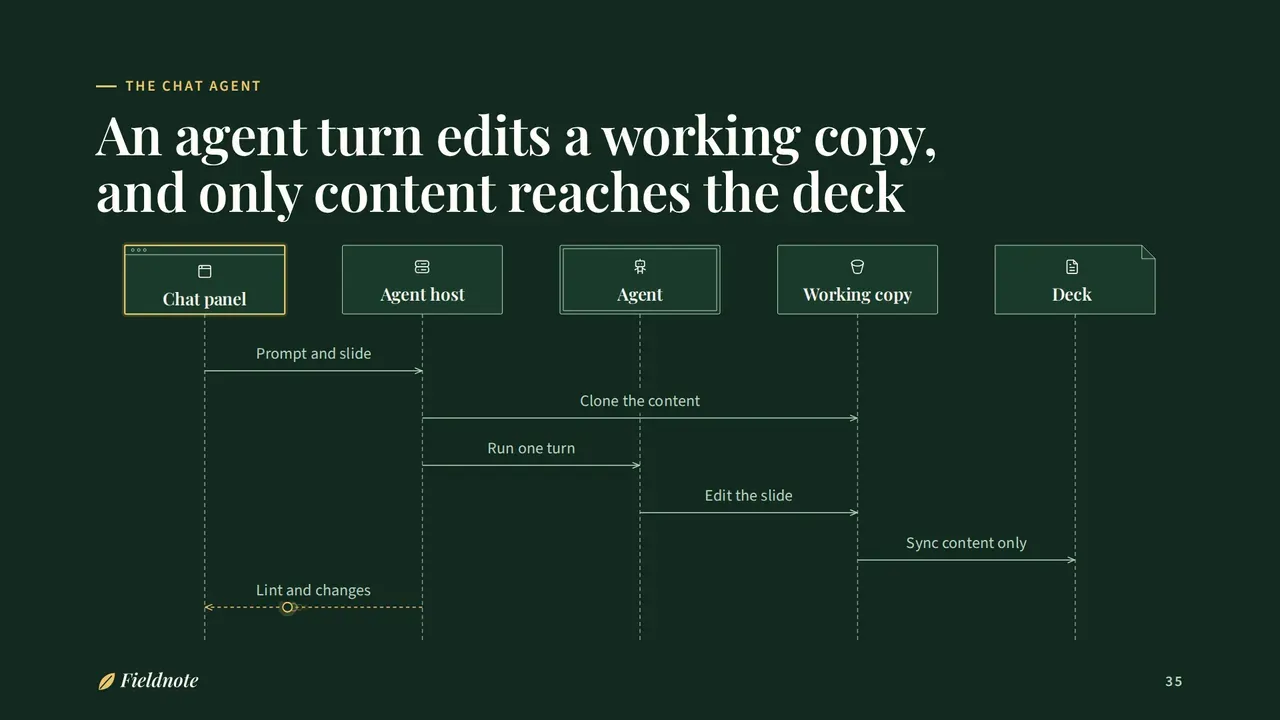
<SequenceDiagram> with <Actor>s and <Message>s |
chat-demo |
demo |
<AppFrame app="agent-chat"> driven by the slide’s steps: a scripted replay, no model |
designer-quote |
quote |
A quote with a portrait |
presenter |
content |
Text with an <Aside> |
export-path |
diagram |
A <Flow> written in TSX with automatic layout |
export-share |
chart |
<Pictogram> |
week |
timeline |
Five milestones |
start |
steps |
Four steps, revealed |
links |
split |
<Button>, <LinkCard> and <Download> |
recap |
chart |
<Progress> bars |
closing |
closing |
QR code and contacts |
A diagram that builds
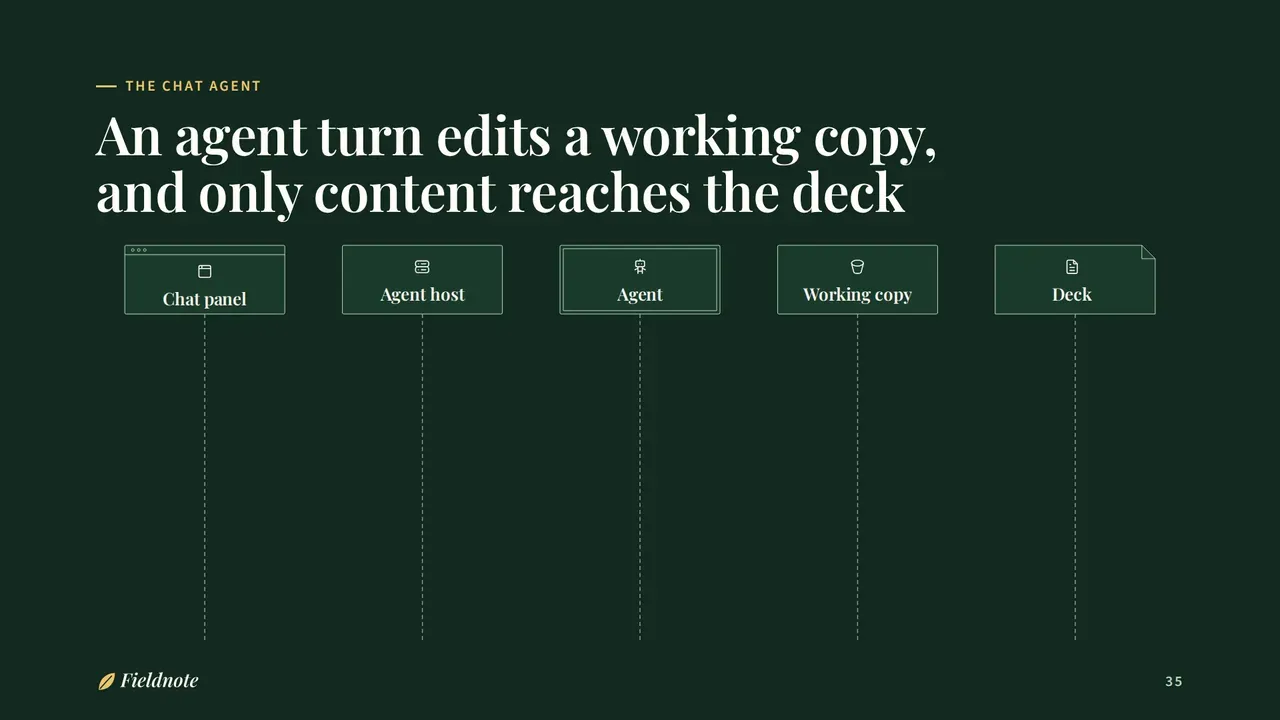
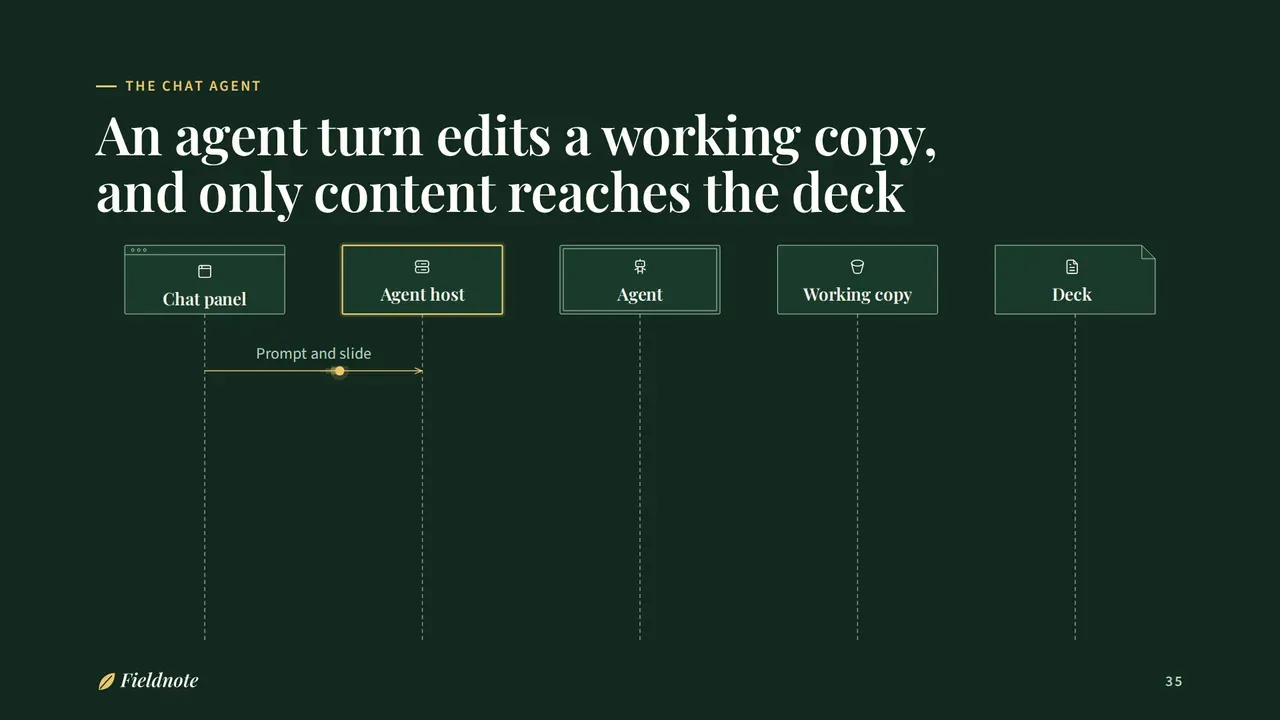
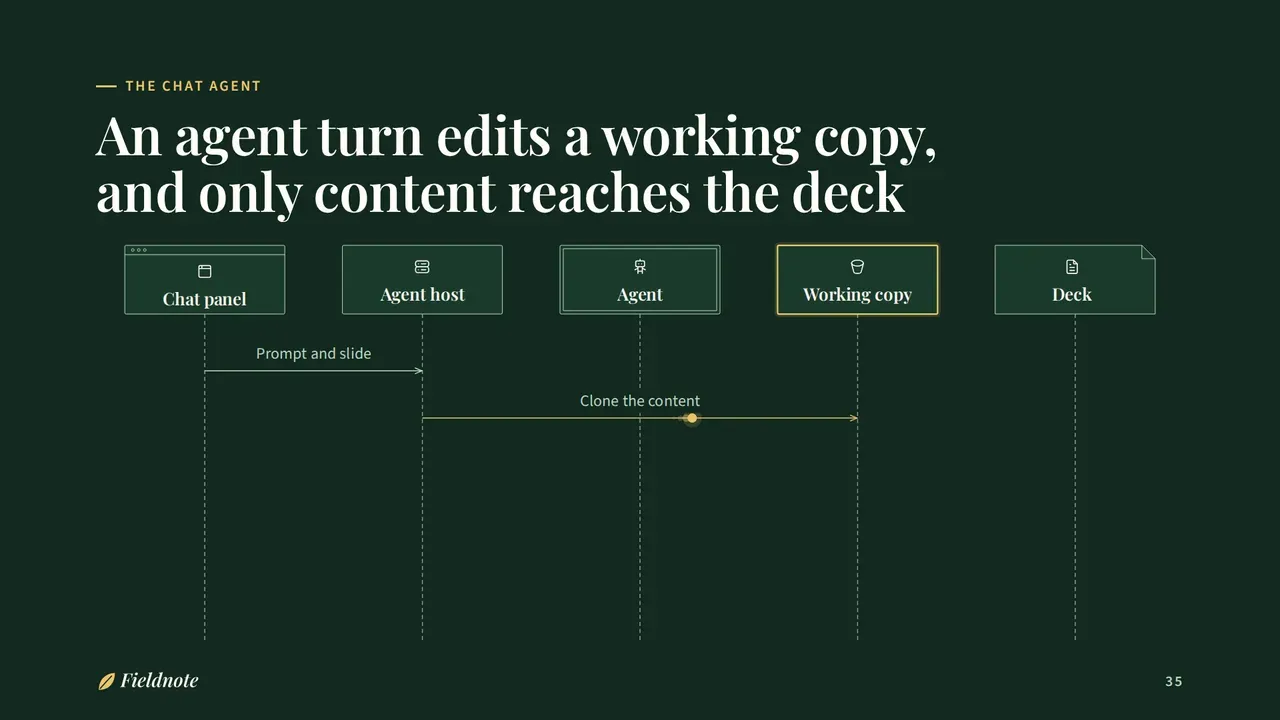
agent-turn adds one message of the sequence per step, from the prompt in the chat panel on step 1 to the lint report on step 6:
 0start
 1
 2
 3
 4
 5
 6finished
Run it or copy from it
The deck is a folder in the repository, decks/showcase/. Besides slides/ (42 MDX files and 3 TSX files) it has lib/ with the React code the TSX slides import, apps/agent-chat/ with the mini app chat-demo shows, and assets/ with the pictures, video and animation (sources and licences in assets/CREDITS.txt). BRIEF.md and OUTLINE.md are the brief and outline it was written from.
To run it with the npm CLI, copy the folder into your workspace and delete the two files that tie it to the monorepo:
git clone --depth 1 --branch v0.7.0 https://github.com/sandrinodm/deckster.git ../deckster
cp -R ../deckster/decks/showcase decks/
rm decks/showcase/package.json decks/showcase/tsconfig.json
Then it lints clean, as in the repository:
$ deck lint showcase
showcase: no problems in 45 slides (105 steps checked).
deck dev showcase serves it, mini app included. The PDF button on the links slide is a <Download file="showcase.pdf">, which links to a file only deck build showcase --with-exports writes into decks/showcase/dist/.
To copy one slide, take its file from slides/ and the files it imports from assets/ or lib/, add its id to your deck.config.ts, and run deck lint.
For the smallest deck, see Hello. For every layout and option in one talk, see the Lookbook. The showcase slides rendered in every published brand are on One deck in every brand.