deck lint opens your deck in Chromium, measures every step of every slide and tells you what is wrong, where, and how to fix it. After this page you can run it, read its findings, fix the common ones and use its exit code or JSON in a script or CI. Why the deck treats lint as the contract is on Lint as the contract.
Run it
-
Lint a deck by its folder name under
decks/:$ deck lint launch-review decks/launch-review/slides/risks.mdx error content-budget (risks): The body slot holds 7 bullets; its layout allows 6. Fix: Cut it to the essentials, split the slide, move detail into speaker notes, or pick a layout made for more content (`deck layouts`). decks/launch-review/slides/revenue.mdx warning chart-topic-title (revenue): "Revenue by region" looks like a topic, not a takeaway (a heuristic: it reads as "X by Y"). Fix: State what the chart shows in the title of decks/launch-review/slides/revenue.mdx, with the number when there is one: "Billing tickets doubled in Q3", not "Tickets by queue". Put the measure and period in the chart's `caption`. warning missing-notes (revenue): The slide has no speaker notes. Fix: Add a `<Notes>` block saying what the slide proves and what to say, in a sentence or two. launch-review: 1 error, 2 warnings in 3 slides (3 steps checked).The command exits with 1 because there is an error.
-
Make the change each
Fix:line asks for. Here: cut therisksbullets to six or fewer, write the chart’s takeaway as the title ofrevenue(the measure goes in the chart’scaption), and add<Notes>torevenue. -
Run it again until it is clean:
$ deck lint launch-review
launch-review: no problems in 3 slides (3 steps checked).
--brand <name> lints the deck rendered with brands/<name> instead of the brand in its deck.config.ts, so you can check a deck in a brand before you switch to it. Problems in the brand itself are listed under the brand’s file, marked “for every slide”; Check a brand covers them.
Read a finding
Findings are grouped under the file to edit. Each one is two lines:
- the severity (
errororwarning), the rule id, and in brackets the slide id, plusstep Nwhen only one step has the problem; - the message, then
Fix:with what to change. The fix names the file, the prop or the command, so you or your agent can act on it without opening a browser.
The last line counts everything: <deck>: N errors, N warnings in N slides (N steps checked)., or <deck>: no problems in ... when there is nothing to report. The step count includes every step of every slide: a slide with <Step at={1}> to <Step at={3}> adds four (steps 0 to 3).
Errors fail the run, warnings do not. deck lint exits with 1 when there is at least one error, and with 0 when there are only warnings. Bad arguments, an unknown deck or a browser that will not start also exit with 1.
Lint runs in three passes. First the deck config, the brand and every slide file go through the same checks as deck build; a problem there is a schema finding (a brand finding when it is in the brand), and the rendered checks are skipped because the deck cannot render:
$ deck lint launch-review
decks/launch-review/slides/risks.mdx
  error   schema (risks): "subtitle" is not a frontmatter field.
          Fix: Remove it. Known fields: layout, title, surface, background, budget, transition, hidden, eyebrow, width, chrome.

launch-review: 1 error, 0 warnings.
Then every step of every slide is rendered in static mode and measured. Last come the rules over the whole deck, such as layout-repetition, few-builds and time-budget. A time-budget or few-builds finding names no slide; a layout-repetition finding names the slide that makes the run three long.
Before and after a fix
The slide plan of a deck launch-risks uses the content layout and promises three risks, but lists nine, each long enough to wrap onto two lines:
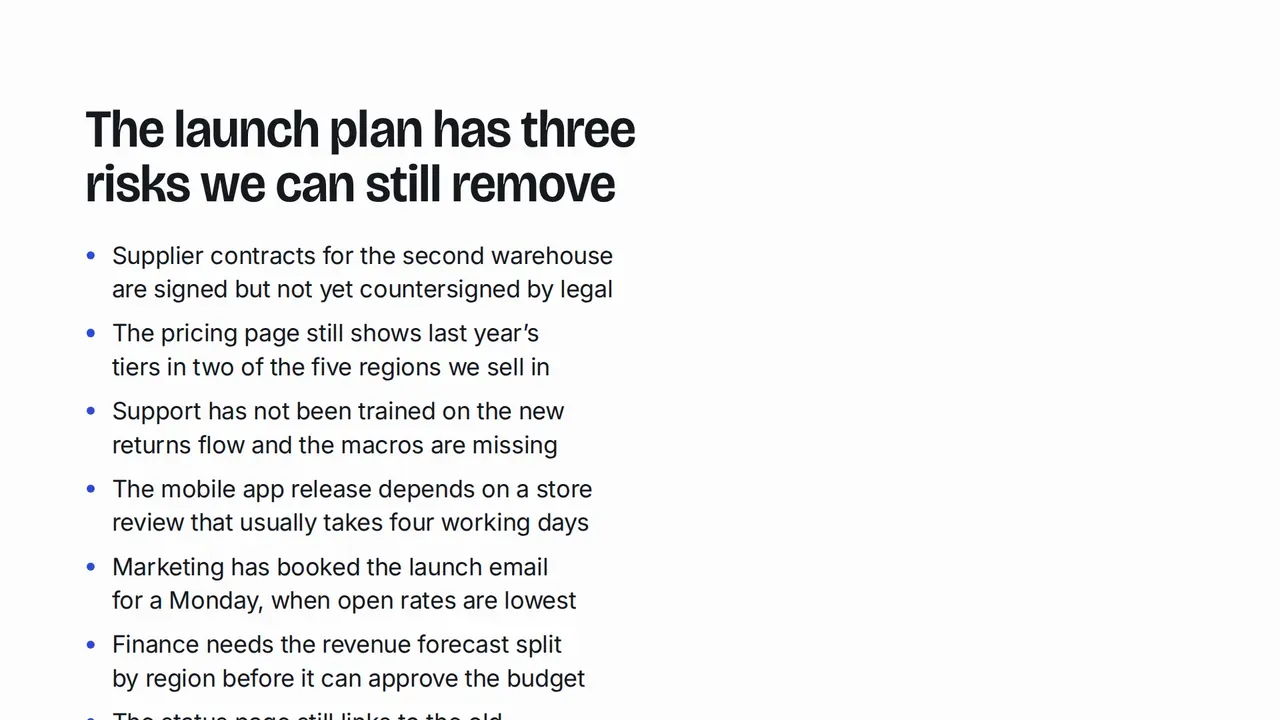
Lint finds the overflow twice, once against the canvas and once against the layout’s text region, and the two budgets of the body slot:
$ deck lint launch-risks
decks/launch-risks/slides/plan.mdx
  error   canvas-overflow (plan step 0): `div.kit-frame > div.kit-safe > div.kit-region > div.kit-content` extends past the canvas: 313px past the bottom edge.
          Fix: Cut the content, split it across two slides or move detail into speaker notes. Do not shrink the type to make it fit. If the element is decoration meant to bleed off the edge, mark it with `aria-hidden="true"` or `data-decorative`.
  error   container-overflow (plan step 0): `div.kit-frame > div.kit-safe > div.kit-region` holds 425px more height than it has (spills out of it); `div.kit-frame > div.kit-safe > div.kit-region > div.kit-content` reaches furthest.
          Fix: Shorten or remove content inside it, split the slide, or give the container room by simplifying the layout around it. Mark decoration that is meant to bleed out with `aria-hidden="true"` or `data-decorative`.
  error   content-budget (plan): The body slot holds 131 words; its layout allows 72.
          Fix: Cut it to the essentials, split the slide, move detail into speaker notes, or pick a layout made for more content (`deck layouts`).
  error   content-budget (plan): The body slot holds 9 bullets; its layout allows 6.
          Fix: Cut it to the essentials, split the slide, move detail into speaker notes, or pick a layout made for more content (`deck layouts`).

launch-risks: 4 errors, 0 warnings in 1 slide (1 step checked).
Cut as the Fix: lines ask, the slide keeps the three risks its title names, each in one short sentence, and the rest of the list moves into the <Notes>:
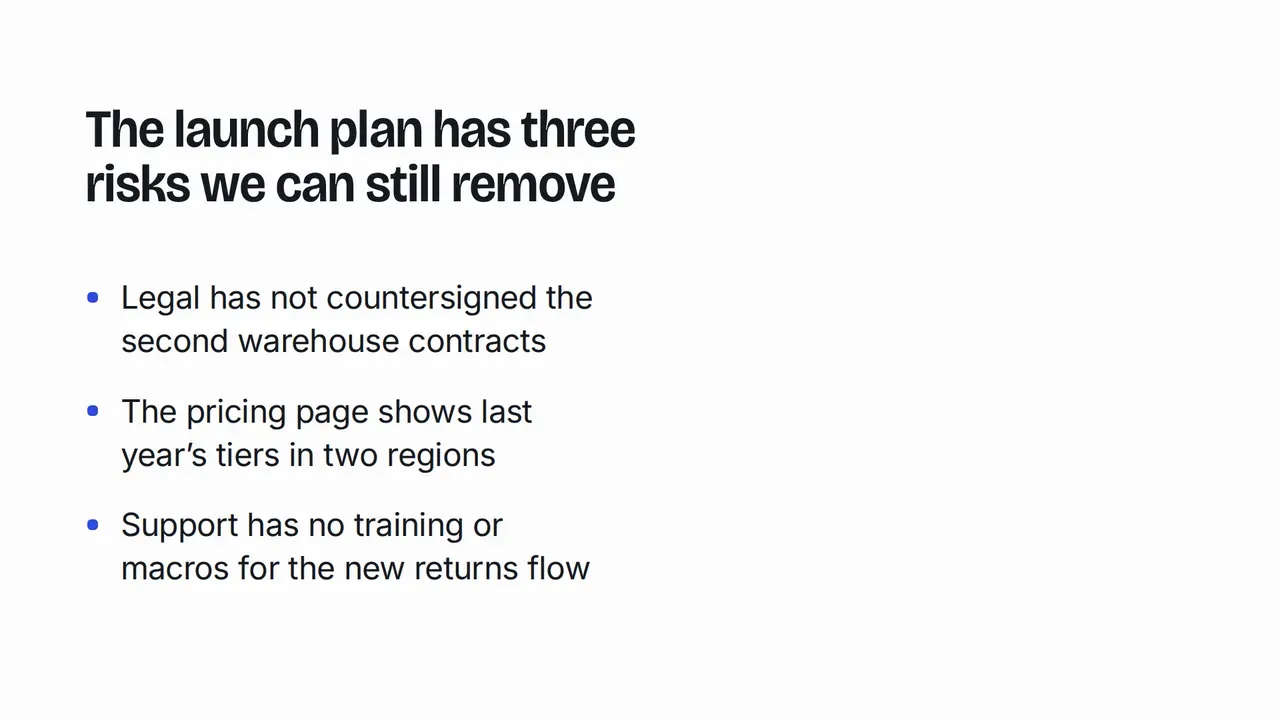
$ deck lint launch-risks
launch-risks: no problems in 1 slide (1 step checked).
Fix the common ones
| Rule | What to do |
|---|---|
content-budget |
A slot holds more words, bullets or code lines than its layout allows. Cut, split the slide, move detail to the notes, or pick a layout made for more (deck layouts). Each layout’s budgets are on Layouts and slots. |
canvas-overflow |
Something runs past the 1920x1080 canvas. Cut or split; the fix says not to shrink the type. |
text-truncated |
Text is cut with an ellipsis or a line clamp. Shorten it or give it room: another ratio, no aside, another layout, fewer chart categories. Text and fitting explains what the layouts do with long text. |
contrast |
Text is below WCAG AA (4.5:1, or 3:1 for large text). The fix names the text roles of the slide’s surface that pass, with their ratios, or the layout options that move text off a photo. |
missing-notes |
Add a <Notes> block: what the slide proves and what to say. See Speaker notes. |
chart-topic-title |
The title reads like a topic (“X by Y”, “X vs Y”). Write the takeaway, with the number: “Billing tickets doubled in Q3”. The check is a heuristic; the message says so. |
few-builds |
Of a deck’s chart, diagram and code slides (when it has 4 or more; hidden slides do not count), fewer than 25% build in steps. Stage the figure in the order the notes explain it: reveal or at on a chart, at on diagram nodes and edges, step ranges on a code fence. Check with deck shot <deck> <slide> --steps. |
time-budget |
The slides’ budget: values add up to more than the deck config’s duration. Cut slides or shorten budgets. Without a duration the rule reports nothing, and a hidden slide’s budget is left out. |
open-comments |
A slide has open review comments in .feedback/. Run deck comments <deck> --slide <id>, make the changes, then deck comments resolve. See Comments. |
Exempt decoration
The overflow and text rules skip anything marked as decoration. Put aria-hidden="true" or data-decorative on a shape or word that is meant to bleed off the edge or sit under other text.
Hidden slides
New in 0.5.0. deck lint checks a hidden slide like any other: it counts in the N slides of the last line, and overflow, contrast and the other slide rules report on it, so a backup slide is not a surprise on stage. Three deck rules describe the talk, so they skip hidden slides (see hidden slides).
time-budget leaves out the budget of a hidden slide. A deck with duration: 2m and four slides, budgets 30 s, 1 m, 1 m and 1 m, where the last one is hidden, has 2:30 of budget in the talk:
$ deck lint launch-review
decks/launch-review/deck.config.ts
  error   time-budget: The slides' budgets add up to 2:30; the talk has 2:00.
          Fix: Cut slides, shorten their budgets, or move detail into an appendix.

launch-review: 1 error, 0 warnings in 4 slides (4 steps checked).
With duration: 3m the same deck passes, where counting the hidden slide’s minute (3:30) would have failed it:
$ deck lint launch-review
launch-review: no problems in 4 slides (4 steps checked).
deck lint --json reports the same total: summary.slides is 4 and summary.budgetSeconds is 150.
layout-repetition looks at the slides in the order a talk shows them. A hidden slide between two shown ones does not break a run. In this pitch deck, one, two and three use the content layout, and a hidden statement slide sits between two and three:
$ deck lint pitch
decks/pitch/slides/three.mdx
  warning layout-repetition (three): 3 slides in a row use the content layout on the default surface: one, two, three.
          Fix: Vary the rhythm: give one of them another layout (`deck layouts`), another surface, or merge slides that make the same point.

pitch: 0 errors, 1 warning in 4 slides (4 steps checked).
Without hidden: true the statement slide breaks the run and the deck passes.
few-builds counts the chart, diagram and code slides that a talk shows, so a hidden one adds nothing to the share and nothing to the minimum of four.
Every rule
Lint rules lists all 43 rules deck lint --help prints in 0.7.0, plus schema, brand and the findings the slide compiler adds, each with its severity and a short fix.
Use it in a script
--json prints the same report as one object:
$ deck lint launch-review --json
{
  "deck": "launch-review",
  "brand": "default",
  "ok": false,
  "summary": {
    "errors": 1,
    "warnings": 2,
    "slides": 3,
    "steps": 3,
    "budgetSeconds": null
  },
  "findings": [
    {
      "slide": "risks",
      "file": "decks/launch-review/slides/risks.mdx",
      "step": null,
      "rule": "content-budget",
      "severity": "error",
      "message": "The body slot holds 7 bullets; its layout allows 6.",
      "fix": "Cut it to the essentials, split the slide, move detail into speaker notes, or pick a layout made for more content (`deck layouts`).",
      "selector": "[data-slot=\"body\"] (maxBullets)"
    },
...
The output is cut after the first finding. ok is false when there is an error, and the exit code follows it. When the command itself fails (bad arguments, unknown deck, browser problems) it prints { "ok": false, "error": { "type", "message" } } instead. In CI, deck lint <deck> as a step is enough: an error fails the job. Lint needs Chromium; install it with npx playwright@1.65.0 install chromium.
The full help is on the CLI reference.