Some pictures no diagram form can make: a floor plan, a map, an illustration someone drew. <Svg> puts that drawing on a slide inline, so it takes the brand’s colours and builds by step like a kit diagram. This page shows you how to place it, recolour it, reveal it and what the kit strips out of the file. When the content is boxes and arrows, a <Flow> is the better tool: it lays itself out and deck lint can check it.
Put the drawing on a slide
Save the .svg in the deck folder, such as assets/, and point <Svg> at it in the diagram layout. title is required: it says what the drawing shows for people who cannot see it.
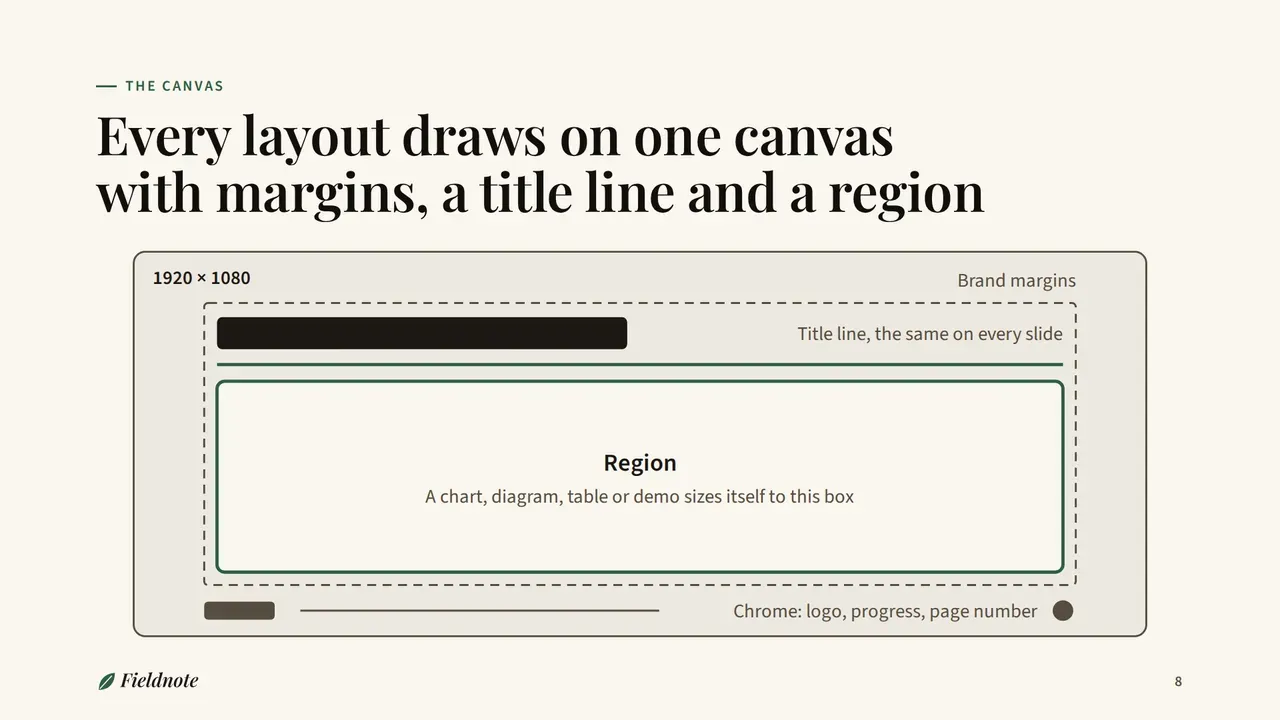
---
layout: diagram
title: Every layout draws on one canvas with margins, a title line and a region
eyebrow: The canvas
budget: 1m
---

<Svg src="../assets/canvas.svg" title="The 1920 by 1080 slide canvas: brand margins, the shared title line, the content region and the chrome" steps={{ margins: 1, titleline: 2, region: 3, chrome: 4 }} recolor={{ "#e4572e": "accent", "#9aa1ae": "edge", "#ffffff": "bg", "#f4f5f8": "group", "#161920": "fg", "#555c6a": "label" }} draw />

<Notes>
The canvas is always 1920 by 1080. [click] The brand sets the margins. [click] Every title sits on the same line, so slides do not jump when you advance. [click] Under it is the region: the room a chart, a diagram or a table sizes itself to. [click] And the chrome, page number and logo, lives in the margins.

This picture is an SVG file, by the way: recoloured to the brand and revealed by element id.

Transition: a layout is how a slide claims part of that canvas.
</Notes>
Slide 8 of the showcase deckView on GitHub
src follows the deck’s path rule: ./ and ../ start at the slide file, a bare path at the deck folder and / at its public/ folder. The file must be an .svg inside the deck folder. A URL fails the build, because the drawing is inlined at build time; a path that does not exist does not stop the build, but deck lint reports it as a media-missing error and the slide shows an error in place of the drawing (render-error). Without height (in canvas pixels), the drawing fills its region and keeps its proportions. In a TSX slide, pass the markup instead of a path, from a ?raw import.
A Markdown image of the same file, , is not inlined: it is drawn as a picture in its own colours and does not build. (In a split media slot it is also cropped like a photo.)
Give it the brand’s colours
recolor maps each colour the file uses to a colour role of the slide’s surface, so the drawing follows the brand and the surface it sits on:
recolor={{ "#e4572e": "accent", "#9aa1ae": "edge", "#ffffff": "bg", "#161920": "fg" }}A colour matches however the file writes it (#F60, #ff6600, rgb(255 102 0), orange), in fill, stroke and stop-color attributes and in style attributes. A <style> element is removed (see below), so the colours its rules set are lost: export the drawing with presentation attributes rather than CSS classes. A shape can also name its role itself with data-fill="accent", data-stroke="edge" or data-stop. The roles:
fg, heading, muted, accent, positive, negative, bg, surface, border, node, node-border, node-text, group, edge, label, highlight, packet.
<Svg> takes no card: the brand’s cards style the nodes the kit draws, and an imported drawing keeps its own shapes in the colours recolor gives them.
An unknown role fails the build, and a colour in recolor that the drawing never uses is a warning. A colour you leave out keeps its value, and deck lint reports it as off-brand:
$ deck lint launch-review
decks/launch-review/slides/floor.mdx
  error   off-brand (floor step 0): `div.kit-frame > div.kit-safe > div.kit-diagram-layout > div.kit-region > div.kit-diagram-fill > span.deck-slot > figure.kit-diagram > div.kit-svg > svg > circle` uses the fill #00aa55, which is not a default brand token on the "default" surface.
          Fix: Use a role class such as `text-fg`, `text-muted`, `bg-surface` or `border-accent`, a palette step or a chart color instead of a hard-coded color. `deck brand --json` lists every color.

launch-review: 1 error, 0 warnings in 2 slides (4 steps checked).
An element with no fill of its own, a <g> included, is reported with the browser’s default #000000. Set fill="none" on the root <svg>, as the published drawings do, and give every shape that should be filled a colour from your recolor map.
Build it by step
steps reveals elements by their id, from the step you give: steps={{ inbound: 1, sorting: 2 }} shows #inbound from step 1 and #sorting from step 2. Group the parts of the drawing in <g id="..."> elements in your editor before you export it. An id the drawing does not have fails the build and lists the ids it does have:
$ deck lint launch-review
decks/launch-review/slides/floor.mdx
  error   schema (floor): Line 7, column 1: <Svg src="../assets/plan.svg"> reveals "exit" in `steps`, which is not an id in the drawing. Ids it has: hall, stage.
          Fix: Use the values the message lists.

launch-review: 1 error, 0 warnings.
draw draws the strokes of each element on as it is revealed, or the whole drawing on entry when nothing has a step. Static mode, and so deck shot and every export, shows each step’s finished drawing.
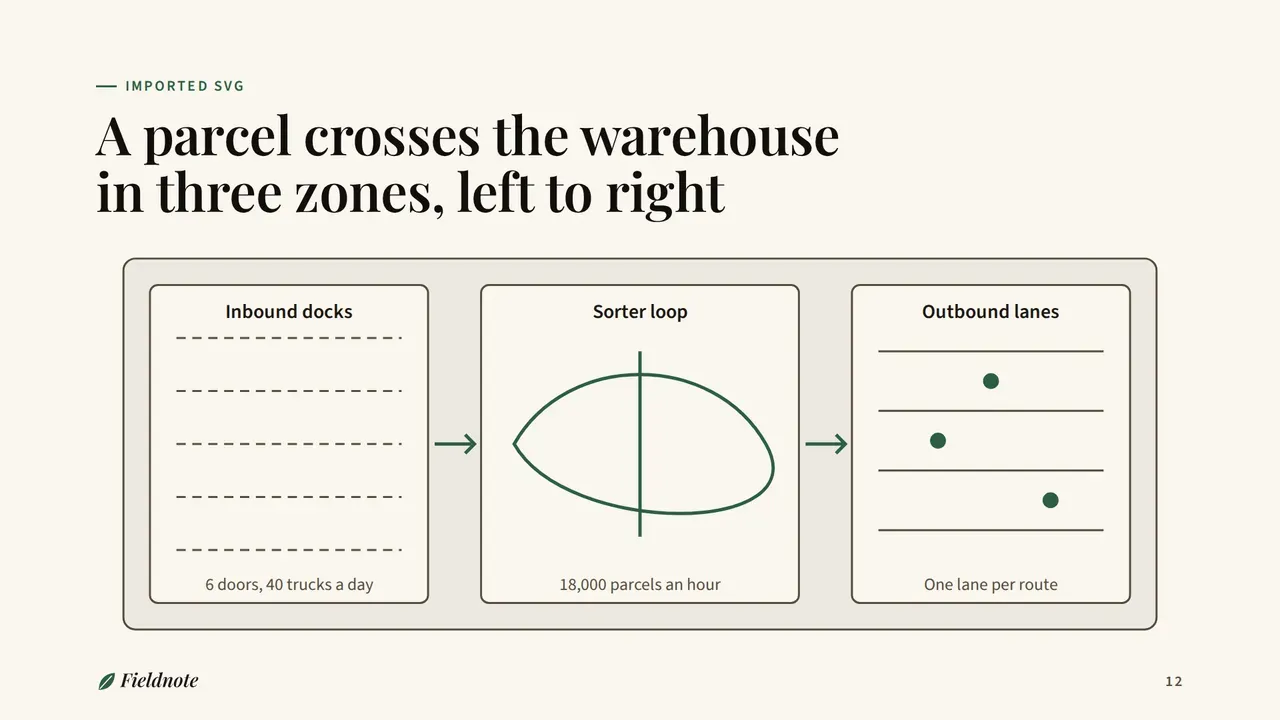
That slide reveals one zone per step: steps={{ inbound: 1, sorting: 2, outbound: 3, "flow-arrows": 3 }}.
What the kit removes
An inline drawing must not run code or load other files, so the build parses the file as a browser would and keeps only an allowlist:
- Elements: shapes, text, structure (
g,defs,symbol,use,a), gradients and patterns, clipping, masks, markers and filter primitives.<script>,<style>,<foreignObject>,<iframe>, the animation elements (animate,set,animateMotion,animateTransform),feImage,cursor,viewand every HTML element are removed with their content. - Attributes: geometry, presentation and text attributes, ids and classes, and
data-*andaria-*attributes. Event handlers such asonloadare removed. - Links:
hrefandxlink:hrefstay only when they point at an#idin the same file, or, on an<image>, at a base64 PNG, JPEG, GIF, WebP or AVIFdata:URL. - CSS in presentation attributes and
style: only known functions (colours,var,calc, transforms, andurl()to a#fragment); a value with escapes, comments or at-rules is removed.
Editor data (<metadata>, and elements and attributes in the Inkscape, Sodipodi, Sketch, Serif, Figma and RDF namespaces) is dropped silently. Everything else that is removed is a warning naming what went:
$ deck lint launch-review
decks/launch-review/slides/floor.mdx
  warning build-warning (floor): Line 7: <Svg src="../assets/plan.svg"> had the onload attribute on <svg>; it was removed, because an inline drawing must not run code or load other files. Remove it from the file to silence this warning.
          Fix: Change the slide as the message says, then run `deck lint` again.
  warning build-warning (floor): Line 7: <Svg src="../assets/plan.svg"> had a <script> element; it was removed, because an inline drawing must not run code or load other files. Remove it from the file to silence this warning.
          Fix: Change the slide as the message says, then run `deck lint` again.

launch-review: 0 errors, 2 warnings in 2 slides (4 steps checked).
Every prop is on the diagram reference; how the project treats untrusted files is on Security.